
Syrex's Advanced Chat Mod
For this minecraft mod 1.21.10 - 1.21.11 we will be able to talk in advanced chat we can write voice messages and files and messages and the server also does not keep logs on the server
Screenshots
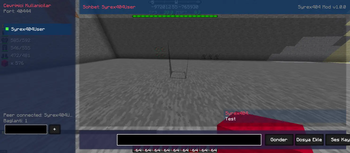
About this Mod
🌐 Syrex P2P Chat & Media Share
[TR] %100 Client-Side (İstemci taraflı) çalışan, sunucuda eklenti gerektirmeyen gelişmiş P2P sohbet ve dosya paylaşım modu.
[EN] A 100% Client-Side advanced P2P chat and file sharing mod that requires no server-side plugins.
✨ Özellikler / Features
- ⚡ Client-Side P2P: Sunucudan bağımsız, doğrudan oyuncular arası güvenli bağlantı. / No server plugins required. Direct peer-to-peer connection.
- 📂 Media & File Share:
.jar,.zip,.png/.jpgdosyalarını sohbetten gönderin. / Share mods, zip files, and images directly through chat. - 🎙️ Voice Messages: Oyun içinden ses kaydı alıp gönderin ve dinleyin. / Record, send, and play voice notes in-game.
- 🖥️ Custom UI: Standart sohbetten bağımsız,
Htuşu ile açılan özel arayüz. / A modern custom GUI opened with theHkey. - 🔒 Isolated: Sunucu komutları çalışmaz, sohbet loglara düşmez. / Secure chat, isolated from server commands and logs.
🛠️ Teknik Detaylar / Technical Details
- Versions: Minecraft 1.21.10 - 1.21.11
- Platform: Fabric Loader
- Performance: %100 Asynchronous / Async threads for 0% FPS drop.
🚀 Kullanım / Usage
- Put the mod into your
modsfolder. - Press
Hin-game to open the custom Syrex UI. - Select a friend and start chatting, sharing files, or sending voice notes!
👥 Krediler / Credits
Developed by Syrex under 404 TEAM. All rights reserved.
Available Versions
How to Install Syrex's Advanced Chat Mod on Your Server
Order Server
Order a Minecraft Java server with at least 3 GB RAM (4 GB recommended).
Set fabric Loader
In the panel under "Egg", select the fabric loader and matching Minecraft version (1.21.11).
Install Mod
Open the mod browser in the dashboard and search for "Syrex's Advanced Chat Mod". Click "Install" – done! Alternatively, upload the .jar via SFTP to the /mods folder.
Compatibility
Mod Loaders
Minecraft Versions
1.21.11, 1.21.10
Server-side
✗ UnsupportedRecommended RAM
4 GB(min. 3 GB)Frequently Asked Questions
Syrex's Advanced Chat Mod server crashes on startup – what to do?
Most common cause: wrong fabric version or insufficient RAM. Check the server log (latest.log) for "OutOfMemoryError" or "Mixin" errors. With Mado Hosting: ensure at least 3 GB RAM is allocated and the loader matches the mod version (1.21.11). You can switch loaders with one click in the panel.
Is Syrex's Advanced Chat Mod compatible with fabric?
Syrex's Advanced Chat Mod officially supports fabric for Minecraft 1.21.11, 1.21.10. The Mado dashboard automatically detects incompatible loader combinations.
Server lagging with Syrex's Advanced Chat Mod – how to optimize performance?
Recommended RAM: 4 GB (per 8 players). Use /spark profiler to check if Syrex's Advanced Chat Mod consumes the most tick time. Common fixes: reduce server view-distance to 8-10, install "performant" or "starlight" as supplementary mods on Forge. With Mado Hosting, your server runs on NVMe SSDs with dedicated CPU cores for minimal latency.
Similar Mods






Rent Modded Server
Install Syrex's Advanced Chat Mod with just one click on your server.