
T.error
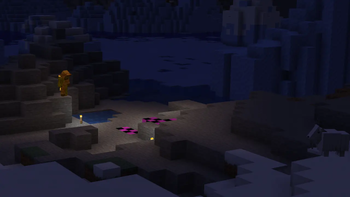
T.error adds a terrifying entity that stalks you, sends creepy messages, and corrupts your world, turning Minecraft into a true horror experience.
Screenshots
About this Mod
T.error – Horror Like You’ve Never Experienced in Minecraft
Version: 1.21.4 | Mod Version: 1.6.2 | Status: Private | Loader: NeoForge | Development Stage: Indev
Team: Hero of Time 64 (Texture Artist/Dev), Samuelchr (Dev), Yoru (Tester), 𐌌𐌙𐌔𐌕𐌉𐌂 (3d modeler/animator)
Dive into your first truly unsettling Minecraft experience with T.error, a mod that will haunt your world in ways you’ve never imagined. This is my first ever Minecraft mod, created for a YouTube video, with plans for more terrifying horror mods in the future.
What T.error Does:
- Introduces a sinister entity that stalks you relentlessly.
- Sends eerie, creepy messages that make every moment in-game tense.
- Interacts with players in unpredictable ways, keeping you constantly on edge.
- Corrupts your game and world, causing bugs, glitches, and unexpected breakages that blur the line between game and nightmare.
Inspirations:
Broken Script, From the Fog, The Backrooms, In Your World, mod_file
Prepare for a chilling experience that turns Minecraft into a psychological horror playground. T.error isn’t just a mod—it’s a test of your courage.
📌 Versioning System Explained
This mod uses a three-number version format (X.Y.Z) designed to clearly show what type of experience you’re running and how updated it is.
X — Build Edition
This number represents which build of the mod you’re using.
Examples include:
• Immersive Build – A highly atmospheric, story-driven version
• Comedy Build – A lighthearted, humorous take on the mod
• Hard Difficulty Build – A challenging, intense gameplay experience(Note: In the current release, Build 1 represents the Standard Build, which is the default experience.)
Y — Feature Update
Increases when new content, mechanics, or major improvements are added to the mod.Z — Bug Fix Update
Used for small patches, fixes, optimizations, and stability improvements.
Example:
1.4.0
- 1 = Standard Build (default build)
- 4 = Fourth major feature update
- 0 = No bug-fix patches yet
This system keeps everything clean, easy to understand, and lets players instantly know which build, feature set, and patch level they’re using.
Available Versions
How to Install T.error on Your Server
Order Server
Order a Minecraft Java server with at least 4 GB RAM (6 GB recommended).
Set neoforge Loader
In the panel under "Egg", select the neoforge loader and matching Minecraft version (1.21.4).
Install Mod
Open the mod browser in the dashboard and search for "T.error". Click "Install" – done! Alternatively, upload the .jar via SFTP to the /mods folder.
Compatibility
Mod Loaders
Minecraft Versions
1.21.4
Server-side
✓ RequiredRecommended RAM
6 GB(min. 4 GB)Frequently Asked Questions
T.error server crashes on startup – what to do?
Most common cause: wrong neoforge version or insufficient RAM. Check the server log (latest.log) for "OutOfMemoryError" or "Mixin" errors. With Mado Hosting: ensure at least 4 GB RAM is allocated and the loader matches the mod version (1.21.4). You can switch loaders with one click in the panel.
Is T.error compatible with neoforge?
T.error officially supports neoforge for Minecraft 1.21.4. The Mado dashboard automatically detects incompatible loader combinations.
Server lagging with T.error – how to optimize performance?
Recommended RAM: 6 GB (per 5 players). Use /spark profiler to check if T.error consumes the most tick time. Common fixes: reduce server view-distance to 8-10, install "performant" or "starlight" as supplementary mods on Forge. With Mado Hosting, your server runs on NVMe SSDs with dedicated CPU cores for minimal latency.
Similar Mods





Rent Modded Server
Install T.error with just one click on your server.