
TabChannel
Create public or private chat channels, manage staff discussions, organize faction communication, and improve multiplayer communication with a modern tab-based chat system inspired by large community servers.
Screenshots
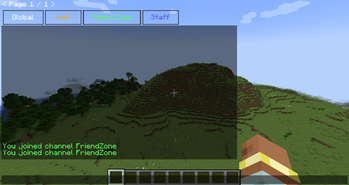
About this Mod
TabChannel
Minecraft 1.21.x · Tabbed chat channels, TabColor, PMs, staff tools, log search, client HUD, and optional Twitch stream overlay (client-only).
Compatibility
| Setup | Result |
|---|---|
| Fabric client + Fabric server with TabChannel | Channels, tab sync, server commands |
| NeoForge on Youer | NeoForge jar on both server and client |
| LuckPerms | Compatible and optional |
TabColor — all colors
Chat colors is # exemple #Red or #FF000
Commands: /tabchannel color <channel> <COLOR> or /setchannel tabcolors <channel> <COLOR>
Use the exact name in UPPERCASE (underscores).
Standard
BLACK · DARK_BLUE · DARK_GREEN · DARK_AQUA · DARK_RED · DARK_PURPLE · GOLD · GRAY · DARK_GRAY · GREEN · AQUA · LIGHT_PURPLE · YELLOW · WHITE · ORANGE · PINK · MAGENTA · CYAN · LIME · BROWN · SILVER · NAVY · TEAL · OLIVE · MAROON · INDIGO · VIOLET · TURQUOISE · SKY_BLUE · MINT · SALMON · CORAL · CRIMSON · BEIGE · IVORY · CHARCOAL · EMERALD · RUBY · AMBER · BRONZE · ROSE · HOT_PINK · DEEP_PINK · FUCHSIA · LAVENDER · PLUM · ORCHID · SCARLET · FIRE_RED · BLOOD_RED · CHERRY · ICE_BLUE · BABY_BLUE · OCEAN_BLUE · ROYAL_BLUE · MIDNIGHT_BLUE · FOREST_GREEN · DARK_FOREST · MOSS_GREEN · JADE · SUNSET_ORANGE · TANGERINE · PEACH · APRICOT · LEMON · CANARY · HONEY · COFFEE · CHOCOLATE · CARAMEL · SAND · SNOW · PEARL · SMOKE · ASH · OBSIDIAN · VOID · NIGHT
“Premium” theme (no admin restriction in the mod)
ELECTRIC_BLUE · LASER_GREEN · TOXIC_GREEN · RADIOACTIVE · GALAXY_PURPLE · COSMIC_PINK · MANA_BLUE · ENDER_PURPLE · DIAMOND · RUBY_RED · SAPPHIRE · TOPAZ · AMETHYST · EMERALD_GREEN
Admin only (OP 2 or tabchannel.admin)
BLUE · RED · NEON_GREEN
Commands
Root aliases: /tabchannel, /tc, /tb, /channel, /ch
| Command | Description |
|---|---|
/channel create <name> <public|private|prive|faction> |
Create (staff channel = admin) |
/channel join <channel> |
Join |
/channel leave <channel> |
Leave |
/channel list |
List |
/channel delete <channel> |
Delete |
/channel color <channel> <TabColor> |
Tab color |
/channel invite <player> <channel> |
Invite |
/channelcreate <name> <type> |
Create (shortcut) |
/channeljoin <channel> |
Join (shortcut) |
/channellist |
List (shortcut) |
/setchannel
| Command | Description |
|---|---|
/setchannel delete <channel> |
Delete |
/setchannel tabcolors <channel> <TabColor> |
Tab color |
/setchannel invite <channel> <player> |
Invite |
/setchannel leave <channel> |
Leave |
/setchannel perm add|remove <channel> <player> <perm> |
Member permissions |
/setchannel rules <channel> <text> |
Rules |
/setchannel warn <channel> on|off |
Profanity filter |
/setchannel kick <channel> <days> <hours> <sec> <player> |
Kick + timed mute |
/setchannel ban <channel> <player> |
Channel ban |
/setchannel f <channel> <faction> |
Link faction |
PMs and logs
| Command | Description |
|---|---|
/mp <player> <message> |
Private message |
/r <message> |
Reply to last PM |
/mp block <player> |
Block |
/mp unblock <player> |
Unblock |
/mp socialspy |
SocialSpy (permission) |
/chatsearch <text> |
Log search (25 max) |
/chat search <text> |
Search alias |
Admin
| Command | Description |
|---|---|
/tabchanneltploc <dimension> <x> <y> <z> |
Teleport (OP 2) |
Built-in channels: global (vanilla / global chat), staff channel (creation: admin, access: staff).
Mentions: @staff, @admin, @mod, @modo in messages (configurable anti-spam).
Client commands
| Command | Description |
|---|---|
/channel position · position default |
Channel HUD position |
/channel resize · resize default |
Channel HUD size |
Twitch stream (client, optional)
| Command | Description |
|---|---|
/streamchat connect |
Connect (set Twitch username in config) |
/streamchat disconnect |
Disconnect |
/streamchat toggle |
Show / hide |
/streamchat position · position default |
Overlay placement |
/streamchat resize · resize default |
Resize overlay |
/streamchat config |
Config screen |
/streamchat clear · test · reload |
Utilities |
Stream does not change Minecraft chat; Twitch only (no YouTube).
LuckPerms
TabChannel — LuckPerms permissions (reference)
LuckPerms is compatible and optional. Without LuckPerms: OP level 2 for some actions, per-member permissions on each channel, and default Bukkit permissions on Youer / Paper (HybridBukkitPermissions).
Global roles
| Permission | Description |
|---|---|
tabchannel.admin |
Mod admin (bypass, staff channel, admin TabColor colors, etc.) |
tabchannel.staff |
Staff (staff channel, staff invites, staff mentions) |
Private messages (PM)
| Permission | Description |
|---|---|
tabchannel.mp.browse |
See all online players in the PM UI |
tabchannel.mp.socialspy |
/mp socialspy |
tabchannel.mp.bypasscooldown |
Ignore PM cooldown |
Chat styling (optional)
| Permission | Description |
|---|---|
tabchannel.chat.color |
Classic colors (&) |
tabchannel.chat.hex |
Hex colors |
tabchannel.chat.format |
Formatting (bold, italic, etc.) |
tabchannel.chat.style |
Bundles color + hex + format |
Per-channel permissions (setchannel.*)
| Permission | Usage |
|---|---|
setchannel.create |
Create a channel |
setchannel.delete |
Delete |
setchannel.invite |
Invite |
setchannel.leave |
Leave |
setchannel.perm |
Manage member rights |
setchannel.rules |
Rules |
setchannel.warn |
Profanity filter |
setchannel.kick |
Kick / mute (duration via /setchannel kick) |
setchannel.ban |
Ban from channel |
setchannel.tabcolors |
Change TabColor |
setchannel.f |
Link a faction |
Bypass
| Permission | Description |
|---|---|
setchannel.bypass.join |
Join without restrictions |
setchannel.bypass.private |
View / join private channels |
setchannel.bypass.ban |
Ignore channel bans |
TabColor — admin-only colors
Only these names require OP 2 or tabchannel.admin:
BLUEREDNEON_GREEN
All other TabColor names in the mod can be used without that restriction (still subject to channel rights for /setchannel tabcolors).
LuckPerms example (YAML)
tabchannel.admin:
  description: TabChannel admin
  default: op

tabchannel.staff:
  description: TabChannel staff
  default: false

tabchannel.mp.socialspy:
  default: false

setchannel.create:
  default: true

setchannel.tabcolors:
  default: true
Dependencies
- NeoForge: NeoForge 1.21.x build
- LuckPerms: no jar required
Available Versions
How to Install TabChannel on Your Server
Order Server
Order a Minecraft Java server with at least 3 GB RAM (4 GB recommended).
Set fabric Loader
In the panel under "Egg", select the fabric loader and matching Minecraft version (26.1.2).
Install Mod
Open the mod browser in the dashboard and search for "TabChannel". Click "Install" – done! Alternatively, upload the .jar via SFTP to the /mods folder.
Compatibility
Mod Loaders
Minecraft Versions
26.1.2, 1.21.1
Server-side
✓ RequiredRecommended RAM
4 GB(min. 3 GB)Frequently Asked Questions
TabChannel server crashes on startup – what to do?
Most common cause: wrong fabric version or insufficient RAM. Check the server log (latest.log) for "OutOfMemoryError" or "Mixin" errors. With Mado Hosting: ensure at least 3 GB RAM is allocated and the loader matches the mod version (26.1.2). You can switch loaders with one click in the panel.
Is TabChannel compatible with fabric and neoforge?
TabChannel officially supports fabric, neoforge for Minecraft 26.1.2, 1.21.1. The Mado dashboard automatically detects incompatible loader combinations.
Server lagging with TabChannel – how to optimize performance?
Recommended RAM: 4 GB (per 8 players). Use /spark profiler to check if TabChannel consumes the most tick time. Common fixes: reduce server view-distance to 8-10, install "performant" or "starlight" as supplementary mods on Forge. With Mado Hosting, your server runs on NVMe SSDs with dedicated CPU cores for minimal latency.
Similar Mods






Rent Modded Server
Install TabChannel with just one click on your server.