Tablist Toggle
A tiny client-side mod that lets you toggle the player list (Tab) on and off instead of holding the key.
Screenshots
About this Mod
Tablist Toggle
A tiny, no-dependency client mod that lets you toggle the player list (the tab list)
instead of having to hold the key the whole time.
Where the idea came from
I was playing survival with some friends, and one of them had rebound Tab to a
different action. The problem: out of pure habit he kept mashing Tab every few seconds,
because that's the key your hand reaches for when you want to see who's online — except now
it did something else entirely.
That's what this mod fixes. Put the player-list on a key you actually have free, flip it to
Toggle, and now a single press keeps the tab list open — no more holding anything, and
your Tab key is free for whatever you rebound it to. (And yes, it's equally great for those
creatures who need to see who's online ALL THE TIME.)
What it does
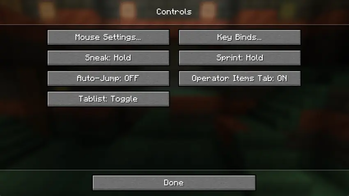
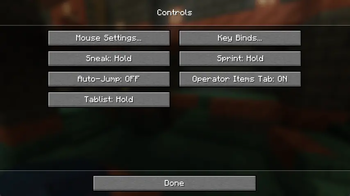
Adds a single option to the Controls settings screen, right next to the vanilla
Toggle Sprint / Toggle Sneak options:
Tablist: Hold / Toggle
- Hold — vanilla behaviour: the list shows only while the key is held.
- Toggle — press the player-list key once to show it, press again to hide it.
The mode is saved and persists across restarts and across every world and server. The list
itself always starts hidden when you join a world or server — only the Hold/Toggle
mode is remembered, never the on/off state.
No dependencies
Tablist Toggle needs nothing but the mod loader. No Fabric API, no libraries, no extra
downloads. Drop the jar in your mods folder and you're done.
Supported versions
Built from one source tree, so every version below ships the exact same feature.
| Minecraft | Fabric | NeoForge |
|---|---|---|
| 1.20.6 | ✅ | ✅ |
| 1.21.1 | ✅ | ✅ |
| 1.21.7 | ✅ | ✅ |
| 26.1.2 | ✅ | ✅ |
1.20.6 is the oldest supported version: from there up the Controls screen exposes a clean
options list to hook into, whereas 1.20.4 and below build the options as individual buttons
(no list), which makes a tidy injection impractical. (maybe adding support at some point)
Usage
- Install Fabric or NeoForge for your
Minecraft version. - Put
tablisttoggle-*.jarin yourmodsfolder. - In game: Options → Controls, set Tablist to Toggle, and (optionally) rebind
the player-list key to whatever you like.
Credits
Huge shoutout to Malenya for inspiring me to actually build this. 💛
Available Versions
How to Install Tablist Toggle on Your Server
Order Server
Order a Minecraft Java server with at least 3 GB RAM (4 GB recommended).
Set fabric Loader
In the panel under "Egg", select the fabric loader and matching Minecraft version (26.1.2).
Install Mod
Open the mod browser in the dashboard and search for "Tablist Toggle". Click "Install" – done! Alternatively, upload the .jar via SFTP to the /mods folder.
Compatibility
Mod Loaders
Minecraft Versions
26.1.2, 1.21.7, 1.21.1 (+1 more)
Server-side
✗ UnsupportedRecommended RAM
4 GB(min. 3 GB)Frequently Asked Questions
Tablist Toggle server crashes on startup – what to do?
Most common cause: wrong fabric version or insufficient RAM. Check the server log (latest.log) for "OutOfMemoryError" or "Mixin" errors. With Mado Hosting: ensure at least 3 GB RAM is allocated and the loader matches the mod version (26.1.2). You can switch loaders with one click in the panel.
Is Tablist Toggle compatible with fabric and neoforge?
Tablist Toggle officially supports fabric, neoforge for Minecraft 26.1.2, 1.21.7, 1.21.1. The Mado dashboard automatically detects incompatible loader combinations.
Server lagging with Tablist Toggle – how to optimize performance?
Recommended RAM: 4 GB (per 8 players). Use /spark profiler to check if Tablist Toggle consumes the most tick time. Common fixes: reduce server view-distance to 8-10, install "performant" or "starlight" as supplementary mods on Forge. With Mado Hosting, your server runs on NVMe SSDs with dedicated CPU cores for minimal latency.
Rent Modded Server
Install Tablist Toggle with just one click on your server.