
Tail Text Preview
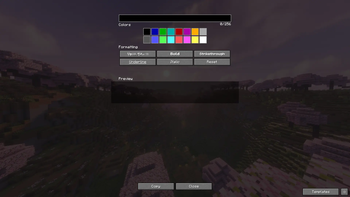
A client-side mod that provides a convenient graphical user interface (GUI) for real-time preview of Minecraft text formatting, including colors, styles, and gradients.
Screenshots
About this Mod
Tail Text Preview — Real-time Minecraft Text Formatting
Мод полностью поддерживает русский язык! Подробнее на русском
Tail Text Preview is a client-side Minecraft mod that provides a convenient GUI for creating and previewing formatted text in real time.
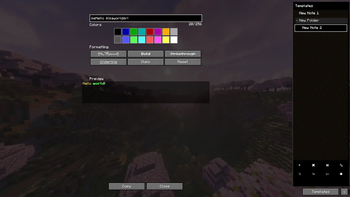
Instead of manually guessing color codes and formatting styles, you can type your text, apply colors or styles, preview the result, and copy the generated formatting code for use in commands, signs, books, or other supported text fields.
Key Features
Live Preview
Preview formatted Minecraft text in real time as you edit.Quick Formatting & Styles
Apply standard Minecraft colors and formatting styles (bold, italic, underline, strikethrough, obfuscated) through a simple visual interface.Advanced Template Manager (Sidebar)
Organize and manage your drafts easily:- Folders & Categories: Group templates into expandable/collapsible folders. Templates without a folder sit cleanly at the root level.
- Drag & Drop: Reorder templates, move them between folders, or drag folders to sort them.
- Dynamic Resizing: Drag the sidebar border to adjust its width.
- Status Indicators: Text colors indicate when a template has unsaved changes (orange) or is saved (green).
- Marquee Effect: Long template or folder names automatically scroll for readability.
Interactive Tooltips & Shortcuts
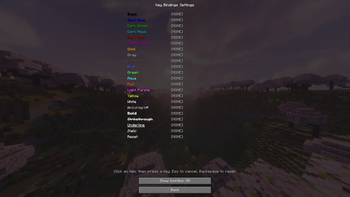
Hover over elements for quick hotkey and usage hints. Can be toggled on/off in the Settings menu.One-Click Copy & Restore
Copy formatted text with a single click. Right-click a template to discard unsaved edits and restore its saved state.Undo and Redo
UseCtrl+ZandCtrl+Yto undo or redo text changes, andCtrl+Sto save template edits instantly.
Who is this for?
Tail Text Preview is useful for:
- Server administrators creating announcements, ranks, messages, or commands
- Map makers designing books, signs, titles, and custom text
- Datapack or command creators working with formatted Minecraft text
- Players looking for a simple way to prepare styled chat messages
Client-Side Only
Tail Text Preview is a client-side mod. It does not need to be installed on the server.
Note: Whether formatted text works in a specific place still depends on Minecraft limitations, server permissions, plugins, or the text field where the output is used.
Requirements
- Loader: Fabric Loader
- Dependencies: Fabric API
- Java: 17 or newer
Available Versions
How to Install Tail Text Preview on Your Server
Order Server
Order a Minecraft Java server with at least 3 GB RAM (4 GB recommended).
Set fabric Loader
In the panel under "Egg", select the fabric loader and matching Minecraft version (1.20.6).
Install Mod
Open the mod browser in the dashboard and search for "Tail Text Preview". Click "Install" – done! Alternatively, upload the .jar via SFTP to the /mods folder.
Compatibility
Mod Loaders
Minecraft Versions
1.20.6, 1.20.5, 1.20.4
Server-side
✗ UnsupportedRecommended RAM
4 GB(min. 3 GB)Frequently Asked Questions
Tail Text Preview server crashes on startup – what to do?
Most common cause: wrong fabric version or insufficient RAM. Check the server log (latest.log) for "OutOfMemoryError" or "Mixin" errors. With Mado Hosting: ensure at least 3 GB RAM is allocated and the loader matches the mod version (1.20.6). You can switch loaders with one click in the panel.
Is Tail Text Preview compatible with fabric?
Tail Text Preview officially supports fabric for Minecraft 1.20.6, 1.20.5, 1.20.4. The Mado dashboard automatically detects incompatible loader combinations.
Server lagging with Tail Text Preview – how to optimize performance?
Recommended RAM: 4 GB (per 8 players). Use /spark profiler to check if Tail Text Preview consumes the most tick time. Common fixes: reduce server view-distance to 8-10, install "performant" or "starlight" as supplementary mods on Forge. With Mado Hosting, your server runs on NVMe SSDs with dedicated CPU cores for minimal latency.
Similar Mods






Rent Modded Server
Install Tail Text Preview with just one click on your server.