
Taste Fatigue
New foods aren’t just novelties or one-offs
Screenshots
About this Mod
Bug reports and suggestions are always welcome!
taste-fatigue-1-21-1-neoforge
taste-fatigue-1-20-1-forge
Taste Fatigue adds a “food disgust” layer to Minecraft 1.21.1 NeoForge, turning every meal into a strategic choice:
• Per-food disgust tracking
Each time you eat a specific food, its disgust counter increases by 1; the counter automatically decreases by 1 every 10 minutes.
• Real-time feedback
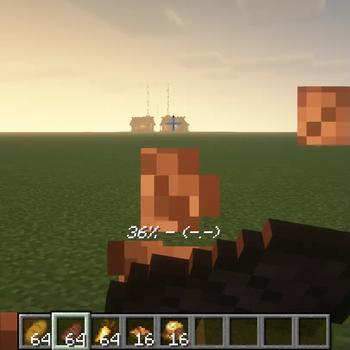
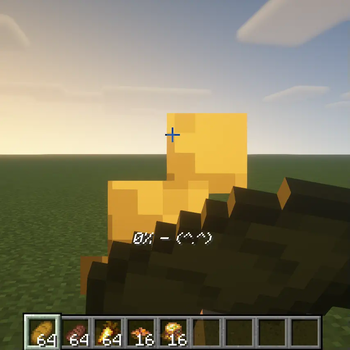
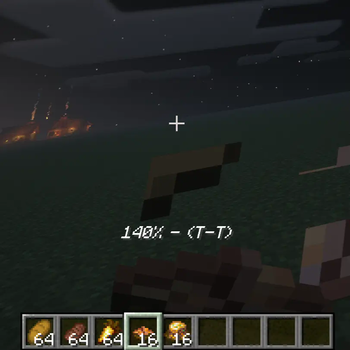
When you start eating, the current disgust value and an emoji appear in the top-left corner, so you always know your status.
• Configurable stages and effects
The default configuration splits disgust into five tiers: 0–10, 11–30, 31–40, 41–50, and 50+.
Each tier controls:
– Eating duration multiplier (0.8×–3×)
– Post-eat effects (instant heal, nausea, damage, etc.)
– Emoji indicators (^(^.^)^, (T-T), (x.x), etc.)
All numbers, emojis, and effects can be freely edited in .minecraft/config/taste_fatigue.json without recompiling.
• Impact on gameplay
Encourages dietary variety: sticking to one food slows eating and inflicts debuffs, while rotating meals grants benefits. It keeps vanilla pacing intact while adding strategic depth for advanced players.
Drop-in installation for both single-player and servers, no additional dependencies.
Available Versions
How to Install Taste Fatigue on Your Server
Order Server
Order a Minecraft Java server with at least 3 GB RAM (4 GB recommended).
Set forge Loader
In the panel under "Egg", select the forge loader and matching Minecraft version (1.21.1).
Install Mod
Open the mod browser in the dashboard and search for "Taste Fatigue". Click "Install" – done! Alternatively, upload the .jar via SFTP to the /mods folder.
Compatibility
Mod Loaders
Minecraft Versions
1.21.1, 1.20.1
Server-side
✓ RequiredRecommended RAM
4 GB(min. 3 GB)Frequently Asked Questions
Taste Fatigue server crashes on startup – what to do?
Most common cause: wrong forge version or insufficient RAM. Check the server log (latest.log) for "OutOfMemoryError" or "Mixin" errors. With Mado Hosting: ensure at least 3 GB RAM is allocated and the loader matches the mod version (1.21.1). You can switch loaders with one click in the panel.
Is Taste Fatigue compatible with forge and neoforge?
Taste Fatigue officially supports forge, neoforge for Minecraft 1.21.1, 1.20.1. The Mado dashboard automatically detects incompatible loader combinations.
Server lagging with Taste Fatigue – how to optimize performance?
Recommended RAM: 4 GB (per 8 players). Use /spark profiler to check if Taste Fatigue consumes the most tick time. Common fixes: reduce server view-distance to 8-10, install "performant" or "starlight" as supplementary mods on Forge. With Mado Hosting, your server runs on NVMe SSDs with dedicated CPU cores for minimal latency.
Similar Mods



Rent Modded Server
Install Taste Fatigue with just one click on your server.