
TeamViewRelay
TeamViewRelay is a real-time tactical awareness system for Minecraft that syncs teammates, entities, quick callouts, and shared waypoints across clients and web maps through a central relay server.
Screenshots
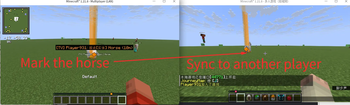
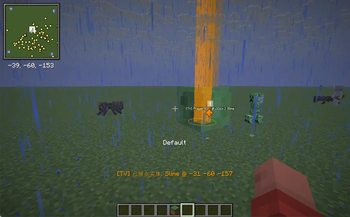
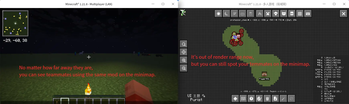
About this Mod
A vision & ping sharing system for Minecraft team coordinated operations. Currently developed and validated primarily on Minecraft 1.21.8 Fabric.
1. Core Features
- Team Player Data Sync: Synchronize player positions, entity information, and shared waypoints
- Quick Pinging: One-click ping via hotkey / double middle mouse click; support middle-click cancellation, timeout cleanup, and quantity limits
- Optional Xaero Integration:
- Bidirectional shared waypoint sync with Xaero Minimap
- Remote player tracking sync with Xaero World Map
- Optional JourneyMap Integration:
- Share waypoints and display remote players on the map
- Room Isolation: Separate lobbies via
roomCodeto avoid cross-interference
Recommended optional installations:
- Mod Menu (direct config access from mod list)
- Xaero Minimap (waypoint sync linkage)
- Xaero World Map (remote player tracking linkage)
- JourneyMap (remote player tracking linkage)
2 In-Game Initial Configuration
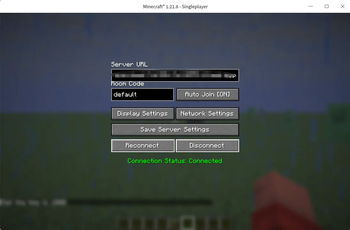
- Press the default hotkey O to open the configuration panel after entering the game.
- Default server address:
ws://127.0.0.1:8765/mc-client(modify to your backend address) - Select a room ID (default:
default; only players in the same room can see each other) - Click Save Server Settings, then click Connect.
3 Basic Controls
- O: Open configuration panel (bound by default)
- Connection Toggle Hotkey: Unbound by default — set manually in control settings
- Quick Ping Hotkey: Unbound by default — set manually in control settings
Pinging and synchronization functions only take effect when rendering is enabled AND network connection is established.
4. Display Functions
- Remote player bounding boxes
- Tracer lines
- Friendly / Neutral / Enemy color coding system
- Switchable ping render styles: beacon / ring / pin
5. Ping Mechanism
- Quick Ping: Press the dedicated ping hotkey, or enable double middle-click pinging
- Cancel Ping: Single middle-click to remove your own pings near the crosshair
- Auto Removal: Entity pings auto-cancel locally when the target entity death is confirmed
- Quantity Limit: Old pings are automatically cleared when a player exceeds the maximum ping count
6. Configuration Entries
- Main Config: Server URL, room ID, connect / disconnect controls
- Display Settings: Render distance, box/tracer toggles, tracer origin, color & ping sub-settings
- Network Settings: Upload frequency, entity upload toggle, shared waypoint upload, system proxy
- Ping Settings: Ping visibility, middle mouse interactions, persistent pings, visual styles & shape parameters
Config file path: config/MC-Teamviewer.json (standard Fabric config directory)
Version Naming Rules
This project adopts a dual versioning scheme, e.g. v0.2.1-proto0.3.0:
- Application version:
0.2.1— indicates core feature iterations and program updates - Network protocol version:
0.3.0— defines the communication protocol standard for cross-program networking
Normal connection and team collaboration require consistent or fully matching network protocol versions across all connected clients and backend services.
Install
In addition to installing this mod in the game, you also need to set up a central server to provide a server URL for synchronizing every player's data. The link is as follows:
https://github.com/MC-TeamViewer/Minecraft-TeamViewer-Backend
Available Versions
How to Install TeamViewRelay on Your Server
Order Server
Order a Minecraft Java server with at least 3 GB RAM (4 GB recommended).
Set fabric Loader
In the panel under "Egg", select the fabric loader and matching Minecraft version (1.21.8).
Install Mod
Open the mod browser in the dashboard and search for "TeamViewRelay". Click "Install" – done! Alternatively, upload the .jar via SFTP to the /mods folder.
Compatibility
Mod Loaders
Minecraft Versions
1.21.8
Server-side
✗ UnsupportedRecommended RAM
4 GB(min. 3 GB)Frequently Asked Questions
TeamViewRelay server crashes on startup – what to do?
Most common cause: wrong fabric version or insufficient RAM. Check the server log (latest.log) for "OutOfMemoryError" or "Mixin" errors. With Mado Hosting: ensure at least 3 GB RAM is allocated and the loader matches the mod version (1.21.8). You can switch loaders with one click in the panel.
Is TeamViewRelay compatible with fabric?
TeamViewRelay officially supports fabric for Minecraft 1.21.8. The Mado dashboard automatically detects incompatible loader combinations.
Server lagging with TeamViewRelay – how to optimize performance?
Recommended RAM: 4 GB (per 8 players). Use /spark profiler to check if TeamViewRelay consumes the most tick time. Common fixes: reduce server view-distance to 8-10, install "performant" or "starlight" as supplementary mods on Forge. With Mado Hosting, your server runs on NVMe SSDs with dedicated CPU cores for minimal latency.
Similar Mods






Rent Modded Server
Install TeamViewRelay with just one click on your server.