
TeamWork
Adds Multiple interactions between hostile mobs, making them do, well, Teamwork
Screenshots
About this Mod
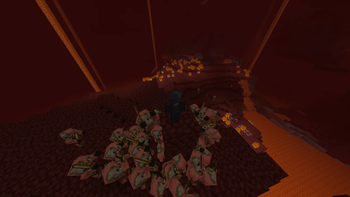
Piglin climbing:
Zombified Piglins will now pillar up eachother if you're too far from them vertically.
The more Zombified Piglins there are, the stronger the climbing power is.
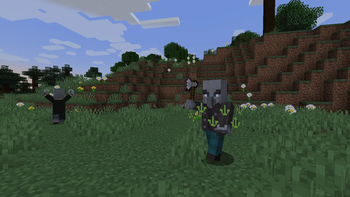
Evoker curses:
Evokers will now apply a curse onto other illagers, the curse will cause them to summon a spiral of Evoker Jaws on death.
The curse is signified by a green circle of eyes around the illager.
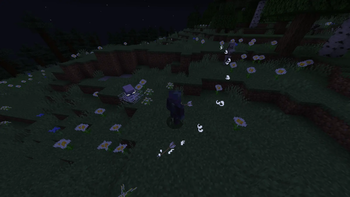
Breeze redirecting:
Breezes will now correct the movement of arrows near them to their target. The aim correction's speed is limited.
Flight response :
All hostile mobs will now flee from lit creepers. Creepers will now hold the fuse when there are hostile mobs extremely close to them.
Better Witches:
Witches now give illager-specific buffs to them, instead of exclusively regeneration and instant health:
Infected on all illagers if they don't have such.
Strength on Vindicators.
Speed on Ravagers.
Zombie Hitchhiking:
Zombie-Type mobs will now find and ride an animal (Cow, Sheep and Pig) when they're far away from you (over 16 blocks).
The animals gain a decrementing speed boost. When the speed boost fully falls off, the Zombie will get off of it.
Available Versions
How to Install TeamWork on Your Server
Order Server
Order a Minecraft Java server with at least 3 GB RAM (4 GB recommended).
Set fabric Loader
In the panel under "Egg", select the fabric loader and matching Minecraft version (1.21.8).
Install Mod
Open the mod browser in the dashboard and search for "TeamWork". Click "Install" – done! Alternatively, upload the .jar via SFTP to the /mods folder.
Compatibility
Mod Loaders
Minecraft Versions
1.21.8, 1.21.1
Server-side
✓ RequiredRecommended RAM
4 GB(min. 3 GB)Frequently Asked Questions
TeamWork server crashes on startup – what to do?
Most common cause: wrong fabric version or insufficient RAM. Check the server log (latest.log) for "OutOfMemoryError" or "Mixin" errors. With Mado Hosting: ensure at least 3 GB RAM is allocated and the loader matches the mod version (1.21.8). You can switch loaders with one click in the panel.
Is TeamWork compatible with fabric?
TeamWork officially supports fabric for Minecraft 1.21.8, 1.21.1. The Mado dashboard automatically detects incompatible loader combinations.
Server lagging with TeamWork – how to optimize performance?
Recommended RAM: 4 GB (per 8 players). Use /spark profiler to check if TeamWork consumes the most tick time. Common fixes: reduce server view-distance to 8-10, install "performant" or "starlight" as supplementary mods on Forge. With Mado Hosting, your server runs on NVMe SSDs with dedicated CPU cores for minimal latency.
Similar Mods




Rent Modded Server
Install TeamWork with just one click on your server.