
TeleFabric
A fabric mod bridging connecting your server to your Telegram groups
Screenshots
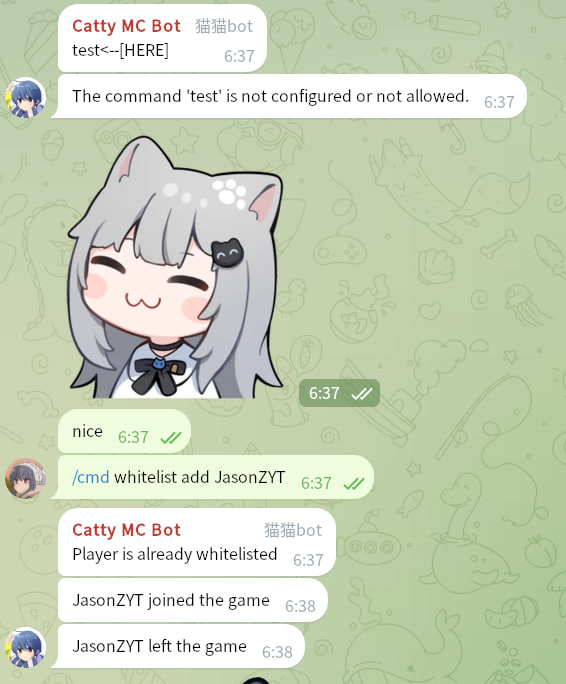
About this Mod
A Fabric mod that bridges your Minecraft server with a Telegram group.
Features
- Chat Bridging: Forward in-game chat to your Telegram group and relay messages from Telegram back to the Minecraft server.
- Remote Commands: Execute server commands (e.g.,
/list,/whitelist) directly from Telegram with a flexible permission system. - Player Notifications: Broadcast player join, leave, and death notifications to your Telegram chat.
Build
./gradlew build
Setup Guide
Follow these steps to get TeleFabric up and running.
1. Create a Telegram Bot
- Open Telegram and send a direct message to @BotFather.
- Send the
/newbotcommand and follow the on-screen instructions.- Note: Pay attention to the distinction between the bot's name and username. You will need the username later.
- Once the bot is created, copy the bot token provided by BotFather.
- Add your new bot to the Telegram group you want to link.
2. Install the Mod
- Download the latest
.jarfile from the Releases page. - Place the
.jarfile into your server'smodsdirectory (/path/to/server/mods/).
3. Initial Configuration
- Start your server once to generate the configuration file.
- Stop the server.
- Open and edit the new file at
/path/to/server/config/telefabric.yml. - Fill in the
bot_tokenandbot_usernamefields with the credentials you received from BotFather.
4. Get Your Chat & User IDs
- Start your server again. The bot should now be online.
- In the Telegram group where you added the bot, type the command
/getid. - The bot will reply with the Chat ID and your personal User ID. Copy these values.
- Important: Group Chat IDs start with a hyphen (
-). Don't forget to include it.
- Important: Group Chat IDs start with a hyphen (
5. Finalize Configuration
Stop the server and open
telefabric.ymlagain.Add the Chat ID(s) and admin User ID(s) to the appropriate fields.
# A list of chat IDs the bot will listen to and broadcast messages to.
chats: [-100123456789, -1145141919810] # <-- Replace with your Chat ID(s)

features:
  # ...
  bot_cmd_command:
    enabled: true
    commands:
      whitelist:
        # A list of user IDs allowed to execute this command from Telegram.
        allowed_users: [123456789] # <-- Replace with an admin's User ID
        permission: users
      # ...
  # ...
Save the file and start your server. The bridge is now fully configured!
If you need to apply changes later without restarting the server, you can use the
/telefabric reloadcommand in the server console.
Troubleshooting
Incorrect Bot Settings
- Symptom: The bot responds to commands (like
/getid) in a direct message but ignores all commands in the group chat. - Solution: This is likely due to the bot's privacy settings.
- DM @BotFather and send the
/mybotscommand. - Select your bot from the list.
- Navigate to
Bot Settings->Group Privacy. - Ensure that group privacy is turned OFF. When disabled, the bot can receive all messages sent in the group.
- DM @BotFather and send the
Acknowledgements
This project was created in memory of a fellow developer.
While searching for a Fabric-Telegram bridge mod for Minecraft 1.21.4, I came across CuteNekoOwO/FabricTgBridge. I was deeply saddened to learn that its creator, MeowBot233, had passed away, and the project would remain on version 1.20 forever. 🕯️
Inspired by their work, I decided to create a new mod with similar functionality for modern versions of Minecraft. And so, TeleFabric was born.
Dependencies
This project relies on the following open-source libraries:
- Minecraft - Proprietary License
- Fabric - Apache License 2.0
- TelegramBots - MIT License
- SnakeYAML - Apache License 2.0
Available Versions
How to Install TeleFabric on Your Server
Order Server
Order a Minecraft Java server with at least 3 GB RAM (4 GB recommended).
Set fabric Loader
In the panel under "Egg", select the fabric loader and matching Minecraft version (1.21.4).
Install Mod
Open the mod browser in the dashboard and search for "TeleFabric". Click "Install" – done! Alternatively, upload the .jar via SFTP to the /mods folder.
Compatibility
Mod Loaders
Minecraft Versions
1.21.4
Server-side
✓ RequiredRecommended RAM
4 GB(min. 3 GB)Frequently Asked Questions
TeleFabric server crashes on startup – what to do?
Most common cause: wrong fabric version or insufficient RAM. Check the server log (latest.log) for "OutOfMemoryError" or "Mixin" errors. With Mado Hosting: ensure at least 3 GB RAM is allocated and the loader matches the mod version (1.21.4). You can switch loaders with one click in the panel.
Is TeleFabric compatible with fabric?
TeleFabric officially supports fabric for Minecraft 1.21.4. The Mado dashboard automatically detects incompatible loader combinations.
Server lagging with TeleFabric – how to optimize performance?
Recommended RAM: 4 GB (per 8 players). Use /spark profiler to check if TeleFabric consumes the most tick time. Common fixes: reduce server view-distance to 8-10, install "performant" or "starlight" as supplementary mods on Forge. With Mado Hosting, your server runs on NVMe SSDs with dedicated CPU cores for minimal latency.
Similar Mods






Rent Modded Server
Install TeleFabric with just one click on your server.