
TeleportBlock
This mod adds a Teleport Block that allows teleportation between two linked ports, making travel faster and more convenient. Teleport distance and cooldown duration can be fully customized through a separate config file to fit different playstyles.
About this Mod
Teleport Block
Place two blocks. Link them,Teleport instantly. No GUI,No commands. Just simple block-based travel.
Introduction
Ever wanted a simple way to travel between two points without commands or complex setups? Teleport Block does exactly that.
Craft the block using vanilla materials, place two of them wherever you need, and link them together with a Shift+Right Click. From that moment, a right click on either block instantly moves you to the other. No menus, no configuration required — just place and go.
Features
If you want to tweak things, a config file "teleportblock-common.toml" lets you change the maximum linking distance and the cooldown between teleports — useful if you're running a server and want to balance things your way.
Mod compatibility (in the latest version):
- Jade — shows link status and target coordinates when looking at the block
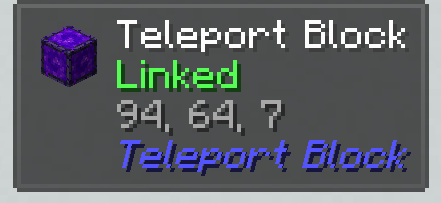
- REI / EMI — crafting recipe visible in recipe browsers
- Waystones — works alongside without conflicts
- Sable / Create: Aeronautics — compatible with moving contraptions
- FTB Chunks — Players cannot teleport into chunks claimed by other teams. Teleporting into your own claimed chunks works as normal.
Available Versions
How to Install TeleportBlock on Your Server
Order Server
Order a Minecraft Java server with at least 3 GB RAM (4 GB recommended).
Set neoforge Loader
In the panel under "Egg", select the neoforge loader and matching Minecraft version (1.21.4).
Install Mod
Open the mod browser in the dashboard and search for "TeleportBlock". Click "Install" – done! Alternatively, upload the .jar via SFTP to the /mods folder.
Compatibility
Mod Loaders
Minecraft Versions
1.21.4, 1.21.3, 1.21.2 (+1 more)
Server-side
✓ RequiredRecommended RAM
4 GB(min. 3 GB)Frequently Asked Questions
TeleportBlock server crashes on startup – what to do?
Most common cause: wrong neoforge version or insufficient RAM. Check the server log (latest.log) for "OutOfMemoryError" or "Mixin" errors. With Mado Hosting: ensure at least 3 GB RAM is allocated and the loader matches the mod version (1.21.4). You can switch loaders with one click in the panel.
Is TeleportBlock compatible with neoforge?
TeleportBlock officially supports neoforge for Minecraft 1.21.4, 1.21.3, 1.21.2. The Mado dashboard automatically detects incompatible loader combinations.
Server lagging with TeleportBlock – how to optimize performance?
Recommended RAM: 4 GB (per 8 players). Use /spark profiler to check if TeleportBlock consumes the most tick time. Common fixes: reduce server view-distance to 8-10, install "performant" or "starlight" as supplementary mods on Forge. With Mado Hosting, your server runs on NVMe SSDs with dedicated CPU cores for minimal latency.
Similar Mods




Rent Modded Server
Install TeleportBlock with just one click on your server.