
Telepost
Nerfed Teleports. Perfect for survival servers.
Screenshots




About this Mod
Telepost doesn't require any other mod to function. However, it has softdepend functions for:
- Luckperms: For permission management. (max posts per player, leverage per player, command permissions)

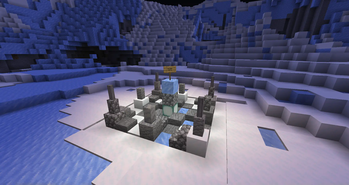
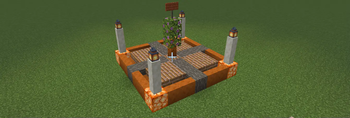
Nerfed teleportation! Easier than ever. Players can create posts if not near enough others. This creates a teleport hall for all players.
You may teleport there if you are standing inside another post.
You can also have your own post to call a /home.
/postor/nearestpostor/closestpost: shows you where the nearest post is./sethomepostor/sethome: sets a home on the nearest post./homepostor/homeor/h: teleports you to your home./visit <Post>or/v: teleports you to a Post./forcevisit <Player> <Post>or/fv: teleports you to a Post without requiring to be standing on a post. OPs only./post list [page]: shows a paginated GUI of the posts./post create <Post> <x> <z>: creates a post with a given name./post rename <OldName> <NewName>: renames a post./post transfer <PostName> <Player>: transfers a post to another player. OPs only./post delete <PostName>: deletes a post. OPs only./post ally <Player>: Mark a player as your ally./post enemy <Player>: Mark a player as your enemy./post forgive <Player>: Forgive a player. (Delete ally/enemy status)

Important permissions:
telepost.posts.NUMBER- Maximum number of posts a player can own. Default is 1.telepost.leverage.NUMBER- Leverage distance to create posts. See the Leverage section for more information. Default is POST-GAP / 2.
Command permissions:
telepost.command.post- Use /post, /nearestpost, /closestposttelepost.command.sethome- Use /sethomepost, /sethometelepost.command.home- Use /homepost, /home, /htelepost.command.visit- Use /visit, /vtelepost.command.forcevisit- Use /forcevisit (OPs only)telepost.command.list- Use /post listtelepost.command.create- Use /post createtelepost.command.rename- Use /post renametelepost.command.transfer- Use /post transfer (OPs only)telepost.command.delete- Use /post delete (OPs only)telepost.command.ally- Use /post allytelepost.command.enemy- Use /post enemytelepost.command.forgive- Use /post forgive
Config
{
  "db-url": "jdbc:postgresql://kryeit.com:5432/servus",
  "db-user": "postgres",
  "db-password": "lel",
  "post-gap": 2000,
  "post-diameter": 31
}
- You need to input the credentials for a PostgreSQL database. Required to have one in order to use the mod.
post-gap: The minimum distance in blocks that must be between two posts. Default is 2000 blocks.post-diameter: The diameter of the post area. Default is 31 blocks. This is also used to offset structures when placing them with/post create.
Leverage
Imagine "post-gap": 1000, inside the config.json.
When creating a post, you must select a location. You can't create a post closer to 1000 blocks from another post.
If you are an ally of a player, their posts will have leverage for you. Once you have leverage, you can create posts closer to your allies. If you had 200 of leverage you could create a post 800 blocks away from your ally's post.
If you are an enemy of a player, their posts will have negative leverage for you. You must create posts further away from your enemies. If you had 200 of leverage you could only create a post 1200 blocks away from your enemy's post.
Our Discord: https://discord.gg/vq5vwuyDGU
Available Versions
How to Install Telepost on Your Server
Order Server
Order a Minecraft Java server with at least 3 GB RAM (4 GB recommended).
Set fabric Loader
In the panel under "Egg", select the fabric loader and matching Minecraft version (1.21.4).
Install Mod
Open the mod browser in the dashboard and search for "Telepost". Click "Install" – done! Alternatively, upload the .jar via SFTP to the /mods folder.
Compatibility
Mod Loaders
Minecraft Versions
1.21.4, 1.21.1, 1.21 (+5 more)
Server-side
✓ RequiredRecommended RAM
4 GB(min. 3 GB)Frequently Asked Questions
Telepost server crashes on startup – what to do?
Most common cause: wrong fabric version or insufficient RAM. Check the server log (latest.log) for "OutOfMemoryError" or "Mixin" errors. With Mado Hosting: ensure at least 3 GB RAM is allocated and the loader matches the mod version (1.21.4). You can switch loaders with one click in the panel.
Is Telepost compatible with fabric and neoforge and quilt?
Telepost officially supports fabric, neoforge, quilt for Minecraft 1.21.4, 1.21.1, 1.21. The Mado dashboard automatically detects incompatible loader combinations.
Server lagging with Telepost – how to optimize performance?
Recommended RAM: 4 GB (per 8 players). Use /spark profiler to check if Telepost consumes the most tick time. Common fixes: reduce server view-distance to 8-10, install "performant" or "starlight" as supplementary mods on Forge. With Mado Hosting, your server runs on NVMe SSDs with dedicated CPU cores for minimal latency.
Similar Mods




Rent Modded Server
Install Telepost with just one click on your server.