
Temperatures
Legend of Zelda inspired temperature system for Minecraft.
Screenshots
About this Mod
Temperatures

Brings the temperature system from modern Legend of Zelda games to Minecraft! This mod is intended to block progression by preventing access and maneuverability in specific biomes or dimensions.
How It Works
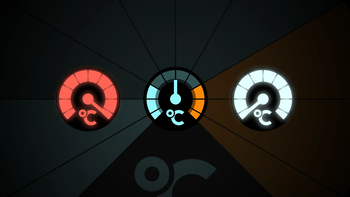
Each biome has a configurable temperature that fluctuates between day and night. Additionally, temperature can be configured to change in rain or snow, or when the player is around certain blocks.
There are four levels of temperature: normal, uncomfortable, very uncomfortable, and extreme. To access uncomfortable temperatures, the player must have one level of the protection aginst that temperature (be it cold or not); for very uncomfortable, level two, and extreme, a specialised protection (named "Icebreaker" and "Flamebreaker"; Fire Resistance as a potion also works).
Protection is gained through drinking potions or wearing enchanted items. These can be mixed: for example, using a Cold Resistant chestplate and having the Cold Resistance I effect will allow you to survive very uncomfortable temperatures.
The two extreme temperatures are burning and freezing. Burning occurs instantly in the Nether, while freezing occurs when going into water in cold regions.
Documentation
You may visit Temperatures' documentation to view information about this mod, including changelogs, configuration information, and modding support.

Notice about Item Generation & Configuration
This mod ships without a premade configuration, recipes, or loot modifiers (planned). As such, all biomes (except the Nether) have no temperature. Additionally, enchantments or potions will not spawn in the wild, and potions cannot be brewed.
I recommend using a mod to add them yourself. For the configuration, you could fill it in manually (see the Configuration section below), or feed it through an AI to get it done quickly.
In the future, this mod will ship with default data and configuration.
Mod Progress
While most of the features of this mod are complete, there are still a couple things in progress:
- Exposed API (just in case):
- Expose hooks that allow other mods to modify the way temperature is calculated;
- Forbid enchantments and potion effects from being added together, similar to how Legend of Zelda actually works;
- Tag support in configuration;
- Blocks that cool down the player;
- Premade configurations;
- Option to add premade loot generators.
This mod was also created specifically for a mod pack I'm making, so it may not contain every feature players may want. If you have an idea, feel free to suggest it on GitHub.
Localisations
The mod has the following locales supported:
- English (en-us)
- Swedish (sv-se)
Available Versions
How to Install Temperatures on Your Server
Order Server
Order a Minecraft Java server with at least 3 GB RAM (4 GB recommended).
Set forge Loader
In the panel under "Egg", select the forge loader and matching Minecraft version (1.20.6).
Install Mod
Open the mod browser in the dashboard and search for "Temperatures". Click "Install" – done! Alternatively, upload the .jar via SFTP to the /mods folder.
Compatibility
Mod Loaders
Minecraft Versions
1.20.6, 1.20.5, 1.20.4 (+3 more)
Server-side
✓ RequiredRecommended RAM
4 GB(min. 3 GB)Frequently Asked Questions
Temperatures server crashes on startup – what to do?
Most common cause: wrong forge version or insufficient RAM. Check the server log (latest.log) for "OutOfMemoryError" or "Mixin" errors. With Mado Hosting: ensure at least 3 GB RAM is allocated and the loader matches the mod version (1.20.6). You can switch loaders with one click in the panel.
Is Temperatures compatible with forge?
Temperatures officially supports forge for Minecraft 1.20.6, 1.20.5, 1.20.4. The Mado dashboard automatically detects incompatible loader combinations.
Server lagging with Temperatures – how to optimize performance?
Recommended RAM: 4 GB (per 8 players). Use /spark profiler to check if Temperatures consumes the most tick time. Common fixes: reduce server view-distance to 8-10, install "performant" or "starlight" as supplementary mods on Forge. With Mado Hosting, your server runs on NVMe SSDs with dedicated CPU cores for minimal latency.
Similar Mods




Rent Modded Server
Install Temperatures with just one click on your server.