
Tensura Metalworks
Tensura Metalworks brings magical metallurgy to Tensura Reincarnated with new alloys, molten metals, Silent Gear materials, EP scaling, engravings, and legendary equipment.
Screenshots
About this Mod
Tensura Metalworks
Tensura Metalworks brings magical metallurgy to Tensura Reincarnated, expanding the way players craft, forge, upgrade, and evolve powerful equipment.
Built around Tensura Reincarnated, Silent Gear, Silent Gear Metalworks, and Productive Metalworks, this addon adds a full metalworking progression path using molten metals, magical alloys, Tensura-inspired materials, EP-supported gear, automatic engravings, advancements, config options, and endgame equipment.
Features;
- New magical materials, including Biological Magisteel, Dragotite, Alienium, Spiritium, and Starheart
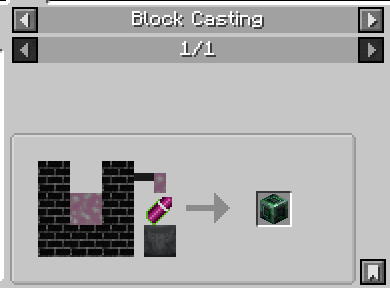
- Productive Metalworks foundry support with molten metals, melting, casting, alloying, and Elemental Lava fuel
- Silent Gear integration for custom parts, materials, traits, coatings, and gear progression
- Tensura EP support for supported tools, weapons, armour, and endgame equipment
- Automatic Tensura engravings for custom gear and selected Silent Gear materials
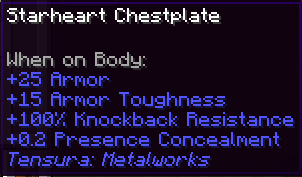
- Endgame Starheart equipment with high-tier stats and God-grade progression
- Legendary weapons: Caliburn and Excalibur
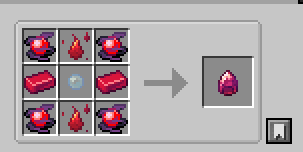
- Custom crafting, smithing, brewing, loot, and advancement progression
- Config toggles for major systems
- Read-only info commands for checking config, compat, EP values, systems, engravings, and flight status
Progression;
Tensura Metalworks is designed around a magical metallurgy progression path:
Magisteel → Biological Magisteel → Dragotite / Alienium / Spiritium → Starheart → Caliburn / Excalibur
Players begin by working with Tensura materials and foundry processes, then gradually progress into stronger magical alloys. Each major material has its own identity, use, and place in the equipment path.
Materials;
Biological Magisteel
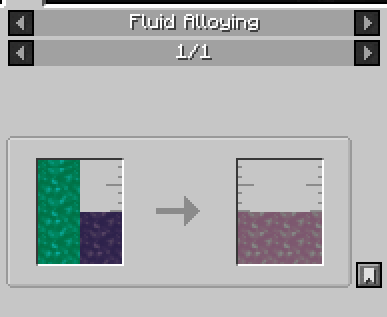
A fusion material created through advanced foundry processing, combining molten Magisteel with Insector-based remains. Biological Magisteel acts as the foundation for several higher-tier alloys and Silent Gear parts.
Dragotite
A powerful draconic metal used for high-tier armour, tools, and weapons. Dragotite equipment is built around strength, durability, draconic power, and advanced Tensura engravings.
Alienium
A biological alien metal inspired by Insectar material progression. Alienium gear focuses on unusual alien-steel properties, energy interaction, and magicule-rich equipment growth.
Spiritium
A custom spirit-aligned alloy created for this addon. Spiritium equipment focuses on elemental force, spiritual power, and magicule channeling.
Starheart
The endgame God-grade material of Tensura Metalworks. Starheart equipment represents the peak of the addon’s gear progression, leading into the legendary weapons Caliburn and Excalibur.
Foundry Integration;
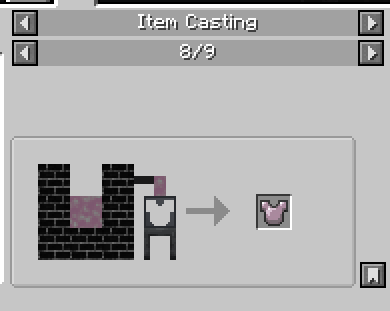
Tensura Metalworks adds several molten fluids and foundry recipes through Productive Metalworks, allowing players to melt, alloy, and cast magical metals.
Included foundry content:
- Molten Magisteel
- Molten Biological Magisteel
- Molten Dragotite
- Molten Alienium
- Molten Spiritium
- Molten Starheart
- Molten Insector Remains
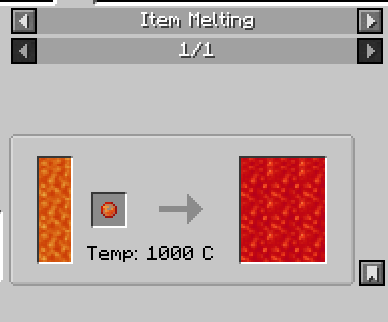
- Elemental Lava
Elemental Lava can also be used as a high-temperature foundry fuel, giving the addon a unique Tensura-themed foundry progression.
Silent Gear Integration;
The addon expands Silent Gear progression with Tensura-themed materials, coatings, linings, rods, bindings, and traits.
Supported Silent Gear content includes:
- Custom materials and parts
- Foundry-cast gear components
- Tensura-inspired traits
- EP-compatible supported tools and weapons
- Automatic engravings from selected materials and gear combinations
This allows Tensura materials to feel properly integrated into Silent Gear instead of existing as separate standalone items.
EP and Engravings;
Tensura Metalworks uses Tensura Reincarnated’s EP system for supported gear.
Custom equipment and supported Silent Gear items can receive:
- Base EP
- Maximum EP
- EP gain values
- Tensura engravings
- Material-specific effects and scaling
The goal is to make gear progression feel connected to Tensura Reincarnated’s power system while still respecting Minecraft’s crafting and equipment progression.
Endgame Equipment;
Tensura Metalworks adds powerful endgame equipment, including:
- Dragotite armour, tools, and weapons
- Alienium armour, tools, and weapons
- Spiritium armour, tools, and weapons
- Starheart armour, tools, and weapons
- Caliburn
- Excalibur
- Starheart, Caliburn, and Excalibur are intended to sit at the highest end of the addon’s progression.
Advancements, Config, and Commands;
The addon includes advancement progression to guide players through the major crafting stages and material upgrades.
Config options allow server owners and modpack creators to enable or disable major systems such as:
- Silent Gear EP bridge
- Custom gear EP
- Automatic engravings
- Armour flight
- Debug logging
Read-only commands are also included to check addon information without giving items or bypassing progression.
Dependencies
Required:
Tensura Reincarnated - 2.0.10+
Silent Gear - 4.2.1.1+
Silent Gear Metalworks - 1.21.1-1.5.0 +
Productive Metalworks - 1.21.1-1.50 +
Built for:
- Minecraft 1.21.1
- NeoForge (Only!)
Notes
Tensura Metalworks is an unofficial addon made for Tensura Reincarnated-focused modpacks. It is designed to expand metalworking, gear progression, Silent Gear & Productive Metalworks integration while keeping the experience themed around Tensura-style magical materials.
Available Versions
How to Install Tensura Metalworks on Your Server
Order Server
Order a Minecraft Java server with at least 3 GB RAM (4 GB recommended).
Set neoforge Loader
In the panel under "Egg", select the neoforge loader and matching Minecraft version (1.21.1).
Install Mod
Open the mod browser in the dashboard and search for "Tensura Metalworks". Click "Install" – done! Alternatively, upload the .jar via SFTP to the /mods folder.
Compatibility
Mod Loaders
Minecraft Versions
1.21.1
Server-side
✓ RequiredRecommended RAM
4 GB(min. 3 GB)Frequently Asked Questions
Tensura Metalworks server crashes on startup – what to do?
Most common cause: wrong neoforge version or insufficient RAM. Check the server log (latest.log) for "OutOfMemoryError" or "Mixin" errors. With Mado Hosting: ensure at least 3 GB RAM is allocated and the loader matches the mod version (1.21.1). You can switch loaders with one click in the panel.
Is Tensura Metalworks compatible with neoforge?
Tensura Metalworks officially supports neoforge for Minecraft 1.21.1. The Mado dashboard automatically detects incompatible loader combinations.
Server lagging with Tensura Metalworks – how to optimize performance?
Recommended RAM: 4 GB (per 8 players). Use /spark profiler to check if Tensura Metalworks consumes the most tick time. Common fixes: reduce server view-distance to 8-10, install "performant" or "starlight" as supplementary mods on Forge. With Mado Hosting, your server runs on NVMe SSDs with dedicated CPU cores for minimal latency.
Similar Mods




Rent Modded Server
Install Tensura Metalworks with just one click on your server.