
TerraMath
Create custom terrain using mathematical functions and formulas for unique procedural world generation.
Screenshots


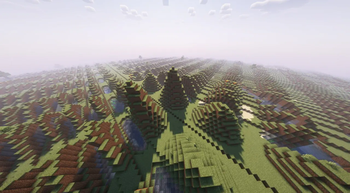
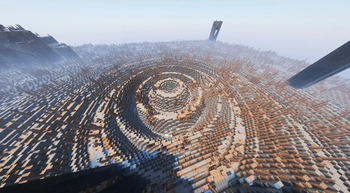
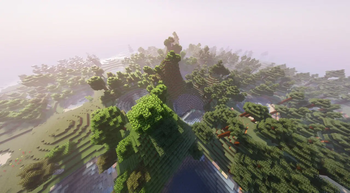
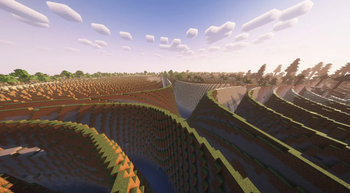
About this Mod






Description
TerraMath is a Minecraft 1.20 - 1.21.x mod that allows you to customize world generation using mathematical functions. Create unique landscapes by defining terrain height through mathematical formulas!
You can also join my Discord to find more formulas or share yours.
Features
- Custom world generation through mathematical formulas
- Adjustable basic generation parameters (scale, height, variation, smoothing)
- Configurable noise overlay on top of your base formula
- Support for mathematical constants in formulas
How to Use on Client
- World generation settings interface
Parameter Configuration
- Go to "World" tab in world creation screen
- Open the terrain settings screen
- Enter your desired formula in the field
- Adjust additional parameters (optional):
- Scale
- Base Height (determines average surface level)
- Height Variation (amplitude of changes)
- Smoothing (terrain transition smoothness)
- Choose noise type and settings (optional):
- Noise type: Perlin, Simplex, Blended, Normal
- X, Y, Z coordinate multipliers
- General noise height multiplier
How to Use on Server
- Start the server with TerraMath mod installed
- Check the config folder, there will be a
terramath.jsonfile - Set the necessary parameters manually in the file, or...
- ...configure the mod on your client
- Set the parameters and save the config
- Transfer the config file to the server's config folder
Important Server Notes:
- For the config to apply to a new world, make sure the
useDefaultFormulaparameter in the config is set totrue - After changing config settings, you'll need to delete the existing world and restart the server for the new terrain formula to take effect
- Alternatively, you can transfer your entire world folder from a client to the server - the world will continue to generate according to the same formula without requiring config changes
Formula Examples
Basic wavy landscape:
sin(x)Spiky volcanic-like terrain with steep slopes:
abs(sin(x/10))*exp(cos(z/15))*8 + tanh(sqrt(x^2 + z^2)/20)*15Rolling mountains:
sin(x/8)*cos(z/8)*10 + abs(sin(x/20))*15 + sqrt(abs(x/10))*5Some crazy and heavy thing:
round(sin(x/15))*10 + round(cos(z/15))*10 + sqrt(abs(sin((x+z)/20)))*15Terraced landscape with plateaus:
floor(sin(x/20) * cos(z/20) * 5) * 4 + sqrt(x^2 + z^2)/10Crater-filled terrain:
10 * (1 - exp(-((x/30)^2 + (z/30)^2) / 2)) + 5 * perlin(x/50, 0, z/50)
Available Functions and Operators
Mathematical Functions:

Trigonometric:
- sin(x) - sine
- cos(x) - cosine
- tan(x) - tangent
- csc(x) - cosecant
- sec(x) - secant
- cot(x) - cotangent
- asin(x) - inverse sine
- acos(x) - inverse cosine
- atan(x) - inverse tangent
- atan2(x,y) - two-argument inverse tangent
- acsc(x) - inverse cosecant
- asec(x) - inverse secant
- acot(x) - inverse cotangent

Hyperbolic:
- sinh(x) - hyperbolic sine
- cosh(x) - hyperbolic cosine
- tanh(x) - hyperbolic tangent
- asinh(x) - inverse hyperbolic sine
- acosh(x) - inverse hyperbolic cosine
- atanh(x) - inverse hyperbolic tangent
- csch(x) - hyperbolic cosecant
- sech(x) - hyperbolic secant
- coth(x) - hyperbolic cotangent
- acsch(x) - inverse hyperbolic cosecant
- asech(x) - inverse hyperbolic secant
- acoth(x) - inverse hyperbolic cotangent

Root and Power:
- sqrt(x) - square root
- cbrt(x) - cube root
- root(x,n) - nth root of x
- pow(x,y) - x raised to power y
- exp(x) - exponential (e^x)

Logarithmic:
- ln(x) - natural logarithm
- lg(x) - base-10 logarithm

Rounding and Numbers:
- abs(x) - absolute value
- floor(x) - largest integer less than x
- ceil(x) - smallest integer greater than x
- round(x) - rounds to nearest integer
- sign(x) - returns sign of x (-1, 0, or 1)
- mod(x,y) - remainder of x divided by y
- gcd(x,y) - greatest common divisor
- lcm(x,y) - least common multiple
- modi(x,y) - modular inverse

Special Functions:
- gamma(x) - gamma function
- erf(x) - error function
- beta(x,y) - beta function

Random Number Generation:
- rand() - random number between 0 and 1
- randnormal(mean,stdev) - random number from normal distribution
- randrange(min,max) - random number between min and max

Noise Functions:
- perlin(x,y,z) - perlin noise
- simplex(x,y,z) - simplex noise
- normal(x,y,z) - normal noise
- blended(x,y,z) - blended noise
- octaved(x,z,octaves,persistence) - octaved noise

Utility Functions:
- max(x,y) - maximum of x and y
- min(x,y) - minimum of x and y
- sigmoid(x) - sigmoid function (1/(1+e^-x))
- clamp(x,min,max) - constrains x between min and max

Constants:
- pi, π - 3.14159... (π constant)
- e - 2.71828... (Euler's number)
- phi, φ - 1.61803... (Golden ratio)
- zeta3, ζ3 - 1.20205... (Apéry's constant)
- catalan, K - 0.91596... (Catalan's constant)
- alpha, α, feigenbaum - 2.50290... (Feigenbaum constant)
- delta, δ, feigenbaumdelta - 4.66920... (Feigenbaum delta)
- omega, Ω - 0.6889 (Cosmological constant)

Variables:
x, y, z - block coordinates in world

Operators:
+, -, *, /, ^, (), !
Known Issues
- Extreme formulas that produce XXL landscapes may impact performance (probably not a completely solvable problem)
- Random number generation functions can significantly impact world generation performance when used extensively. Consider using these functions sparingly, especially in complex terrain formulas, as they may cause frame rate drops or increased chunk loading time
Contributing
Feel free to report bugs or suggest features through the issue tracker!
Available Versions
How to Install TerraMath on Your Server
Order Server
Order a Minecraft Java server with at least 4 GB RAM (6 GB recommended).
Set fabric Loader
In the panel under "Egg", select the fabric loader and matching Minecraft version (1.21.4).
Install Mod
Open the mod browser in the dashboard and search for "TerraMath". Click "Install" – done! Alternatively, upload the .jar via SFTP to the /mods folder.
Compatibility
Mod Loaders
Minecraft Versions
1.21.4, 1.21.3, 1.21.2 (+9 more)
Server-side
✓ RequiredRecommended RAM
6 GB(min. 4 GB)Frequently Asked Questions
TerraMath server crashes on startup – what to do?
Most common cause: wrong fabric version or insufficient RAM. Check the server log (latest.log) for "OutOfMemoryError" or "Mixin" errors. With Mado Hosting: ensure at least 4 GB RAM is allocated and the loader matches the mod version (1.21.4). You can switch loaders with one click in the panel.
Is TerraMath compatible with fabric and forge?
TerraMath officially supports fabric, forge for Minecraft 1.21.4, 1.21.3, 1.21.2. Note: Forge and Fabric mods are NOT cross-compatible – pick one loader and stick with it. The Mado dashboard automatically detects incompatible loader combinations.
Server lagging with TerraMath – how to optimize performance?
Recommended RAM: 6 GB (per 5 players). Use /spark profiler to check if TerraMath consumes the most tick time. Common fixes: reduce server view-distance to 8-10, install "performant" or "starlight" as supplementary mods on Forge. With Mado Hosting, your server runs on NVMe SSDs with dedicated CPU cores for minimal latency.
Similar Mods





Rent Modded Server
Install TerraMath with just one click on your server.