Terrarium
Earth in Minecraft - Configurable! Spiritual successor to Terra 1:1
Screenshots

About this Mod
Terrarium
Pixel-Perfect Earth Terrain for Minecraft
Generate pixel-perfect worlds from real elevation data, with dynamic tile loading and customizable terrain shaping.
- World type is
terrarium:terrariumfor servers, singleplayer, select earth when creating world and choose customize to change settings per world.
🌐 Terrain Data Pipeline
- Source: AWS S3 (
elevation-tiles-prod/terrarium/{zoom}/{x}/{y}.png) - Temperature and Precipitation Personal Source Hosted on GitHub, I compiled this using QGIS. (
clim-monthly/{month}/{zoom}/{x}/{y}) This is a temporary hosting solution - Pixel-to-Block: 1 pixel = 1 Minecraft block.
- Tile System:
- Each tile =
256×256pixels (256×256blocks ingame). zoomlevel determines tile count per axis (2^zoomtiles).- Example:
zoom: 8=2⁸ = 256tiles →256×256 = 65,536blocks wide.
- Example:
- Each tile =
🗃️ Downloads
- You can download indev test versions here
- Support is not guarunteed for those, only alphas, betas, and releases
- FabricAPI is required
🏔️ Technical Notes
- Scale Examples:
- zoom: 10 = 1,024 tiles → 262,144×262,144 blocks.
- zoom: 13 = 8,192 tiles → 2,097,152×2,097,152 blocks.
🌩️ Performance:
- Higher zoom = larger worlds but slower generation.
- Reduce zoom to 8–10 for survival-friendly sizes.
World Size Comparison
- zoom: 10 (small - ~1:48) vs. zoom: 13 (planetary-scale - ~1:6).
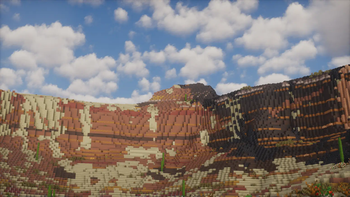
🖼️ Screenshots:
- Taken with v0.0.2-beta.2 + Bliss/Photon + WWOO
Zoom: 13 | Height 768
🛠️ How It Works
- Tile Fetching: Downloads 256×256 PNG tiles from AWS based on zoom and caches.
- Height Mapping: Converts RGB pixels to block heights, scaled by additionalAlt.
- Biome Placement: Vanilla biomes mapped using elevation (startingY + altitudeDropoff).
🔧 Configuration
/config/BlossomMods/Terrarium.json:
{
  "ELEVATION_URL": "https://s3.amazonaws.com/elevation-tiles-prod/terrarium/", //elevation data source
  "TEMPERATURE_URL": "https://raw.githubusercontent.com/ly-nxs/terrarium-data/refs/heads/main/tiles/climate-monthly/", //climate data source
  "CACHE_DIR": "./tiles", //tile cache dir
}
Available Versions
How to Install Terrarium on Your Server
Order Server
Order a Minecraft Java server with at least 4 GB RAM (6 GB recommended).
Set fabric Loader
In the panel under "Egg", select the fabric loader and matching Minecraft version (1.21.8).
Install Mod
Open the mod browser in the dashboard and search for "Terrarium". Click "Install" – done! Alternatively, upload the .jar via SFTP to the /mods folder.
Compatibility
Mod Loaders
Minecraft Versions
1.21.8, 1.21.7, 1.21.6 (+13 more)
Server-side
✓ RequiredRecommended RAM
6 GB(min. 4 GB)Frequently Asked Questions
Terrarium server crashes on startup – what to do?
Most common cause: wrong fabric version or insufficient RAM. Check the server log (latest.log) for "OutOfMemoryError" or "Mixin" errors. With Mado Hosting: ensure at least 4 GB RAM is allocated and the loader matches the mod version (1.21.8). You can switch loaders with one click in the panel.
Is Terrarium compatible with fabric and neoforge?
Terrarium officially supports fabric, neoforge for Minecraft 1.21.8, 1.21.7, 1.21.6. The Mado dashboard automatically detects incompatible loader combinations.
Server lagging with Terrarium – how to optimize performance?
Recommended RAM: 6 GB (per 5 players). Use /spark profiler to check if Terrarium consumes the most tick time. Common fixes: reduce server view-distance to 8-10, install "performant" or "starlight" as supplementary mods on Forge. With Mado Hosting, your server runs on NVMe SSDs with dedicated CPU cores for minimal latency.
Similar Mods




Rent Modded Server
Install Terrarium with just one click on your server.
Details
- License
- Creative Commons Attribution Non Commercial Share Alike 4.0 International
- Server-side
- Required