
Tetra Loopback
An addon mod made for Tetra that adds some modular curios and materials.
Screenshots
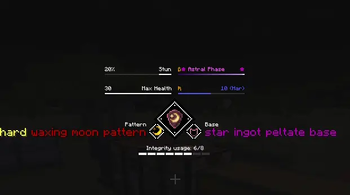


About this Mod
This mod adds several modular curios to Tetra: "emblem" and "goggles". It also adds a new curios slot.
Some metal, gem, and socket materials have been added.
Some special itemeffect were added and special GUI bars were created for them.
A scroll associated with curios has been added to apply the corresponding improvements.
A work block called ancient forge has been added for crafting materials.
If you have any questions or suggestions, you are welcome to come to my Discord channel to discuss.
Currently, only version 1.20.1 is supported
Mod dependencies:
Tetra6.5.0+
Curios API 5.8.1+
Currently, an emblem consists of peltate, gempeltate, pattern, and gemcore. Dynamic slots are used to bind peltate to pattern and gempeltate to gemcore.
Goggles consist of buckle, edge, frame, leftlense, rightlense, singlelense, and strap. They also use dynamic slots to bind lenses to the frames they use.
If you are the author of datapack or modpack, you are free to use it as long as you follow the license (LGPLv3). You can configure some itemeffects through datapack.
Discord: https://discord.com/invite/6jXEgEPjx5
GitHub:https://github.com/Neferge466/Tetra-Loopback
It is already compatible with some of the native itemeffects of tetra.


Available Versions
How to Install Tetra Loopback on Your Server
Order Server
Order a Minecraft Java server with at least 3 GB RAM (4 GB recommended).
Set forge Loader
In the panel under "Egg", select the forge loader and matching Minecraft version (1.20.1).
Install Mod
Open the mod browser in the dashboard and search for "Tetra Loopback". Click "Install" – done! Alternatively, upload the .jar via SFTP to the /mods folder.
Compatibility
Mod Loaders
Minecraft Versions
1.20.1
Server-side
✓ RequiredRecommended RAM
4 GB(min. 3 GB)Frequently Asked Questions
Tetra Loopback server crashes on startup – what to do?
Most common cause: wrong forge version or insufficient RAM. Check the server log (latest.log) for "OutOfMemoryError" or "Mixin" errors. With Mado Hosting: ensure at least 3 GB RAM is allocated and the loader matches the mod version (1.20.1). You can switch loaders with one click in the panel.
Is Tetra Loopback compatible with forge?
Tetra Loopback officially supports forge for Minecraft 1.20.1. The Mado dashboard automatically detects incompatible loader combinations.
Server lagging with Tetra Loopback – how to optimize performance?
Recommended RAM: 4 GB (per 8 players). Use /spark profiler to check if Tetra Loopback consumes the most tick time. Common fixes: reduce server view-distance to 8-10, install "performant" or "starlight" as supplementary mods on Forge. With Mado Hosting, your server runs on NVMe SSDs with dedicated CPU cores for minimal latency.
Similar Mods




![[TaCZ] Timeless and Classics Zero](https://cdn.modrinth.com/data/SzzJttH8/fd27766d2bb8390d284696b1dbd358f87e081439_96.webp)

Rent Modded Server
Install Tetra Loopback with just one click on your server.