
Tetris MC Unofficial
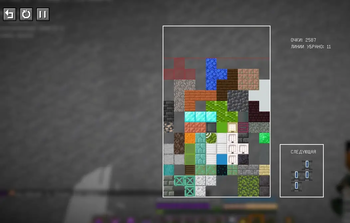
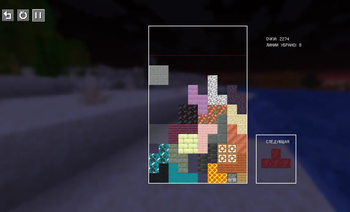
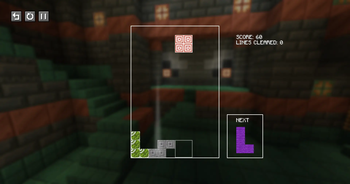
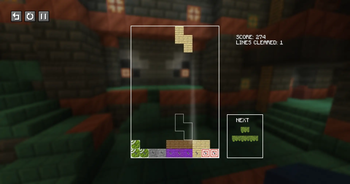
Adds tetris as an onscreen minigames to play while you're bored in Minecraft
Screenshots
About this Mod
English
Unofficial port of Tetris MC by Nukebob3 (CC-BY-4.0), updated for Minecraft 1.21.11 with new features.
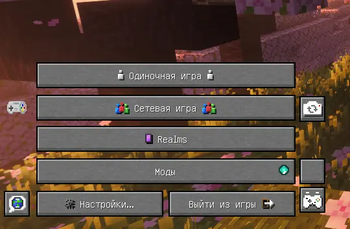
Adds a Tetris minigame to the Title Screen and Pause Menu. Pieces use random block textures from your installed mods.
Features
| Feature | Details |
|---|---|
| Tetris minigame | Accessible from Title Screen and Pause Menu |
| Block textures | Random textures from installed mods, or classic solid colors |
| Hard drop | Three preview styles: outline, hologram, or none |
| Next piece panel | Can be hidden in settings |
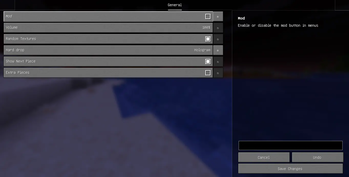
| Extra pieces | 7 additional piece shapes, toggleable in settings |
| Hold mechanic | Save a piece for later with C or Shift |
| Config screen | Via ModMenu + YACL |
| Languages | English and Russian |
Changes in this version
- Ported to Minecraft 1.21.11
- Added config screen via YACL
- Added Russian translation
- Added 7 extra piece shapes
- Added hold piece mechanic
Dependencies
- Fabric API — required
- YACL — required
- ModMenu — optional, needed for config screen
Русский
Неофициальный порт Tetris MC от Nukebob3 (CC-BY-4.0), обновлённый для Minecraft 1.21.11.
Добавляет мини-игру Тетрис в главное меню и меню паузы. Фигуры используют текстуры блоков из установленных модов.
Возможности
| Функция | Описание |
|---|---|
| Мини-игра Тетрис | Доступна из главного меню и меню паузы |
| Текстуры блоков | Случайные из установленных модов или классические |
| Жёсткое падение | Три режима: контур, голограмма, без предпросмотра |
| Следующая фигура | Панель можно скрыть в настройках |
| Доп. фигуры | 7 новых форм, включаются в настройках |
| Запас фигуры | Сохранить фигуру на потом — C или Shift |
| Меню настроек | Через ModMenu + YACL |
| Языки | Английский и русский |
Изменения в этой версии
- Порт на Minecraft 1.21.11
- Добавлено меню настроек через YACL
- Добавлен русский перевод
- Добавлено 7 новых фигур
- Добавлена механика запаса фигуры
Зависимости
- Fabric API — обязательно
- YACL — обязательно
- ModMenu — опционально, нужен для настроек
Available Versions
How to Install Tetris MC Unofficial on Your Server
Order Server
Order a Minecraft Java server with at least 3 GB RAM (4 GB recommended).
Set fabric Loader
In the panel under "Egg", select the fabric loader and matching Minecraft version (1.21.11).
Install Mod
Open the mod browser in the dashboard and search for "Tetris MC Unofficial". Click "Install" – done! Alternatively, upload the .jar via SFTP to the /mods folder.
Compatibility
Mod Loaders
Minecraft Versions
1.21.11
Server-side
✗ UnsupportedRecommended RAM
4 GB(min. 3 GB)Frequently Asked Questions
Tetris MC Unofficial server crashes on startup – what to do?
Most common cause: wrong fabric version or insufficient RAM. Check the server log (latest.log) for "OutOfMemoryError" or "Mixin" errors. With Mado Hosting: ensure at least 3 GB RAM is allocated and the loader matches the mod version (1.21.11). You can switch loaders with one click in the panel.
Is Tetris MC Unofficial compatible with fabric?
Tetris MC Unofficial officially supports fabric for Minecraft 1.21.11. The Mado dashboard automatically detects incompatible loader combinations.
Server lagging with Tetris MC Unofficial – how to optimize performance?
Recommended RAM: 4 GB (per 8 players). Use /spark profiler to check if Tetris MC Unofficial consumes the most tick time. Common fixes: reduce server view-distance to 8-10, install "performant" or "starlight" as supplementary mods on Forge. With Mado Hosting, your server runs on NVMe SSDs with dedicated CPU cores for minimal latency.
Similar Mods





Rent Modded Server
Install Tetris MC Unofficial with just one click on your server.