
TFC Glass Workshop
Adds a TFC-style mechanical glass press for batch glass production, reusable molds, ceramic molds, and powder-dyed glass recipes.
Screenshots
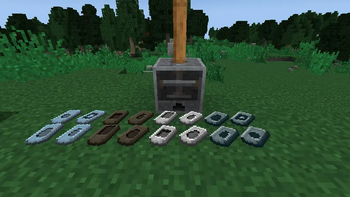
About this Mod
Description
TerraFirmaCraft: Glass Workshop expands TFC glass production with one focused machine: the Glass Press.
Instead of replacing TerraFirmaCraft's glass systems, this add-on builds on them. You still heat glass batches with TFC mechanics, still work with metal and ceramic molds, and still rely on TFC-style progression. The press simply gives you a batch-production step for turning hot glass batches into finished glass products.
The Glass Press requires mechanical power from above. Faster rotation means faster pressing. It can produce glass blocks, glass panes, TFC glass bottles, jars, lamp glass, and lenses depending on the installed mold.
For colored glass, the press includes three powder slots and supports the same powder combinations used by TFC glassworking. Add the right powders, install a block or plate mold, and press dyed glass blocks or panes directly.
Features
- Glass Press machine for TFC-style batch glass production
- Requires TFC mechanical power from the top
- Uses hot TFC glass batches and TFC heat data
- 6 mold shapes:
- Plate
- Block
- Bottle
- Jar
- Lamp Glass
- Lens
- Permanent wrought iron and steel molds
- Ceramic molds made with clay knapping and firing
- Ceramic molds have a chance to break during pressing
- Powder dyeing for glass blocks and panes
- JEI recipe category for pressing recipes
- Integrated TFC Field Guide entries
- Bottom hopper extraction only pulls finished output
How To Use
- Heat a TFC glass batch to at least Faint Red.
- Place it in the Glass Press input slot.
- Insert a matching press mold.
- For dyed glass, add the required powders to the three powder slots.
- Power the Glass Press from the top with TFC mechanical power.
- Collect the output manually or with a hopper underneath.
Automation
The Glass Press is automation-friendly:
- Top: mechanical power input
- Bottom: output-only item access
- Other sides: inventory access for automation setups
This prevents a hopper below the press from stealing glass batches, molds, or powders.
Available Versions
How to Install TFC Glass Workshop on Your Server
Order Server
Order a Minecraft Java server with at least 3 GB RAM (4 GB recommended).
Set forge Loader
In the panel under "Egg", select the forge loader and matching Minecraft version (1.21.1).
Install Mod
Open the mod browser in the dashboard and search for "TFC Glass Workshop". Click "Install" – done! Alternatively, upload the .jar via SFTP to the /mods folder.
Compatibility
Mod Loaders
Minecraft Versions
1.21.1, 1.20.1
Server-side
✓ RequiredRecommended RAM
4 GB(min. 3 GB)Frequently Asked Questions
TFC Glass Workshop server crashes on startup – what to do?
Most common cause: wrong forge version or insufficient RAM. Check the server log (latest.log) for "OutOfMemoryError" or "Mixin" errors. With Mado Hosting: ensure at least 3 GB RAM is allocated and the loader matches the mod version (1.21.1). You can switch loaders with one click in the panel.
Is TFC Glass Workshop compatible with forge and neoforge?
TFC Glass Workshop officially supports forge, neoforge for Minecraft 1.21.1, 1.20.1. The Mado dashboard automatically detects incompatible loader combinations.
Server lagging with TFC Glass Workshop – how to optimize performance?
Recommended RAM: 4 GB (per 8 players). Use /spark profiler to check if TFC Glass Workshop consumes the most tick time. Common fixes: reduce server view-distance to 8-10, install "performant" or "starlight" as supplementary mods on Forge. With Mado Hosting, your server runs on NVMe SSDs with dedicated CPU cores for minimal latency.
Similar Mods





Rent Modded Server
Install TFC Glass Workshop with just one click on your server.