
The Clone
I'm on singleplayer, right? Why is there another player?
Screenshots
About this Mod
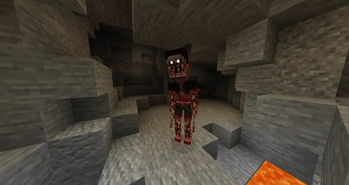
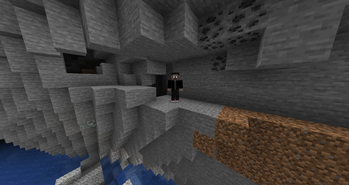
The Clone adds a terrifying new monster. A strange creature lurks in the world, one that looks exactly like a player but darker with glowing eyes. It watches silently from a distance, always appearing nearby with an eerie sound. If you lock at it, it may simply vanish… or turning into a monster. You may think you’re alone, but when you hear that sound… you’ll know it’s watching.
Updates continue on Curseforge
- A mod made by Zcoper
- Mod created with MCreator!
- Requires Geckolib
● Visit my Discord Server!
https://discord.gg/akP56NtmVQ
● Important FaQ
Spoiler
► [OLD] What is my console spaming?
Most mobs use special spawning conditions, which means that these mobs can only appear under certain conditions. If the spawning conditions work, this spam is created in the console.
► [OLD] Why can't I summon a mob?
Spawning Conditions determine which conditions must be met in order to spawn certain mobs. Some mobs only spawn above Y level 60. Some below. Most mobs can only spawn in the overworld than in other dimensions.
► Why are features missing in different versions?
It is recommended to play the newest versions of higher minecraft versions.
Not all features of MCreator available or the same in different versions.
For example: Version 1.19.2 doesn't have the feature of shield, better structure generation or custom villagers, but Version 1.20.1 does have them.
► How does the Phases work?
Through the phases that increase up to phase 3, The Clone becomes more aggressive.
Phase 0
Spawns far from the player and vanishes when looked at.
Phase 1
Spawns closer. If looked at, it transforms into a monster but does not attack.
Phase 2
Spawns even closer. The monster can now attack the player.
Phase 3
Spawns very close. The monster can emerge from the ground.
► How to change phases?
Phases are reset to 0 if The Clone kills a player.
Alternatively, you can use the command "clone_add_phases" to increase the phase by one.
The phases are reset to 0 with the command “clone_reset_phases”.
► How can I disable other skins?
Other skins from the clone can be disabled when setting the gamerule "EnableMultipleCloneSkins" to false.
If set to false, only belon and unnamed skins will be used.
► How does he changes skins?
The Clone can change his skin from 13 different opions when he spawns and the gamerule "EnableMultipleCloneSkins" is set to true. When the clone spawns as a player, it will randomly pick a number from 0 to 12 which determinds his skin.
Number 0 or anything above 12 = Belon
Number 1 = Unnamed
Number 2 = Paul
Number 3 = Chaos
Number 4 = Hannes
Number 5 = Steve (Buddy)
Number 6 = Kerjoc
Number 7 = Diggazuspät
Number 8 = Slime_HD5800
Number 9 = Lilly
Number 10 = Slimmy
Number 11 = Zcoper
Number 12 = Ash
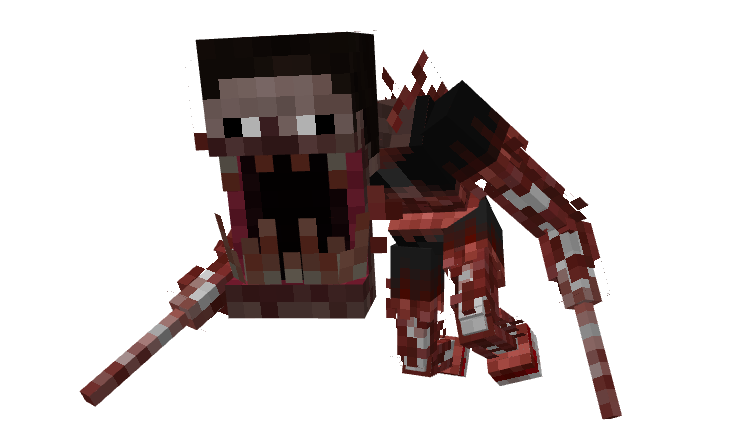
At first glance, The Clone appears as a normal player that stalks the player. Its arrival is marked by a distant sound, a warning that it has spawned nearby, silently watching its target. If you look directly at the Clone, it either vanishes or reveals its true form. When this happens, you’ll be blinded for a brief moment, just enough time for it to disappear. But don’t be fooled, it’s still there, lurking, waiting to strike from a random direction. The Clone moves quickly, can destroy blocks, climb up to four blocks high, and break shields. It can even burrow underground, resurfacing beneath unsuspecting players. Sometimes, it disappears entirely, leaving behind only an eerie silence.
- Config File not inculed.
- You are all allowed to use this mod in your modpacks!
- Do not port my mods without permission!
Available Versions
How to Install The Clone on Your Server
Order Server
Order a Minecraft Java server with at least 3 GB RAM (4 GB recommended).
Set forge Loader
In the panel under "Egg", select the forge loader and matching Minecraft version (1.20.1).
Install Mod
Open the mod browser in the dashboard and search for "The Clone". Click "Install" – done! Alternatively, upload the .jar via SFTP to the /mods folder.
Compatibility
Mod Loaders
Minecraft Versions
1.20.1, 1.19.4, 1.19.2
Server-side
✓ RequiredRecommended RAM
4 GB(min. 3 GB)Frequently Asked Questions
The Clone server crashes on startup – what to do?
Most common cause: wrong forge version or insufficient RAM. Check the server log (latest.log) for "OutOfMemoryError" or "Mixin" errors. With Mado Hosting: ensure at least 3 GB RAM is allocated and the loader matches the mod version (1.20.1). You can switch loaders with one click in the panel.
Is The Clone compatible with forge?
The Clone officially supports forge for Minecraft 1.20.1, 1.19.4, 1.19.2. The Mado dashboard automatically detects incompatible loader combinations.
Server lagging with The Clone – how to optimize performance?
Recommended RAM: 4 GB (per 8 players). Use /spark profiler to check if The Clone consumes the most tick time. Common fixes: reduce server view-distance to 8-10, install "performant" or "starlight" as supplementary mods on Forge. With Mado Hosting, your server runs on NVMe SSDs with dedicated CPU cores for minimal latency.
Rent Modded Server
Install The Clone with just one click on your server.