
Day and Death Counter
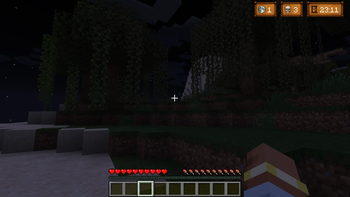
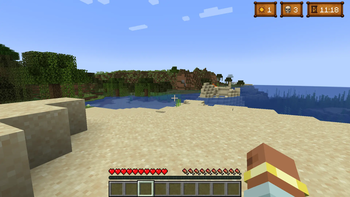
This mod displays an in-game overlay that tracks days, deaths, and in-game time.
Screenshots
About this Mod
Counter Mod

This mod displays an in-game overlay that tracks days, deaths, and in-game time. It was designed primarily for Minecraft content creators who want to avoid manually editing these counters into their videos — especially for "100 Days" or Hardcore challenges.
I originally created this mod to save myself time editing my own gameplay videos, but quickly realized it could also help players who want better time awareness in solo adventures, long-term survival, or multiplayer series.
🛠️ Features
- Death Count: The mod automatically tracks your deaths and now includes automatic and manual sync options to ensure your death count is always correct.
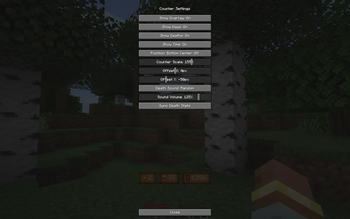
- Flexible Placement: Choose from twelve total overlay positions to perfectly integrate the counter into your screen layout.
- Customization: Fine-tune the counter's look using the Scale Slider to adjust its size, and use the Offset Slider for the Bottom-Center position to move it vertically, ensuring it doesn't conflict with other modpack UIs.
- Visuals & Sound: Includes one clean overlay style, basic icons, and random death sounds.
Whether you're a content creator or a player who likes visual feedback, this mod brings a simple and stylish way to track your journey.
🎁 A more complete and customizable version — featuring multiple overlay styles and icon themes — is currently available exclusively on my Patreon while the mod is still in development. Supporting the project helps me continue adding more styles and features.
🌟 This enhanced version will eventually be released for free in the future, once development is further along.
👉 Support the mod on Patreon
Available Versions
How to Install Day and Death Counter on Your Server
Order Server
Order a Minecraft Java server with at least 3 GB RAM (4 GB recommended).
Set forge Loader
In the panel under "Egg", select the forge loader and matching Minecraft version (1.20.1).
Install Mod
Open the mod browser in the dashboard and search for "Day and Death Counter". Click "Install" – done! Alternatively, upload the .jar via SFTP to the /mods folder.
Compatibility
Mod Loaders
Minecraft Versions
1.20.1
Server-side
✓ RequiredRecommended RAM
4 GB(min. 3 GB)Frequently Asked Questions
Day and Death Counter server crashes on startup – what to do?
Most common cause: wrong forge version or insufficient RAM. Check the server log (latest.log) for "OutOfMemoryError" or "Mixin" errors. With Mado Hosting: ensure at least 3 GB RAM is allocated and the loader matches the mod version (1.20.1). You can switch loaders with one click in the panel.
Is Day and Death Counter compatible with forge?
Day and Death Counter officially supports forge for Minecraft 1.20.1. The Mado dashboard automatically detects incompatible loader combinations.
Server lagging with Day and Death Counter – how to optimize performance?
Recommended RAM: 4 GB (per 8 players). Use /spark profiler to check if Day and Death Counter consumes the most tick time. Common fixes: reduce server view-distance to 8-10, install "performant" or "starlight" as supplementary mods on Forge. With Mado Hosting, your server runs on NVMe SSDs with dedicated CPU cores for minimal latency.
Similar Mods




Rent Modded Server
Install Day and Death Counter with just one click on your server.