
The Game Crasher
Instantly crash minecraft with 1 command on any PC! (Not a lag crash)
Screenshots
About this Mod
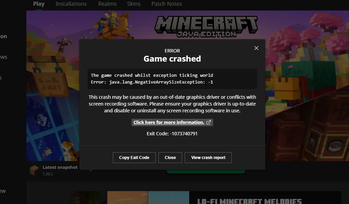
Crash minecraft with only 1 command instantly, on any PC
Have you ever thought of purposefully crashing minecraft with 1 command, for a cool effect for horror maps or just to prank your friends? Well this is a simple datapack I made to achieve this.
Run this command to crash the game:
/function ant:crash
The crash is not making lags on purpose or out of memory stuff, it is reusable, so you can safely join your world again after a crash and everything will probably be fine.
This datapack was made by using a worldgen bug MC-264777, so the function just loads a chunk in a custom void dimension that has noise settings height defined bigger than the max build height. The datapack can be installed both during world creation and to an existing world, but you need to re-enter your world 1 time after installing in an existing already loaded world, /reload won't work. Before entering a world with this datapack you will see a warning.
Keep in mind that because it's a bug, this can be fixed in future versions, and any mod may fix the crash or make things even worse. For example Concurrent Chunk Management Engine mod will break the datapack.
I strongly recommend to make backups of your important worlds before installing this datapack to them, because even tho my tests show that everything is fine, every type of crash may damage your world.
Available Versions
How to Install The Game Crasher on Your Server
Order Server
Order a Minecraft Java server with at least 3 GB RAM (4 GB recommended).
Set datapack Loader
In the panel under "Egg", select the datapack loader and matching Minecraft version (1.21.11).
Install Mod
Open the mod browser in the dashboard and search for "The Game Crasher". Click "Install" – done! Alternatively, upload the .jar via SFTP to the /mods folder.
Compatibility
Mod Loaders
Minecraft Versions
1.21.11, 1.21.10, 1.21.9 (+24 more)
Server-side
✓ RequiredRecommended RAM
4 GB(min. 3 GB)Frequently Asked Questions
The Game Crasher server crashes on startup – what to do?
Most common cause: wrong datapack version or insufficient RAM. Check the server log (latest.log) for "OutOfMemoryError" or "Mixin" errors. With Mado Hosting: ensure at least 3 GB RAM is allocated and the loader matches the mod version (1.21.11). You can switch loaders with one click in the panel.
Is The Game Crasher compatible with datapack and fabric and forge and neoforge and quilt?
The Game Crasher officially supports datapack, fabric, forge, neoforge, quilt for Minecraft 1.21.11, 1.21.10, 1.21.9. Note: Forge and Fabric mods are NOT cross-compatible – pick one loader and stick with it. The Mado dashboard automatically detects incompatible loader combinations.
Server lagging with The Game Crasher – how to optimize performance?
Recommended RAM: 4 GB (per 8 players). Use /spark profiler to check if The Game Crasher consumes the most tick time. Common fixes: reduce server view-distance to 8-10, install "performant" or "starlight" as supplementary mods on Forge. With Mado Hosting, your server runs on NVMe SSDs with dedicated CPU cores for minimal latency.
Similar Mods





Rent Modded Server
Install The Game Crasher with just one click on your server.