
Gimcraft
A mod created for the loyal followers of the gim troupe. Adds many gim-related features.
Screenshots
About this Mod
Made by and for the loyal followers of The Gim Troupe
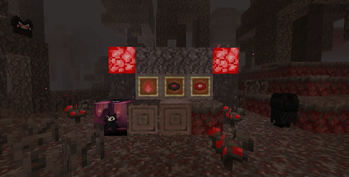
A mod that adds many gim-tastic features to the game! Includes 8 new blocks, 3 new items, 2 new plants, 2 new advancements, 3 new paintings, a new mob, and even a new biome?! And that's not all, as more content will be added to the mod with future updates! The purpose of this mod is to not only add more content to the Minecraft experience, but to also encourage even more exploration and creativity from the player.
CONTENTS:
Many new blocks, such as the Block of Gim, Gimmed Stems, Gimmed Wart blocks, and even Nightmare Shroomlights.
The Gimwoods Biome, which can be found in the Nether.
New Plants to accompany this new biome, such as the Gimmed Fungus and the Gimweed.
Holdable Fire!
Music???
A new mob: Gim.
Disclaimer: You may notice that some features (most notably, the wood set) are missing. All of these "missing" features will be added in a future update coming very soon.
Another Disclaimer: This mod may contain very loud sounds. Playing with high volume is not recommended.
A Final Disclaimer: Many of the features in this mod are based on the game Hollow Knight, created by Team Cherry. It's a great game, and is definitely worth checking out.
I Lied This is the Final Disclaimer: Many of the elements in this mod were made for humorous purposes, so don't expect everything to be serious.
With that being said, have fun, and gim on!
Available Versions
How to Install Gimcraft on Your Server
Order Server
Order a Minecraft Java server with at least 3 GB RAM (4 GB recommended).
Set neoforge Loader
In the panel under "Egg", select the neoforge loader and matching Minecraft version (1.21.7).
Install Mod
Open the mod browser in the dashboard and search for "Gimcraft". Click "Install" – done! Alternatively, upload the .jar via SFTP to the /mods folder.
Compatibility
Mod Loaders
Minecraft Versions
1.21.7, 1.21.6, 1.21.5 (+1 more)
Server-side
✓ RequiredRecommended RAM
4 GB(min. 3 GB)Frequently Asked Questions
Gimcraft server crashes on startup – what to do?
Most common cause: wrong neoforge version or insufficient RAM. Check the server log (latest.log) for "OutOfMemoryError" or "Mixin" errors. With Mado Hosting: ensure at least 3 GB RAM is allocated and the loader matches the mod version (1.21.7). You can switch loaders with one click in the panel.
Is Gimcraft compatible with neoforge?
Gimcraft officially supports neoforge for Minecraft 1.21.7, 1.21.6, 1.21.5. The Mado dashboard automatically detects incompatible loader combinations.
Server lagging with Gimcraft – how to optimize performance?
Recommended RAM: 4 GB (per 8 players). Use /spark profiler to check if Gimcraft consumes the most tick time. Common fixes: reduce server view-distance to 8-10, install "performant" or "starlight" as supplementary mods on Forge. With Mado Hosting, your server runs on NVMe SSDs with dedicated CPU cores for minimal latency.
Similar Mods




Rent Modded Server
Install Gimcraft with just one click on your server.