
The Ice Warrior
datapack that add an ice theme mid-game boss
Screenshots

About this Mod
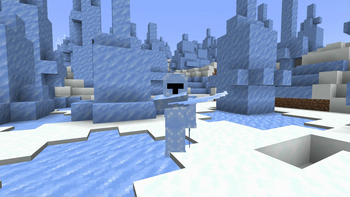
The Ice Warrior
Description
Minecraft datapack that add an ice themed boss
WARNING
This datapack require a resourcepack
Require the mod launch-command
This datapack whas made using Animated Java (so if the datapack is terrible that on me)
Features
This datapack has a config wich you can access it with /function icewarrior:admin/_/config
How to start:
First of all, there is new advancements that you can follow to check everything that the datapack has to offer !
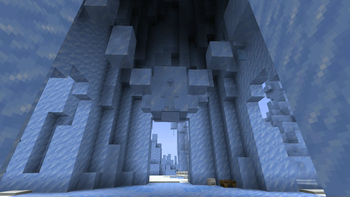
To find the boss, you will need to find the ice_guard_tower structure located in an ice_spikes biome.
NOTE
You can craft a map that will show you the structure by dropping a
Woodland explorer mapinside apowder_snow

When entering the tower you will see the ice warrior encased in ice. To release him you will need to use a lava bucket in order to melt the ice (right-click).
Boss:
- 2 phases
- 170 health
- everythime you get hit his combo counter will go up, dodging an attack will reset it to 0.
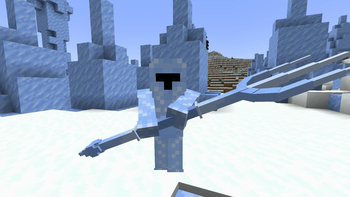
First phase: The boss will attack using his ice claw

Second phase: The boss will attack using his trident (activate on 50% max hp)

Master: Strongest variant of the boss, can only be summoned by first defeating an enraged Ice Warrior

NOTE
The first and second phases of the boss isn't that strong, and all his attacks are dodgeable. I personally recommend to face him with a full set of diamond armor.
NOTE
You can enrage an Ice Warrior by summoning one while having an
Ice Warrior Headnear it on the ground
The boss cannot target/damage mobs that have the tag icew.immune.
You can summon the boss anywere in your wold using the command /function icewarrior:admin/_/summon
Or you can summon the boss encased in ice with /function icewarrior:boss_summoner/summon
Because working with vanilla mob with datapack can be an absolute nightmare, all Ice Warrior share the same target.
Other informations
Because the boss use a stray as its hitbox/health, any mod that modify stray can affect the boss and might cause issues. Hoewer I already fixed this issue for some mod, if those allowed me to blacklist the mob from getting any modification.
Also because the boss use a stray as its hitbox/health, he has some difficulty when attacking mob with wide hitbox.
You can modify:
- items that can melt the boss ice in
data/icewarrior/tags/item/can_melt_ice_room.json - mobs that aggro the boss in
data/icewarrior/tags/entity_type/aggro_boss.json - entities that can be parried in
data/icewarrior/tags/entity_type/can_parry.json
Knows issues
- An issue has been found with mob battle where if you set the boss target using the
Mob Enrageritem, the stray that is use for the boss hitbox/health, will not reset is target and attack the mob (he deal 0 damage btw). If you want to change the boss target run this command:/execute as <entity> run function icewarrior:set_target
Problems you might encounter
Spoiler
1. The boss isn't working at all / animation are not playing
I have 0 idea what's causing this issue, but the main way to fix it is to execute these commands in order.
(which is basically disabling the datapack, reload the word, than enable it again)
/datapack disable <icewarrior datapack>

/execute positioned 0 0 0 run reload

/datapack enable <icewarrior datapack>

/execute positioned 0 0 0 run reload
2. When summoning the boss I only see prismarine_shard
That mean the resource pack need an higher priority. Go to the resource pack and make Fabric mods (on fabric) / Mod Resources (NeoForge) higher on the list. (if you are using the mod version of the datapack)
If that doesn't solve the issue, or create more issues, since other mods can affect the mod resource file.
You can download the required resource pack individually (you will found it on the datapack platform where you can download the datapack .zip file at the bottom of the page)
3. Boss instantly die when summoned
This problem can happen due to mod incompatibility, mainly mods that affect vanilla mobs.
If that happen please report the issue I will try to find the mod and fix it (if possible).
But I do not guaranteed that I will found the mod.
Showcase
If you want to take a look at the boss
Any type of feedback is alway welcome ! You can send them at the Curseforge comment page of the Datapack https://www.curseforge.com/minecraft/mc-mods/the-ice-warrior/comments
Available Versions
How to Install The Ice Warrior on Your Server
Order Server
Order a Minecraft Java server with at least 3 GB RAM (4 GB recommended).
Set datapack Loader
In the panel under "Egg", select the datapack loader and matching Minecraft version (1.21.1).
Install Mod
Open the mod browser in the dashboard and search for "The Ice Warrior". Click "Install" – done! Alternatively, upload the .jar via SFTP to the /mods folder.
Compatibility
Mod Loaders
Minecraft Versions
1.21.1, 1.21
Server-side
✓ RequiredRecommended RAM
4 GB(min. 3 GB)Frequently Asked Questions
The Ice Warrior server crashes on startup – what to do?
Most common cause: wrong datapack version or insufficient RAM. Check the server log (latest.log) for "OutOfMemoryError" or "Mixin" errors. With Mado Hosting: ensure at least 3 GB RAM is allocated and the loader matches the mod version (1.21.1). You can switch loaders with one click in the panel.
Is The Ice Warrior compatible with datapack and fabric and neoforge?
The Ice Warrior officially supports datapack, fabric, neoforge for Minecraft 1.21.1, 1.21. The Mado dashboard automatically detects incompatible loader combinations.
Server lagging with The Ice Warrior – how to optimize performance?
Recommended RAM: 4 GB (per 8 players). Use /spark profiler to check if The Ice Warrior consumes the most tick time. Common fixes: reduce server view-distance to 8-10, install "performant" or "starlight" as supplementary mods on Forge. With Mado Hosting, your server runs on NVMe SSDs with dedicated CPU cores for minimal latency.
Similar Mods




Rent Modded Server
Install The Ice Warrior with just one click on your server.