
The Mad Hatter
Submission for Neoforge 1.21.1. Adds a magical hat that can store near-endless items and retrieve them.
Screenshots


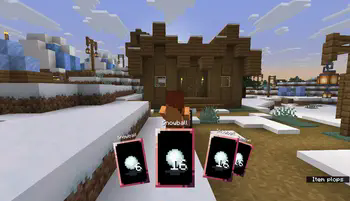


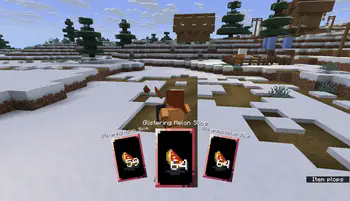
About this Mod
This mod is ported from Miyucomic's The Mad Hatter. Thanks to Miyucomics for the creativity!
You can now experience this mod in neoforge1.21.1!
A simple magician's hat with infinite storage, cool animations, a vacuuming and ejecting system, themed after cards, and containing confetti!
In your inventory, it works similar to a bundle. You can place items in and take items out. You can then right-click it to put it on your head, or press H by default to take it off.
Once you wear the hat, you can access a special mode by holding Left Alt by default. Hold right-click or walk into items while in this mode to pick them up into the hat, and left-click to rapid-fire shoot them out. You can also press middle-click to shoot confetti.
This mod have added three additional events, HatThrowItemEvent and HatVacuumItemEvent, and HatConfettiEvent. You can cancel the event and conjure up a pigeon from inside.(But this mod didn't add pigeons)
If encounter bugs, please give feedback to the mod author instead of going to the original author.
这个模组是从**Miyucomic's The Mad Hatter**移植而来的.感谢Miyucomics的创造力!
你现在可以在neoforge1.21.1中体验这个模组!
一顶简单的魔术师帽,有无限的存储空间、酷炫的动画、吸尘和弹出系统、主题卡片和五彩纸屑!
在你的储存中,它的工作方式类似于背包。您可以放入和取出物品。然后,您可以右键单击它将其戴在头上,或者默认情况下按H将其取下。
戴上帽子后,默认情况下按住左Alt键可以进入特殊模式。在此模式下,按住鼠标右键或走进物品,将它们捡起放在帽子里,然后单击鼠标左键快速射击。您也可以按鼠标中键发射五彩纸屑。
此模组额外添加了三个事件,吸入取出和放烟花,你可以取消事件并从里面变出一只鸽子。(但是这个模组没有添加鸽子)
如果你遇到bug请向此模组作者反馈而不是去找原作者。
Available Versions
How to Install The Mad Hatter on Your Server
Order Server
Order a Minecraft Java server with at least 3 GB RAM (4 GB recommended).
Set neoforge Loader
In the panel under "Egg", select the neoforge loader and matching Minecraft version (1.21.1).
Install Mod
Open the mod browser in the dashboard and search for "The Mad Hatter". Click "Install" – done! Alternatively, upload the .jar via SFTP to the /mods folder.
Compatibility
Mod Loaders
Minecraft Versions
1.21.1
Server-side
✓ RequiredRecommended RAM
4 GB(min. 3 GB)Frequently Asked Questions
The Mad Hatter server crashes on startup – what to do?
Most common cause: wrong neoforge version or insufficient RAM. Check the server log (latest.log) for "OutOfMemoryError" or "Mixin" errors. With Mado Hosting: ensure at least 3 GB RAM is allocated and the loader matches the mod version (1.21.1). You can switch loaders with one click in the panel.
Is The Mad Hatter compatible with neoforge?
The Mad Hatter officially supports neoforge for Minecraft 1.21.1. The Mado dashboard automatically detects incompatible loader combinations.
Server lagging with The Mad Hatter – how to optimize performance?
Recommended RAM: 4 GB (per 8 players). Use /spark profiler to check if The Mad Hatter consumes the most tick time. Common fixes: reduce server view-distance to 8-10, install "performant" or "starlight" as supplementary mods on Forge. With Mado Hosting, your server runs on NVMe SSDs with dedicated CPU cores for minimal latency.
Rent Modded Server
Install The Mad Hatter with just one click on your server.