
The Spice of Life 2
A remake of The Spice of Life mod made in 1.12.2 for modern versions of Minecraft.
Screenshots
About this Mod
This project is no longer updated. It has been merged into my master mod, Red's Survival Overhaul
The Spice of Life 2
This is a port of the classic mod The Spice of Life which was originally made for 1.12.2.
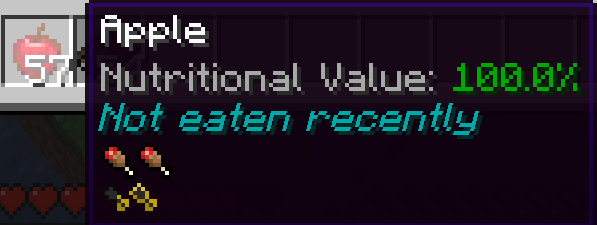
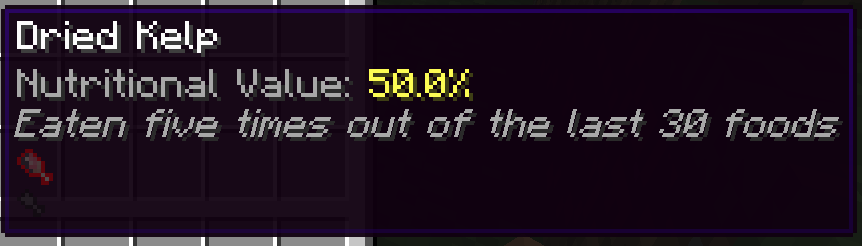
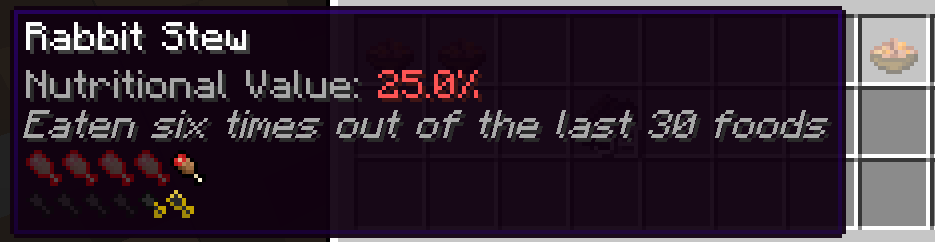
This mod encourages a diverse diet of foods by punishing the player for eating the same food
repeatedly. The hunger and saturation of a given food will diminish as you eat that food multiple
times. By default, the player will remember the last 30 foods that you have eaten, so after eating
other foods the nutrition value of a food will eventually come back.
Customization
This mod comes with a common config file located in your instances config folder (config/spiceoflife-
common.toml)
In the config file, you are able to modify the way the mod works. At the present, there are two possible config options that you are able to change:
- Nutrition Decay - A List of floats that control the rate at which hunger and saturation decay at.
For example, [1.0, 1.0, 0.5, 0.0] would mean that the first three times you eat a food, it will
retain 100% of its nutrition value, the fourth time would have 50%, and the fifth would have 0%. - Max History - The maximum amount of food that the player will remember before foods reset. For
example, if max history is 10, it will take 10 different foods to reset the nutrition value
completely for any given food.
Compatability
This mod is currently compatible with AppleSkin
AppleSkin provides a large amount of information about nutrition to your hud, particularly the amount of hunger and saturation that a given food will restore. This mod will adjust that accordingly and the HUD will display the correct information.
FAQ
Q: "I have a suggestion/bug report/request"
A: Please create an issue tracker on the Github page
Q: "Fabric please!!!"
A: Not right now
Q: Can I use your mod in my modpack?
A: Of course! :P
Credit
- The Spice of Life - Original idea and logo
- The Spice of Life: Classic Edition - Tutorial for using mixins
Available Versions
How to Install The Spice of Life 2 on Your Server
Order Server
Order a Minecraft Java server with at least 3 GB RAM (4 GB recommended).
Set forge Loader
In the panel under "Egg", select the forge loader and matching Minecraft version (1.20.1).
Install Mod
Open the mod browser in the dashboard and search for "The Spice of Life 2". Click "Install" – done! Alternatively, upload the .jar via SFTP to the /mods folder.
Compatibility
Mod Loaders
Minecraft Versions
1.20.1
Server-side
✓ RequiredRecommended RAM
4 GB(min. 3 GB)Frequently Asked Questions
The Spice of Life 2 server crashes on startup – what to do?
Most common cause: wrong forge version or insufficient RAM. Check the server log (latest.log) for "OutOfMemoryError" or "Mixin" errors. With Mado Hosting: ensure at least 3 GB RAM is allocated and the loader matches the mod version (1.20.1). You can switch loaders with one click in the panel.
Is The Spice of Life 2 compatible with forge?
The Spice of Life 2 officially supports forge for Minecraft 1.20.1. The Mado dashboard automatically detects incompatible loader combinations.
Server lagging with The Spice of Life 2 – how to optimize performance?
Recommended RAM: 4 GB (per 8 players). Use /spark profiler to check if The Spice of Life 2 consumes the most tick time. Common fixes: reduce server view-distance to 8-10, install "performant" or "starlight" as supplementary mods on Forge. With Mado Hosting, your server runs on NVMe SSDs with dedicated CPU cores for minimal latency.
Similar Mods



Rent Modded Server
Install The Spice of Life 2 with just one click on your server.