
The Witcher World
Become a Witcher and use signs to complete contracts
Screenshots
About this Mod

This is an unofficial fan work and is not approved/endorsed by CD PROJEKT RED.
REQUIERES AZURE LIB 1.0.11+
REQUIERES SMART BRAIN LIB 1.9+
REQUIERES BJORNLIB 1.0.11+
Join The Community Discord Here.
Remember to delete your config folder when updating the version.
With this mod you will be able to be a witcher and complete contracts by hunting monsters around the world using signs, leveling up and upgrading your equipment.
This mod is highly configurable and you can add your own contracts, recipes, define what type of mob they are (cursed, beast, necrophage, etc), which makes it very useful for monster hunting mod packs.
Signs
As in the witcher 3 you have all the witcher signs.By pressing the G key you can change the sign.
By pressing the R key you can launch the sign.
Aard : Push the enemies wherever you look.
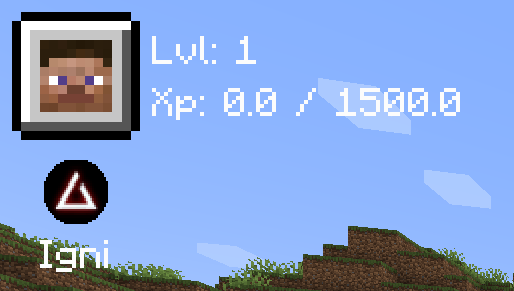
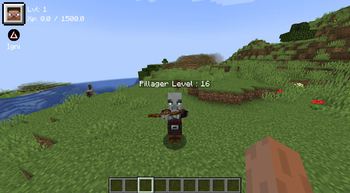
Igni : Throw a flare forward that damages the enemy.
Axii : Stuns the enemy you cast it on, if he is smart he will become your ally temporarily attacking other mobs.
Yrden : Creates a circle on the ground causing the wraith to take more damage.
Queen : Gives you a shield that removes the damage of the next hit you receive.
All signs can be upgraded by unlocking abilities.
Abilities
By pressing the U key you can unlock and equip skills when you level up.
when you level up.
Alchemy
By pressing the K key you can create various items very useful for a Witcher.
This crafting system is inspired by the one in the witcher 3.
Through the configuration files you will be able to modify the recipes, add new ones and create new categories.
Whistle
With this system you will be able to keep a tame horse and call it from anywhere in the world even if the horse dies.
Press H while riding a horse to save it.
Press J to call the horse.
This system is not limited to horses only, any mount could work.
Player Chances
added chance of :
Critical
Dodge
Poison
Bleed
Oils
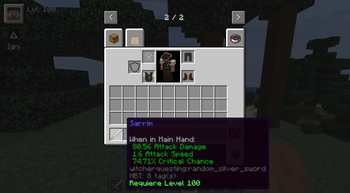
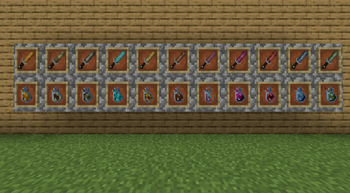
Oils can be applied to silver swords.
Right click with the oil on the sword to apply it.
Silver and Steel
Silver : more damage to monsters.
Steel : more damage to humans.
Other Mechanics
No mob will burn during the day.
Right click on a campfire to save the spawn point.
Right click on a grindstone to apply critical chance to a sword temporarily.
The critical hit while jumping mechanic has been removed and replaced by the critical probability of hit.
Armor slows the player down depending on the weight.
Preconfigured Mods
These mods are configured by default by adding quests or compatibility with swords and oils
Whisperwoods
Meetyourfight
Biomemakeover
Alexsmobs
Creeperoverhaul
Weirdmobs
Savage_and_ravage
Friendsandfoes
Hunterillager
MonsterPlus
Better Combat
MCA Reborn
Obscure Tooltips
-Alex Caves
-Colossal Giants
-Enderman Overhaul
-Enemy Expansion
-Illager Invasion
-Orcz
-Raided
-Rats
-Realm RPG: Imps & Demons
-Realm RPG: Dragon Wyrms
The mod is in alpha and it is possible to crash with multiple things and mods.
Available Versions
How to Install The Witcher World on Your Server
Order Server
Order a Minecraft Java server with at least 4 GB RAM (6 GB recommended).
Set forge Loader
In the panel under "Egg", select the forge loader and matching Minecraft version (1.21.1).
Install Mod
Open the mod browser in the dashboard and search for "The Witcher World". Click "Install" – done! Alternatively, upload the .jar via SFTP to the /mods folder.
Compatibility
Mod Loaders
Minecraft Versions
1.21.1, 1.20.1, 1.20
Server-side
✓ RequiredRecommended RAM
6 GB(min. 4 GB)Frequently Asked Questions
The Witcher World server crashes on startup – what to do?
Most common cause: wrong forge version or insufficient RAM. Check the server log (latest.log) for "OutOfMemoryError" or "Mixin" errors. With Mado Hosting: ensure at least 4 GB RAM is allocated and the loader matches the mod version (1.21.1). You can switch loaders with one click in the panel.
Is The Witcher World compatible with forge and neoforge?
The Witcher World officially supports forge, neoforge for Minecraft 1.21.1, 1.20.1, 1.20. The Mado dashboard automatically detects incompatible loader combinations.
Server lagging with The Witcher World – how to optimize performance?
Recommended RAM: 6 GB (per 5 players). Use /spark profiler to check if The Witcher World consumes the most tick time. Common fixes: reduce server view-distance to 8-10, install "performant" or "starlight" as supplementary mods on Forge. With Mado Hosting, your server runs on NVMe SSDs with dedicated CPU cores for minimal latency.
Similar Mods




Rent Modded Server
Install The Witcher World with just one click on your server.