
TheBloodmoon
Every few nights the moon turns blood red. Hostile mobs spawn faster, hit harder, run quicker, and chase you further. Fully configurable — tune every multiplier from x1.0 to x9.9 in the in-game settings screen.
Screenshots
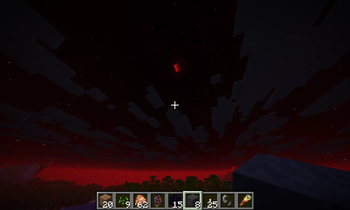
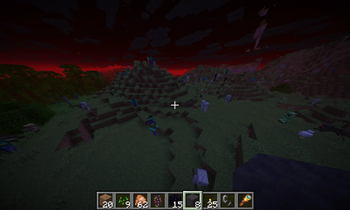
About this Mod
Blood Moon
Every few nights, the moon turns blood red — and the world turns against you.
Blood Moon adds a recurring night event to your Minecraft world. On a Blood Moon night, the sky bleeds crimson, the moon glows a deep red, and the hostile mobs come out in numbers, faster, stronger, and more aggressive than they've ever been. Surviving a Blood Moon is a different game from surviving a normal night.
What happens during a Blood Moon?
When night falls and the blood moon rises:
- The sky turns red. A custom shader replaces the normal night sky with a deep, ominous crimson glow you can't miss.
- Hostile mobs spawn far more often. The world fills with zombies, skeletons, spiders, creepers — whatever your biome supports, but more of them.
- They hit harder. Attack damage is multiplied.
- They take more punishment. Their health pool grows.
- They move faster. No more strolling away from a chasing zombie.
- They see you from further away. Aggression range expands — they find you before you find them.
A Blood Moon doesn't just make the night harder. It changes how you plan your day, where you build your shelter, and what fights you pick.
Fully configurable — your difficulty, your way
Every part of a Blood Moon is tunable through an in-game settings screen. No editing config files, no restarting the game.
Open the Blood Moon Settings screen and adjust:
- Nights between Blood Moons — how often they happen
- Hostile spawn rate — x1.0 to x9.9
- Hostile attack damage — x1.0 to x9.9
- Hostile max health — x1.0 to x9.9
- Hostile movement speed — x1.0 to x9.9
- Hostile aggression (follow range) — x1.0 to x9.9
Want a chill experience where Blood Moons happen monthly with mild buffs? Set it that way. Want a brutal nightmare where every seventh night is a full siege at x9.9 across the board? Go ahead. The mod adapts to the difficulty you actually want.
Designed for both single-player and servers
Blood Moon works out of the box in single-player and on multiplayer servers. Configuration changes are synced to all players, so everyone on a server experiences the same Blood Moon.
The mod is lightweight, has no custom items or blocks, and integrates cleanly with the vanilla world — no datapack conflicts, no custom dimensions, no extra dependencies.
Languages
- English
Requirements
- Minecraft 1.21.10 (26.1.2)
- NeoForge 26.1.2.26-beta or newer
Compatibility
Blood Moon works alongside most other mods. It modifies hostile mob attributes only on Blood Moon nights and resets them when the sun rises, so other mods that depend on standard mob behavior are unaffected during normal nights.
Credits
Created by TheMorf.
Feedback & bug reports
Found a bug? Got a feature suggestion? Open an issue on the project page — feedback shapes future updates.
Available Versions
How to Install TheBloodmoon on Your Server
Order Server
Order a Minecraft Java server with at least 3 GB RAM (4 GB recommended).
Set neoforge Loader
In the panel under "Egg", select the neoforge loader and matching Minecraft version (26.1.2).
Install Mod
Open the mod browser in the dashboard and search for "TheBloodmoon". Click "Install" – done! Alternatively, upload the .jar via SFTP to the /mods folder.
Compatibility
Mod Loaders
Minecraft Versions
26.1.2
Server-side
✓ RequiredRecommended RAM
4 GB(min. 3 GB)Frequently Asked Questions
TheBloodmoon server crashes on startup – what to do?
Most common cause: wrong neoforge version or insufficient RAM. Check the server log (latest.log) for "OutOfMemoryError" or "Mixin" errors. With Mado Hosting: ensure at least 3 GB RAM is allocated and the loader matches the mod version (26.1.2). You can switch loaders with one click in the panel.
Is TheBloodmoon compatible with neoforge?
TheBloodmoon officially supports neoforge for Minecraft 26.1.2. The Mado dashboard automatically detects incompatible loader combinations.
Server lagging with TheBloodmoon – how to optimize performance?
Recommended RAM: 4 GB (per 8 players). Use /spark profiler to check if TheBloodmoon consumes the most tick time. Common fixes: reduce server view-distance to 8-10, install "performant" or "starlight" as supplementary mods on Forge. With Mado Hosting, your server runs on NVMe SSDs with dedicated CPU cores for minimal latency.
Similar Mods




Rent Modded Server
Install TheBloodmoon with just one click on your server.