
TheTrackers
A projector mod that point where the entity is
About this Mod
Mod Introduction
This mod provides multiple types of entity-tracking cursors (two available, one planned), assisting players in locating targets. It also serves as a specialized HUD library.
When you're facing mobs flying chaotically across the screen or clipping through walls, you'll need this. (Vex: huh?)
By default, the mod includes tracking cursors for the Ender Dragon and Wither, as well as boss pointers integrated with Confluence: Otherworld.
Do not load this mod together with Confluence: Otherworld, as it is already built into Confluence: Otherworld.
The mod is a submodule in Confluence: Otherworld, but it can also be played standalone as a util mod.
Users can configure the mod (via config file or in-game GUI) with the following options:
- Enable/Disable: Toggle the tracking functionality.
- Cursor Size: Adjust the relative global size of cursors. Default: 0.6.
- Max Tracking Count: Limit the number of tracked entities to prevent excessive clutter. Only the nearest n entities will be shown. Default: 10, maximum: 400.
- Central Surround Cursor Toggle: One of the most commonly used cursor types. See details below.
- Projection Algorithm: Choose the projection used in central surround mode. Aitoff generally performs best, so switching is not recommended.
- Direct Projection Cursor Toggle: A more common quest-marker style seen in other games. See details below.
- Longitude Axis Toggle: A pre-assigned third cursor type, not yet developed. Currently non-functional.
- Tracking List: A list where each entry corresponds to an EntityType + Cursor. You can specify which entity types to track and which cursor style to use. See configuration details below.
Tracking Details
Currently, tracking is limited to the following range: x: ±64 blocks, y: +64 / -48 blocks, z: ±64 blocks
Central Surround Cursor (TRelativeCursor)
This completed mode creates HUD pointers circling the center to indicate entity direction.
Old version 0.0.3 (ignore Vpet): 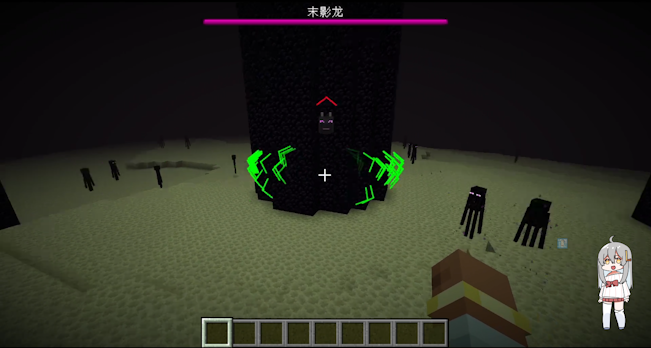
New version 0.2.5: 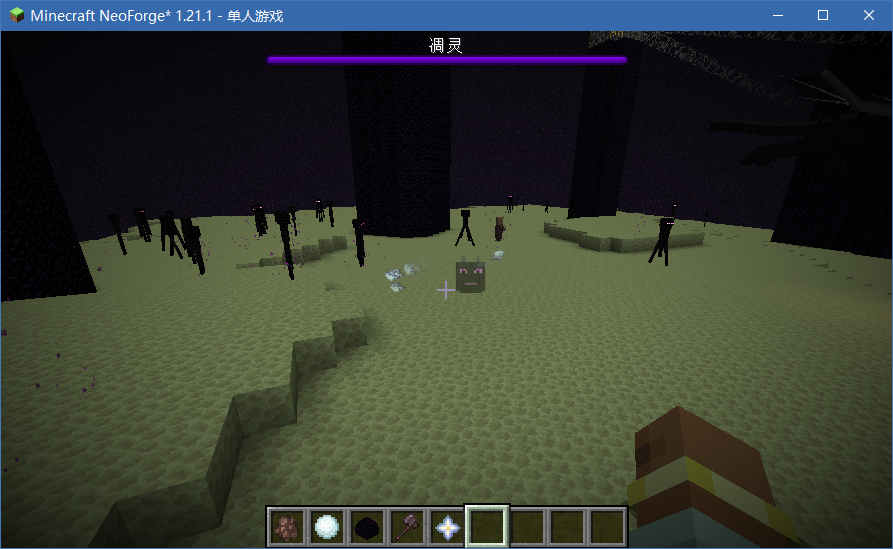
It’s clear that these pointers indicate "which way to turn to see the entity" rather than "where the entity is in the world."
The cursor's distance from the center reflects how much you need to rotate your view. When the entity's direction nearly overlaps with your view, the cursor fades out. (In the old image, the green pointer indicates a nearby Enderman.)
Three projection algorithms are available: Mercator, Aitoff, and Winkel Tripel. Tests show little visual difference, but Aitoff performs best, so the others are not recommended.
Some may wonder about using vanilla matrices for 2D-to-3D direction, but research suggests a slight curved offset produces a more useful effect.
Direct Projection Cursor (TDirectProjCursor)
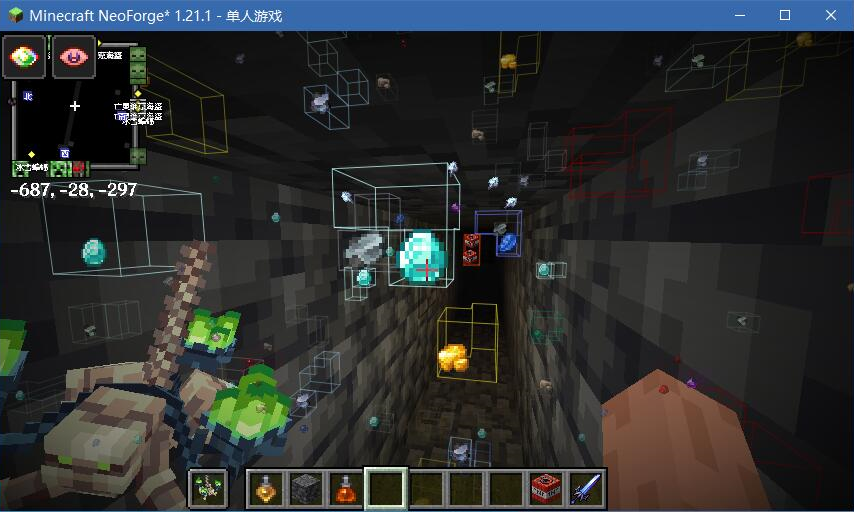
This screenshot was taken while developing Confluence: Otherworld's Mining Potion. The ore markers are implemented via this mod.
This mode directly overlays the cursor onto the target entity (not a world marker, but a true 2D overlay).
Variants include a single portrait-style marker and three icons circling the target. There are also Easter eggs!
Configuring the Mod
In-game, you can create a central surround cursor with the following format:
<modid:entity_type>|<cursor_arrow_type>|<cursor_icon_type>
Example: the default Ender Dragon cursor is configured as:
minecraft:ender_dragon|normal|ender_dragon_head
For direct projection cursors, configuration is more complex and experimental. Format:
<modid:entity_type>|<cursor_type>:<cursor_icon_type>(|easter_eggs_type)
Available Cursor Arrows
normal, normal_red, normal_green, normal_white
normal is the updated arrow shown in the new screenshots, artwork by LazyPillow.
Available Icons
- Vanilla-based:
ender_dragon_head,wither_head. - Confluence: Otherworld:
king_slime,eye_of_cthulhu,brain_of_cthulhu,queen_bee,eater_of_worlds,skeletron,deerclops,wall_of_flesh.
These icons can be used without requiring Confluence: Otherworld as a dependency.
If you set a field to none, that part of the cursor will not display.
You can also add new textures via resource packs, as long as they share the same directory as this mod’s assets. As long as names don’t conflict, they can be referenced directly.
Note: For visual optimization, entities derived from PartEntity (e.g., Ender Dragon’s wings and tail) will not be tracked.
Tip
Many tracking features are already complete and deployed in Confluence: Otherworld. However, configuration and usage may still have imperfections. Feedback is welcome!
Notes
Join the Confluence: Otherworld Discord to support the author.
If you are a mod developer, check the GitPage documentation for more details(Chinese only).
Available Versions
How to Install TheTrackers on Your Server
Order Server
Order a Minecraft Java server with at least 3 GB RAM (4 GB recommended).
Set forge Loader
In the panel under "Egg", select the forge loader and matching Minecraft version (1.21.1).
Install Mod
Open the mod browser in the dashboard and search for "TheTrackers". Click "Install" – done! Alternatively, upload the .jar via SFTP to the /mods folder.
Compatibility
Mod Loaders
Minecraft Versions
1.21.1, 1.20.6, 1.20.5 (+4 more)
Server-side
✗ UnsupportedRecommended RAM
4 GB(min. 3 GB)Frequently Asked Questions
TheTrackers server crashes on startup – what to do?
Most common cause: wrong forge version or insufficient RAM. Check the server log (latest.log) for "OutOfMemoryError" or "Mixin" errors. With Mado Hosting: ensure at least 3 GB RAM is allocated and the loader matches the mod version (1.21.1). You can switch loaders with one click in the panel.
Is TheTrackers compatible with forge and neoforge?
TheTrackers officially supports forge, neoforge for Minecraft 1.21.1, 1.20.6, 1.20.5. The Mado dashboard automatically detects incompatible loader combinations.
Server lagging with TheTrackers – how to optimize performance?
Recommended RAM: 4 GB (per 8 players). Use /spark profiler to check if TheTrackers consumes the most tick time. Common fixes: reduce server view-distance to 8-10, install "performant" or "starlight" as supplementary mods on Forge. With Mado Hosting, your server runs on NVMe SSDs with dedicated CPU cores for minimal latency.
Similar Mods



Rent Modded Server
Install TheTrackers with just one click on your server.