
Thirst Bar
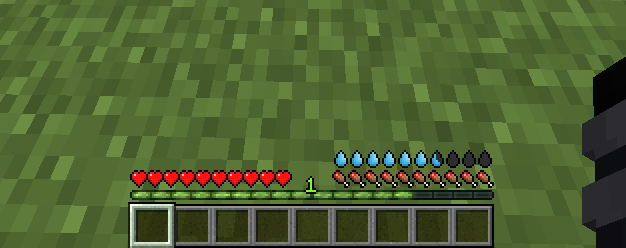
Adds a thirst bar to the game.
Screenshots
About this Mod
💧 Thirst Bar
Thirst Bar is a Minecraft datapack+resourcepack/mod that adds a thirst bar to the game.
✨ Features
- The thirst bar can be refilled by drinking water bottles.

- Customizable values.
- As soon as you enter the water, it disappears so that the drowning hud is visible.
- Works in singleplayer and multiplayer.
- Supports Smithed Actionbar Libary.
🛠️ Settings
You can easily customize the thirst depletion rate at any time using the following command (1 second = 20 ticks):
- 🛠️ Customize thirst depletion rate:
/data modify storage thirstbar time set value [timeinticks](Default Value:1200)
Example: data modify storage thirstbar time set value 600 (600 = 30 seconds)
You can also easily customize how often damage is dealt when the thirst bar is empty at any time using the following command (1 second = 20 ticks):
- 🛠️ Customize damage rate:
/data modify storage thirstbar damagetime set value [timeinticks](Default Value:20)
Example: data modify storage thirstbar damagetime set value 40 (40 = 2 seconds)
📦 Optional Library Support – Actionbar
This datapack allows the actionbar to be shared across multiple datapacks on a server, preventing conflicts and ensuring compatibility.
🔗 Download: Smithed – Actionbar Library
Enable support with the following command:
scoreboard players set .library thirstbar 1Disable support with the following command:
scoreboard players set .library thirstbar 0
📦 Installation
There are two ways to install:
1️⃣ Mod Version
Download the mod file and add it to your mods folder as you would with any other Minecraft mod. You dont need to install the Resource Pack
2️⃣ Datapack + Resource Pack
First, download the resource pack and place it in your resourcepacks folder.
Then, download the datapack and add it to your world's datapacks folder or your server's datapacks directory.
You can download Resource Pack from the releases page: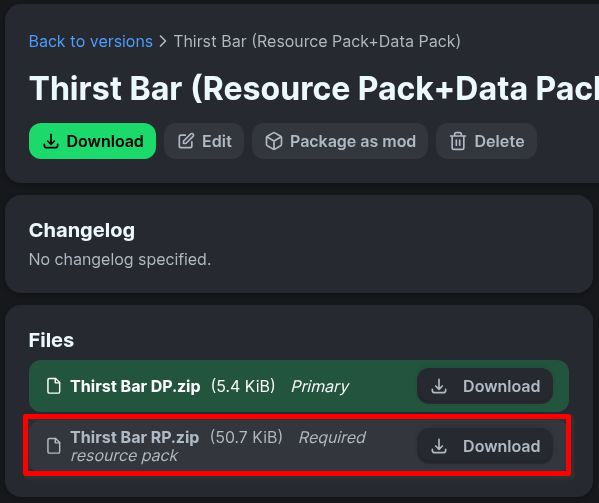
🧱 Compatibility
- Minecraft Java Edition 1.19.3+
- If you choose to use the resource pack, you must also install the datapack
🌐 ITITAN Hosting

💬 Feedback and Request
If you have a request or feedback, please write them in to my discord 3geetr.
Available Versions
How to Install Thirst Bar on Your Server
Order Server
Order a Minecraft Java server with at least 3 GB RAM (4 GB recommended).
Set datapack Loader
In the panel under "Egg", select the datapack loader and matching Minecraft version (26.2).
Install Mod
Open the mod browser in the dashboard and search for "Thirst Bar". Click "Install" – done! Alternatively, upload the .jar via SFTP to the /mods folder.
Compatibility
Mod Loaders
Minecraft Versions
26.2, 26.1.2, 26.1.1 (+13 more)
Server-side
✓ RequiredRecommended RAM
4 GB(min. 3 GB)Frequently Asked Questions
Thirst Bar server crashes on startup – what to do?
Most common cause: wrong datapack version or insufficient RAM. Check the server log (latest.log) for "OutOfMemoryError" or "Mixin" errors. With Mado Hosting: ensure at least 3 GB RAM is allocated and the loader matches the mod version (26.2). You can switch loaders with one click in the panel.
Is Thirst Bar compatible with datapack and fabric and forge and neoforge and quilt?
Thirst Bar officially supports datapack, fabric, forge, neoforge, quilt for Minecraft 26.2, 26.1.2, 26.1.1. Note: Forge and Fabric mods are NOT cross-compatible – pick one loader and stick with it. The Mado dashboard automatically detects incompatible loader combinations.
Server lagging with Thirst Bar – how to optimize performance?
Recommended RAM: 4 GB (per 8 players). Use /spark profiler to check if Thirst Bar consumes the most tick time. Common fixes: reduce server view-distance to 8-10, install "performant" or "starlight" as supplementary mods on Forge. With Mado Hosting, your server runs on NVMe SSDs with dedicated CPU cores for minimal latency.
Similar Mods




Rent Modded Server
Install Thirst Bar with just one click on your server.