
Thirsty - Thirst System
Adds a simple Thirst System to Minecraft!
Screenshots
About this Mod
Features
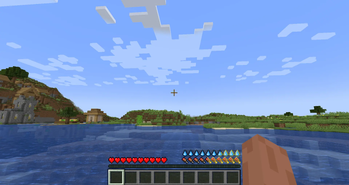
New Thirst Bar
Restore your Thirst by:
- Consuming drinkable items
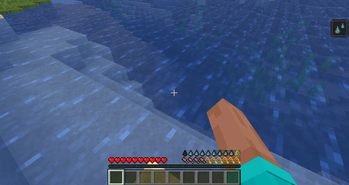
- Right-clicking a Water Source Block
At 6 Thirst or less (3 Water Droplets): Players cant sprint
At 0 Thirst: Players slowly take damage (just like vanilla hunger starvation)
Config
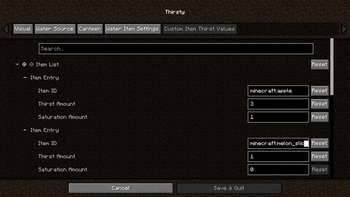
Add any Vanilla or Modded Consumable to the Config and customize how much Thirst each item restores.
New Items
Bowl of Water
- Right-click with a vanilla Bowl on a Water Source to obtain
- Can be consumed to restore Thirst
Bowl of Pure Water
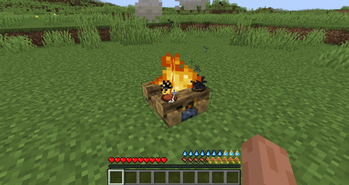
- Cook a Bowl of Water on a Campfire to obtain
- Can be consumed to restore Thirst
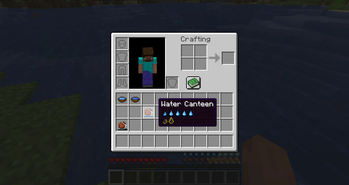
Water Canteen
- Right-click a Water Source to fill
- Stores Water with 12 uses (configurable)
- Can hold Dirty or Purified Water
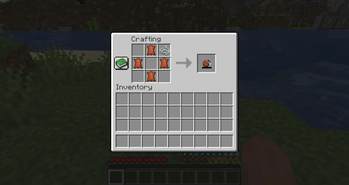
- Craft with Leather and String in a Crafting Table
Dirty Water System
Drinking directly from a Water Source Block:
- Applies the Thirst effect
- Has a 10% chance to apply Poison effect (configurable)
Drinking from:
- Bowl of Water
- Water Bottle or
- Dirty Water Canteen
- Has a 30% chance to apply the Thirst effect (configurable)
Purification
- Cook a Water Canteen or a Bowl of Water on a Campfire to Purify the Water inside
- Purified Water does not apply the Thirst Effect!
Compatibility
Future Plans
- More water purification methods
- Per biome Thirst scaling (faster thirst depletion in Deserts and Nether biomes)
- More Water Canteen variants
FAQ
Q: Will you add support for other Minecraft versions and modloaders?
A: If there's enough demand in my Discord, I'll port the mod to other versions and modloaders.
Available Versions
How to Install Thirsty - Thirst System on Your Server
Order Server
Order a Minecraft Java server with at least 3 GB RAM (4 GB recommended).
Set fabric Loader
In the panel under "Egg", select the fabric loader and matching Minecraft version (1.20.1).
Install Mod
Open the mod browser in the dashboard and search for "Thirsty - Thirst System". Click "Install" – done! Alternatively, upload the .jar via SFTP to the /mods folder.
Compatibility
Mod Loaders
Minecraft Versions
1.20.1
Server-side
✓ RequiredRecommended RAM
4 GB(min. 3 GB)Frequently Asked Questions
Thirsty - Thirst System server crashes on startup – what to do?
Most common cause: wrong fabric version or insufficient RAM. Check the server log (latest.log) for "OutOfMemoryError" or "Mixin" errors. With Mado Hosting: ensure at least 3 GB RAM is allocated and the loader matches the mod version (1.20.1). You can switch loaders with one click in the panel.
Is Thirsty - Thirst System compatible with fabric?
Thirsty - Thirst System officially supports fabric for Minecraft 1.20.1. The Mado dashboard automatically detects incompatible loader combinations.
Server lagging with Thirsty - Thirst System – how to optimize performance?
Recommended RAM: 4 GB (per 8 players). Use /spark profiler to check if Thirsty - Thirst System consumes the most tick time. Common fixes: reduce server view-distance to 8-10, install "performant" or "starlight" as supplementary mods on Forge. With Mado Hosting, your server runs on NVMe SSDs with dedicated CPU cores for minimal latency.
Similar Mods




Rent Modded Server
Install Thirsty - Thirst System with just one click on your server.