
ThreatenGL
Threatens Minecraft to use modern versions of OpenGL
Screenshots
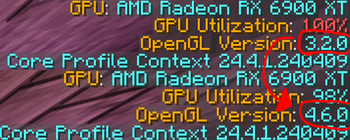
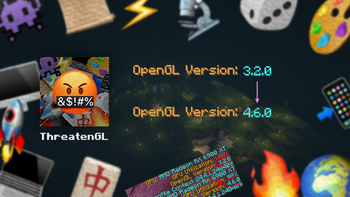
About this Mod

🤬 ThreatenGL
Welcome to ThreatenGL!
ThreatenGL is a Minecraft mod that takes a stand against the outdated OpenGL version 3.2, threatening Minecraft to use the more modern version 4.6. This mod aims to explore the effects of this change.
Minecraft: "please... anything but that!" 😰
ThreatenGL: "opengl version 4.6, or else!" 😡🔪
🤨 What's the deal?
ThreatenGL is about testing the effects of changing the OpenGL version, and potentially enhancing your experience. By threatening Minecraft to switch to OpenGL 4.6, this mod aims to investigate how OpenGL version changes affect the functioning of your GPU. Users have reported smoother gameplay and better frame rates, especially on newer devices.
For a more detailed description of what this does, please visit the GitHub repository. (Mod developers, please read this to understand the mod in-depth!)
⚙️ How does it work?
ThreatenGL works its magic by tinkering with Minecraft's internals. By injecting some code into the game's graphics setup process, it convinces Minecraft to opt for OpenGL 4.6 instead of the old 3.2. This simple tweak has the potential to make a difference in how the game performs, as some GPU manufacturers like to use different, specific profiles for different OpenGL versions in their drivers. (I have no idea why they do that, but I'm guessing its for compatibility)
📥 Installing the Mod
Installing this mod is as simple as putting it inside the mods directory of Minecraft.
Since 1.3.2-beta.1, ThreatenGL no longer requires any more additional libraries!
Installing versions before 1.3.2-beta.1 (Not recommended)
Please note that 1.3.1-beta.1 is completely broken on all platforms, do NOT use that version.If you really want to install an earlier version for some reason, there will be some dependencies:
- If you are using Quilt, you will have to install the Quilted Fabric API (QFAPI).
- If you are using Forge, you will have to install the Architectury API for Forge.
Fabric and NeoForge have always worked without any additional dependencies.
🔒 Will this mod work for me?
This mod will NOT do anything if your hardware does not support OpenGL 4.6.
On macOS, this mod will force OpenGL 4.1 instead of 4.6 as Apple deprecated OpenGL in favour of Metal starting with macOS Mojave (10.14) and has not updated it since.
The OpenGL 4.6 specification was released on July 31st, 2017. Generally, this mod should work if:
- you have an Nvidia Graphics Card from 2012 and upwards (Nvidia Kepler and above are supported)
- you have an AMD Graphics Card from 2012 and upwards (AMD GCN and above are supported)
- you have any Graphics Card which currently actively receives driver updates
- you have any Graphics Card which used to receive driver updates up until or after the release date of the OpenGL 4.6 specification
❗Notes
ThreatenGL has been thoroughly tested to ensure it doesn't explore your device. However, please keep in mind that this is still an experiment and the efficacy of this mod is being actively researched and discussed. While many users have seen positive results, your results may vary depending on your setup.
If you encounter any issues, feel free to reach out by posting an issue on GitHub or joining the Discord Server, and I'll do my best to assist you in any way I can! :)
Have a great day/night, and enjoy this mod! 😊
Available Versions
How to Install ThreatenGL on Your Server
Order Server
Order a Minecraft Java server with at least 3 GB RAM (4 GB recommended).
Set fabric Loader
In the panel under "Egg", select the fabric loader and matching Minecraft version (1.21.11).
Install Mod
Open the mod browser in the dashboard and search for "ThreatenGL". Click "Install" – done! Alternatively, upload the .jar via SFTP to the /mods folder.
Compatibility
Mod Loaders
Minecraft Versions
1.21.11, 1.21.10, 1.21.9 (+26 more)
Server-side
✗ UnsupportedRecommended RAM
4 GB(min. 3 GB)Frequently Asked Questions
ThreatenGL server crashes on startup – what to do?
Most common cause: wrong fabric version or insufficient RAM. Check the server log (latest.log) for "OutOfMemoryError" or "Mixin" errors. With Mado Hosting: ensure at least 3 GB RAM is allocated and the loader matches the mod version (1.21.11). You can switch loaders with one click in the panel.
Is ThreatenGL compatible with fabric and forge and neoforge and quilt?
ThreatenGL officially supports fabric, forge, neoforge, quilt for Minecraft 1.21.11, 1.21.10, 1.21.9. Note: Forge and Fabric mods are NOT cross-compatible – pick one loader and stick with it. The Mado dashboard automatically detects incompatible loader combinations.
Server lagging with ThreatenGL – how to optimize performance?
Recommended RAM: 4 GB (per 8 players). Use /spark profiler to check if ThreatenGL consumes the most tick time. Common fixes: reduce server view-distance to 8-10, install "performant" or "starlight" as supplementary mods on Forge. With Mado Hosting, your server runs on NVMe SSDs with dedicated CPU cores for minimal latency.
Rent Modded Server
Install ThreatenGL with just one click on your server.