
Tidal
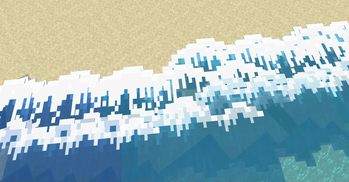
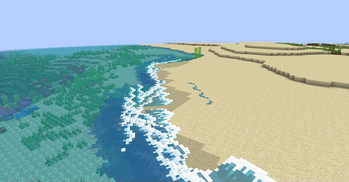
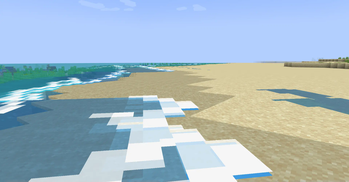
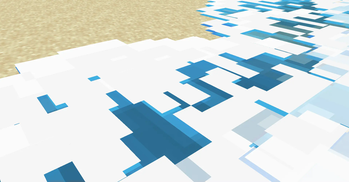
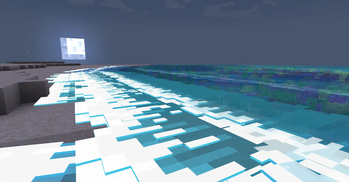
Adds ambient tidal waves to beaches and oceans!
Screenshots
About this Mod
Tidal
Beach waves!
Tidal adds ambient water waves! They are most noticeable at beaches & shores where they get really big, but can also spawn around islands to help make the water feel more alive.
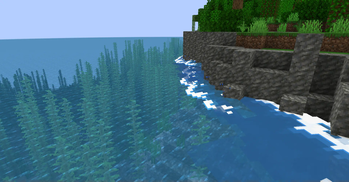
Waves can also crash against blocks if they're in the way, making rocky cliffs next to water even more dramatic! During full moons, the waves glow at night too.
Note: Tidal is currently in alpha! There's plenty of known bugs and plans for optimizations.
Lots of work happens behind the scenes to figure out where & how to spawn waves. If waves are not spawning, or spawning unusually(e.g. going wrong way), you can recalculate this info by reloading the chunks via F3 + a.

Dependencies
Requires Fabric API. In the near future, a config library might also be required.
Note for resource packs
If you decide to change the wave textures via a resource pack, the naming and mcmeta is very specific!!
The names & locations of textures must be the same.
A custom mcmeta format is used. Instead of animation, use wave_animation. This provides you with 2 options:
frametime- The amount of ticks each frame should exist. (Default = 5)frame_height- The height(in pixels) of each frame. (Default = 16)
It is expected that the animation is done with a single vertical sprite sheet image. The amount of frames will be determined using the frame_height variable.
Available Versions
How to Install Tidal on Your Server
Order Server
Order a Minecraft Java server with at least 3 GB RAM (4 GB recommended).
Set fabric Loader
In the panel under "Egg", select the fabric loader and matching Minecraft version (1.21.1).
Install Mod
Open the mod browser in the dashboard and search for "Tidal". Click "Install" – done! Alternatively, upload the .jar via SFTP to the /mods folder.
Compatibility
Mod Loaders
Minecraft Versions
1.21.1
Server-side
✗ UnsupportedRecommended RAM
4 GB(min. 3 GB)Frequently Asked Questions
Tidal server crashes on startup – what to do?
Most common cause: wrong fabric version or insufficient RAM. Check the server log (latest.log) for "OutOfMemoryError" or "Mixin" errors. With Mado Hosting: ensure at least 3 GB RAM is allocated and the loader matches the mod version (1.21.1). You can switch loaders with one click in the panel.
Is Tidal compatible with fabric?
Tidal officially supports fabric for Minecraft 1.21.1. The Mado dashboard automatically detects incompatible loader combinations.
Server lagging with Tidal – how to optimize performance?
Recommended RAM: 4 GB (per 8 players). Use /spark profiler to check if Tidal consumes the most tick time. Common fixes: reduce server view-distance to 8-10, install "performant" or "starlight" as supplementary mods on Forge. With Mado Hosting, your server runs on NVMe SSDs with dedicated CPU cores for minimal latency.
Similar Mods




Rent Modded Server
Install Tidal with just one click on your server.