
TimedLife
Survival getting boring? Try this time-based challenge! Mine resources for time, die if you run out!
Screenshots
About this Mod
TimedLife Datapack
The TimedLife datapack adds an exciting element to your Minecraft gameplay by introducing a time-based challenge. Each player begins with a limited amount of time, and as the clock ticks down, they must strategically gather rare blocks to extend their lifespans. Once a player's remaining time reaches zero, they face the ultimate consequence – death.
How to Play
- Start: Your time begins ticking down as soon as you move.
- Gain Time: Place rare blocks, stand on them, and sneak to consume them, adding precious minutes to your remaining time.
- Survive: Strategize and extend your lifespan by wisely using rare blocks.
- Consequence: When your remaining time hits zero, you will face unavoidable death.
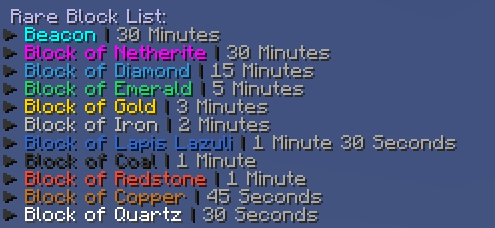
Rare Block List
- Beacon | 30 Minutes
- Block of Netherite | 30 Minutes
- Block of Diamond | 15 Minutes
- Block of Emerald | 5 Minutes
- Block of Gold | 3 Minutes
- Block of Iron | 2 Minutes
- Block of Lapis Lazuli | 1 Minute 30 Seconds
- Block of Coal | 1 Minute
- Block of Redstone | 1 Minute
- Block of Copper | 45 Seconds
- Block of Quartz | 30 Seconds
Notes
This datapack is inspired by a video I saw a few years ago, unfortunately I can't find it or I would credit it for the idea.
Supports Multiplayer
Your time is precious – use it wisely!
Available Versions
How to Install TimedLife on Your Server
Order Server
Order a Minecraft Java server with at least 3 GB RAM (4 GB recommended).
Set datapack Loader
In the panel under "Egg", select the datapack loader and matching Minecraft version (1.20.4).
Install Mod
Open the mod browser in the dashboard and search for "TimedLife". Click "Install" – done! Alternatively, upload the .jar via SFTP to the /mods folder.
Compatibility
Mod Loaders
Minecraft Versions
1.20.4, 1.20.3, 1.20.2 (+2 more)
Server-side
✓ RequiredRecommended RAM
4 GB(min. 3 GB)Frequently Asked Questions
TimedLife server crashes on startup – what to do?
Most common cause: wrong datapack version or insufficient RAM. Check the server log (latest.log) for "OutOfMemoryError" or "Mixin" errors. With Mado Hosting: ensure at least 3 GB RAM is allocated and the loader matches the mod version (1.20.4). You can switch loaders with one click in the panel.
Is TimedLife compatible with datapack and fabric and forge and quilt?
TimedLife officially supports datapack, fabric, forge, quilt for Minecraft 1.20.4, 1.20.3, 1.20.2. Note: Forge and Fabric mods are NOT cross-compatible – pick one loader and stick with it. The Mado dashboard automatically detects incompatible loader combinations.
Server lagging with TimedLife – how to optimize performance?
Recommended RAM: 4 GB (per 8 players). Use /spark profiler to check if TimedLife consumes the most tick time. Common fixes: reduce server view-distance to 8-10, install "performant" or "starlight" as supplementary mods on Forge. With Mado Hosting, your server runs on NVMe SSDs with dedicated CPU cores for minimal latency.
Similar Mods




Rent Modded Server
Install TimedLife with just one click on your server.