
TimeRecorder
A mod allows you to record server statistics.
Screenshots
About this Mod
TimeRecorder
A server-side module that allows you to count some information about the server.
As of Release 1.0.0, this mod is a subsidiary mod of McBot.
Highlights
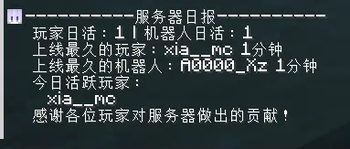
----------服务器日报----------
 玩家日活:2 | 机器人日活:1
 上线最久的玩家:xia__mc 10分钟
 上线最久的机器人:bot 1分钟
 今日活跃玩家:
  xia__mc
  A0000_Xz
 感谢各位玩家对服务器做出的贡献!
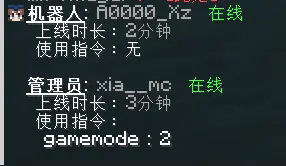
- Generate Server Daily
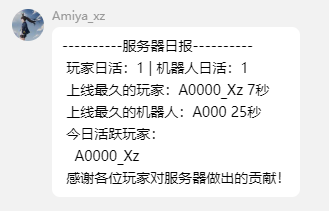
- [OPs only] Send to games and group chats.
管理员: xia__mc  离线
 上线时长:10分钟
 使用指令:tp

玩家: A0000_Xz  在线
 上线时长:10秒

机器人: bot  在线
 上线时长:1分钟
- [OPs only] Generate per-player reports
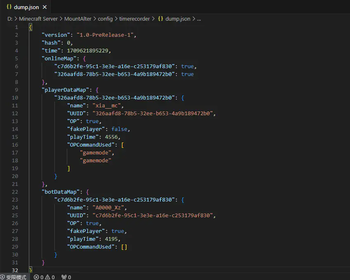
{
    "version": "1.0.0",
    "hash": 0,
    "time": 1710675809885,
    "onlineMap": {
        "326aafd8-78b5-32ee-b653-4a9b189472b0": true
    },
    "playerDataMap": {
        "326aafd8-78b5-32ee-b653-4a9b189472b0": {
            "name": "xia__mc",
            "UUID": "326aafd8-78b5-32ee-b653-4a9b189472b0",
            "OP": true,
            "fakePlayer": false,
            "playTime": 1397,
            "OPCommandUsed": []
        }
    }
}
- [OPs only] Store/load statistical data
Compatibility
Support for Vanish Mod: Vanished players will not be marked as online, nor will their online time be counted.
Support for Carpet Mod: Dummies summoned by /player are listed as "bots".
How to use
- Install the mod to the server
- Start the server and adjust the settings in the config file.
- Control the mod via
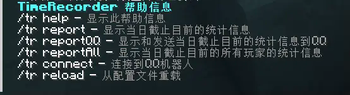
/tr(only some commands are available to normal players).
Contribute
Feel free to raise an issue or submit a pull request.
Special thanks
Available Versions
How to Install TimeRecorder on Your Server
Order Server
Order a Minecraft Java server with at least 3 GB RAM (4 GB recommended).
Set fabric Loader
In the panel under "Egg", select the fabric loader and matching Minecraft version (1.20.5).
Install Mod
Open the mod browser in the dashboard and search for "TimeRecorder". Click "Install" – done! Alternatively, upload the .jar via SFTP to the /mods folder.
Compatibility
Mod Loaders
Minecraft Versions
1.20.5, 1.20.4, 1.20.3 (+3 more)
Server-side
✓ RequiredRecommended RAM
4 GB(min. 3 GB)Frequently Asked Questions
TimeRecorder server crashes on startup – what to do?
Most common cause: wrong fabric version or insufficient RAM. Check the server log (latest.log) for "OutOfMemoryError" or "Mixin" errors. With Mado Hosting: ensure at least 3 GB RAM is allocated and the loader matches the mod version (1.20.5). You can switch loaders with one click in the panel.
Is TimeRecorder compatible with fabric?
TimeRecorder officially supports fabric for Minecraft 1.20.5, 1.20.4, 1.20.3. The Mado dashboard automatically detects incompatible loader combinations.
Server lagging with TimeRecorder – how to optimize performance?
Recommended RAM: 4 GB (per 8 players). Use /spark profiler to check if TimeRecorder consumes the most tick time. Common fixes: reduce server view-distance to 8-10, install "performant" or "starlight" as supplementary mods on Forge. With Mado Hosting, your server runs on NVMe SSDs with dedicated CPU cores for minimal latency.
Similar Mods






Rent Modded Server
Install TimeRecorder with just one click on your server.