Tinkers' Mechworks
Tinkers' Mechworks is a mod that adds various redstone machines.
Screenshots
About this Mod
Tinkers' Mechworks is a mod that adds various redstone machines originally created by mDiyo.
This is a complete rewrite of Tinkers' Mechworks and thus not all features have been yet reimplemented.
Requires Slimeknights Library Mod: Mantle
Slime Knights
You can find us on Discord: discord.gg/njGrvuh
License
Most code is licensed under the MIT License.
Textures and binaries are licensed under Creative Commons 3.
Any alternate licenses are noted where appropriate.
Modpacks
Feel free to use the mod in any modpacks. You are allowed to use it, you do not need to ask for permission, in fact permission requests will usually be ignored. When using the mod, please use the Modrinth/Curse/Curseforge download and do not rehost the files.
Any modpack which uses Tinkers' Mechworks takes full responsibility for user support queries.
For anyone else, we only support official builds from Modrinth/Curse/Curseforge, not custom built jars. We also do not take bug reports for outdated builds of Minecraft.
Features
World Generation
Mechworks adds copper and aluminum ores that generate in the overworld, these ores are used to craft items throughout the mod.
If aluminum brass is available, it is used instead. E.g. this mod will provide copper and aluminum for Tinkers' Construct that you can use to make aluminum brass using the smeltery.
Drawbridge
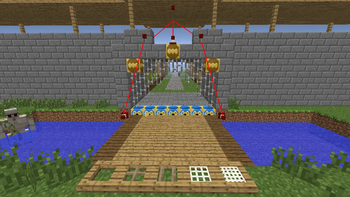
Place and retract any kind of block, including ones not normally movable with pistons. They also hold their own inventory as items, meaning you can place drawbridges with drawbridges!
Firestarter
Sets the block in front of it on fire when given a redstone signal, and can optionally extinguish it when power is removed
Credits
Tinkers' Mechworks >= 1.14
- fuj1n - Developer/Maintainer
- mDiyo - Original Author
Tinkers' Mechworks <= 1.7.10
- pillbox - Signaling buses
- Gyro - Filters
- mDiyo - Drawbridges
Available Versions
How to Install Tinkers' Mechworks on Your Server
Order Server
Order a Minecraft Java server with at least 3 GB RAM (4 GB recommended).
Set forge Loader
In the panel under "Egg", select the forge loader and matching Minecraft version (1.16.5).
Install Mod
Open the mod browser in the dashboard and search for "Tinkers' Mechworks". Click "Install" – done! Alternatively, upload the .jar via SFTP to the /mods folder.
Compatibility
Mod Loaders
Minecraft Versions
1.16.5, 1.16.4, 1.16.3 (+6 more)
Server-side
✓ RequiredRecommended RAM
4 GB(min. 3 GB)Frequently Asked Questions
Tinkers' Mechworks server crashes on startup – what to do?
Most common cause: wrong forge version or insufficient RAM. Check the server log (latest.log) for "OutOfMemoryError" or "Mixin" errors. With Mado Hosting: ensure at least 3 GB RAM is allocated and the loader matches the mod version (1.16.5). You can switch loaders with one click in the panel.
Is Tinkers' Mechworks compatible with forge?
Tinkers' Mechworks officially supports forge for Minecraft 1.16.5, 1.16.4, 1.16.3. The Mado dashboard automatically detects incompatible loader combinations.
Server lagging with Tinkers' Mechworks – how to optimize performance?
Recommended RAM: 4 GB (per 8 players). Use /spark profiler to check if Tinkers' Mechworks consumes the most tick time. Common fixes: reduce server view-distance to 8-10, install "performant" or "starlight" as supplementary mods on Forge. With Mado Hosting, your server runs on NVMe SSDs with dedicated CPU cores for minimal latency.
Similar Mods





Rent Modded Server
Install Tinkers' Mechworks with just one click on your server.