
Tinkers Compass
Tinkers Compass is a... new? Way to create WAYpoints.
Screenshots
About this Mod
Tinkers Compass – Vanilla+ Waypoints
Are you tired of ruining your survival immersion by opening the F3 debug screen every time you go exploring? Do massive minimap mods clutter your screen and ruin the classic vanilla aesthetic of your worlds?
A new WAY to create WAYpoints!
Tinkers Compass expands Minecraft’s navigation system with a new compass type that supports multiple lodestones, slot naming, and dimension‑aware mechanics.
In its second alpha release, the mod lays the foundation for a project focused on exploration and orientation.
Current Features
Calibrated Compass
4 memory slots available by default
Empty slots point to true north
Dimension restriction: once a slot is linked to a lodestone in dimension n, all other slots must also belong to that dimension.
Functional texture: each slot points correctly to its lodestone; empty slots point north.
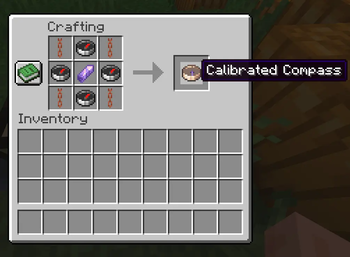
Crafting Recipe
copper chain | compass | copper chain
compass | amethyst shard | compass
copper chain | compass | copper chain\
Slot naming
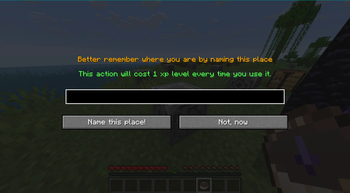
Rename slots via a custom GUI.
Costs 1 XP level per rename.
Default names: “Calibrated Compass: Lodestone N”.
If no lodestone is assigned, it shows simply “Calibrated Compass”.
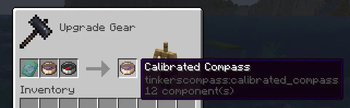
Upgrade System
Use the smithing table.
Recipe: paper + calibrated compass + copper ingot → +1 memory slot.
Currently limited to 6 slots maximum (the original 4 + 2 upgrades).
Command fallback
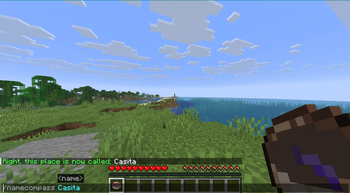
/namecompass available if GUI fails.
Also consumes 1 XP level.
Planned Adittions
- New lodestones with custom features.
- New compasses.
- Upgrade templates for visual and functional progression.
Supported Languages:
- en_Us
- es_Ec
Feel free to include this mod in your modpacks!
📜 Version History & Archive
🔍 v0.0.3 Changes (Current Release)
- Recipe Balancing: The grid layout now strictly requires Waxed Copper Chains (
minecraft:waxed_copper_chain) instead of normal copper chains to perfectly match the internal Java data validation channels. - Security Update: Integrated smart anti-cheat grid scan that prevents duplicate lodestone links and mixing different dimensions.
- Inventory Shield: Forced
.stacksTo(1)to permanently resolve metadata sharing bugs in grouped items.
📦 v0.0.2 Archive
- Upgrade System Overhaul: The upgrade method moved from the vanilla crafting table to the Smithing Table.
- New Items: Introduced the custom Memory Upgrade Smithing Template to guide the modular progression up to 6 slots, discarding the legacy raw materials recipe.
- Visual Enhancements: Added custom empty slots textures and icons mapping directly to the smithing UI catalog.
🌱 v0.0.1 Legacy Archive
- Initial Release: The Calibrated Compass was introduced with a baseline capacity of 4 dynamic memory slots.
- Legacy Upgrade Method: Upgrades from 4 to 6 slots were crafted directly in the standard Crafting Table using paper and a copper ingot.
- Basic Textures: Standard textures for linked and empty slot selection.
Available Versions
How to Install Tinkers Compass on Your Server
Order Server
Order a Minecraft Java server with at least 3 GB RAM (4 GB recommended).
Set fabric Loader
In the panel under "Egg", select the fabric loader and matching Minecraft version (26.1.2).
Install Mod
Open the mod browser in the dashboard and search for "Tinkers Compass". Click "Install" – done! Alternatively, upload the .jar via SFTP to the /mods folder.
Compatibility
Mod Loaders
Minecraft Versions
26.1.2
Server-side
✓ RequiredRecommended RAM
4 GB(min. 3 GB)Frequently Asked Questions
Tinkers Compass server crashes on startup – what to do?
Most common cause: wrong fabric version or insufficient RAM. Check the server log (latest.log) for "OutOfMemoryError" or "Mixin" errors. With Mado Hosting: ensure at least 3 GB RAM is allocated and the loader matches the mod version (26.1.2). You can switch loaders with one click in the panel.
Is Tinkers Compass compatible with fabric?
Tinkers Compass officially supports fabric for Minecraft 26.1.2. The Mado dashboard automatically detects incompatible loader combinations.
Server lagging with Tinkers Compass – how to optimize performance?
Recommended RAM: 4 GB (per 8 players). Use /spark profiler to check if Tinkers Compass consumes the most tick time. Common fixes: reduce server view-distance to 8-10, install "performant" or "starlight" as supplementary mods on Forge. With Mado Hosting, your server runs on NVMe SSDs with dedicated CPU cores for minimal latency.
Similar Mods




Rent Modded Server
Install Tinkers Compass with just one click on your server.