
TinyHUD
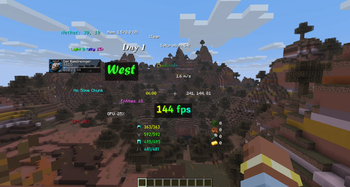
A lightweight, fully customizable HUD for NeoForge. Add the information you want to your screen, place it exactly where you like with a drag-and-drop editor.
Screenshots
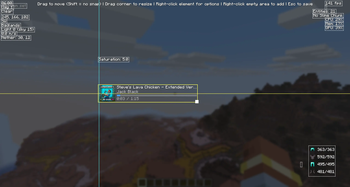
About this Mod
A lightweight, fully customizable HUD for NeoForge. Add the information you want to your screen, place it exactly where you like with a drag-and-drop editor, and style every element down to the font and color — no config files required.
Default Keybind is 'H'
TinyHUD is client-side only and works on Windows, macOS, and Linux.
HUD Elements
World
- Time — in-game time. Formats: 24h, 12h, 24h+seconds, 12h+seconds.
- Day — current world day count.
- Weather — current weather state.
- Biome — the biome you're standing in.
- Light Level — light level at your position.
- Looking At — the block you're currently targeting.
- Slime Chunk — shows whether your current chunk can spawn slimes.
- Entity Count — number of loaded entities around you.
Player
- Coordinates — your X/Y/Z. Formats: whole numbers, decimals, and variants that include the dimension.
- Direction — the way you're facing. Formats: short (N/E/S/W), full (North/East...), or degrees.
- Velocity — your current speed. Formats: m/s, horizontal m/s, km/h.
- Portal Coordinates — the corresponding Nether/Overworld coordinates for easy portal linking.
- Armor Durability — remaining durability of your equipped armor. Formats: X/Y or percent.
- Saturation — your hidden saturation value.
- Item Tracker — track the total count of any items across your inventory.
- Pick any number of items from a searchable item list.
- "Hide when 0" option — automatically hides items you're not currently carrying.
System
- FPS — current frames per second.
- Ping — your latency to the server.
- CPU Usage — system CPU load.
- GPU Usage — GPU utilization (NVIDIA, AMD, and Intel supported across Windows/Linux/macOS).
- Memory Usage — the Minecraft instance's heap usage (used vs. allocated). Formats: percent, MB, GB.
- Media — a now-playing widget for whatever you're listening to (see below).
Media element
A compact "now playing" display that reads directly from your operating system's media API:
- Windows — System Media Transport Controls (works with Spotify, browsers, and any media app).
- macOS — Spotify.
- Linux — MPRIS (
playerctl).
Features:
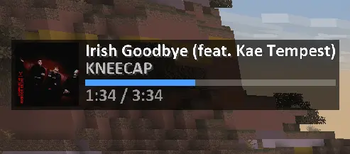
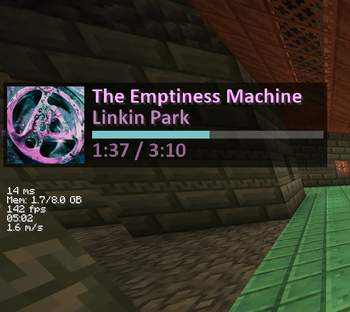
- Track title and artist.
- Album cover art, pulled straight from the OS media session (toggleable).
- Smooth, synchronized progress bar that stays in sync with actual playback.
- Source selection — Auto (whatever is currently playing) or Spotify-only.
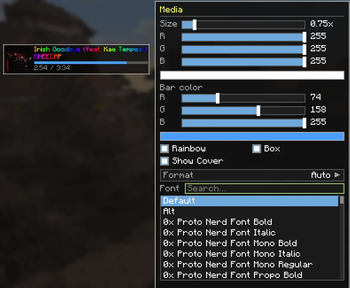
- Full styling support, including rainbow title/artist and a custom accent color for the progress bar.
In-game editor
Everything is configured through a built-in visual editor (open it with the keybind, default unbound — set it in Controls).
- Drag-and-drop placement — move any element anywhere on screen.
- Smart snapping — elements snap to screen edges, screen center, and to the edges/centers of other elements, with on-screen alignment guides. Hold Shift to disable snapping for free placement.
- Resize by dragging — grab the bottom-right corner of any element to scale it up or down.
- Right-click an element for quick options (edit style, hide).
- Right-click empty space to add elements from a searchable, categorized menu (World / Player / System).
- Live preview — see exactly how everything looks while you edit.
Per-element styling
Every element can be individually styled:
- Size — scale from 0.5x to 3.0x.
- Color — full RGB color picker.
- Accent color — a second color for elements with bars (e.g. the media progress bar).
- Rainbow mode — smooth, animated per-character rainbow text.
- Background box — toggle a semi-transparent backdrop for readability.
- Custom fonts — use any font installed on your system (TrueType
.ttf/.ttc), with a searchable font picker, in addition to Minecraft's default and alt fonts. - Format options — many elements offer multiple display formats (see below).
Available Versions
How to Install TinyHUD on Your Server
Order Server
Order a Minecraft Java server with at least 3 GB RAM (4 GB recommended).
Set neoforge Loader
In the panel under "Egg", select the neoforge loader and matching Minecraft version (26.1.2).
Install Mod
Open the mod browser in the dashboard and search for "TinyHUD". Click "Install" – done! Alternatively, upload the .jar via SFTP to the /mods folder.
Compatibility
Mod Loaders
Minecraft Versions
26.1.2
Server-side
✗ UnsupportedRecommended RAM
4 GB(min. 3 GB)Frequently Asked Questions
TinyHUD server crashes on startup – what to do?
Most common cause: wrong neoforge version or insufficient RAM. Check the server log (latest.log) for "OutOfMemoryError" or "Mixin" errors. With Mado Hosting: ensure at least 3 GB RAM is allocated and the loader matches the mod version (26.1.2). You can switch loaders with one click in the panel.
Is TinyHUD compatible with neoforge?
TinyHUD officially supports neoforge for Minecraft 26.1.2. The Mado dashboard automatically detects incompatible loader combinations.
Server lagging with TinyHUD – how to optimize performance?
Recommended RAM: 4 GB (per 8 players). Use /spark profiler to check if TinyHUD consumes the most tick time. Common fixes: reduce server view-distance to 8-10, install "performant" or "starlight" as supplementary mods on Forge. With Mado Hosting, your server runs on NVMe SSDs with dedicated CPU cores for minimal latency.
Rent Modded Server
Install TinyHUD with just one click on your server.