
Title Writer
Animate Title Text with Typewriter animation
Screenshots
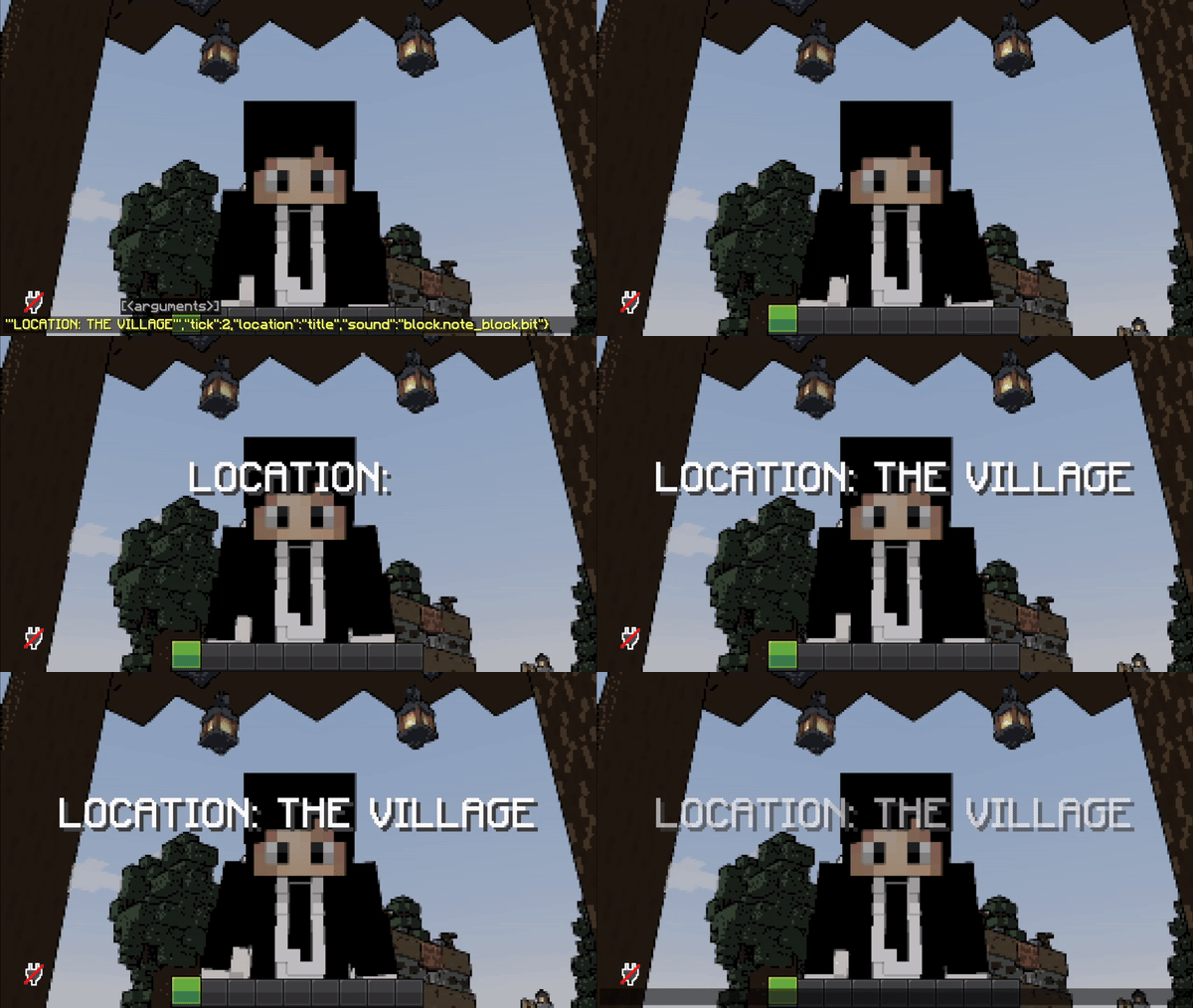

About this Mod
About Me
"TitleWriter" is a small datapack/mapmaking/gamemaking tool that allows players to show animated titles to players where the animation style is "typewriter". Players can set tick-delay and sound that is played per character, to imitate a typewriter animation style!
How to use
/function tl:title {"text":"abcd","tick":10,"location":"actionbar/title","sound":"block.note_block.bit master @s ~ ~ ~ 1 2 1", args:{font:"minecraft:default",is_bold:FALSE,is_italic:FALSE}}
To use this datapack, you'll have to run a function file "tl:title" with a set of parameters inside `{..}`. These are the following:
- text : Self-explanatory, it's the text.
    |_______ can be either pure string, or literal SNBT (lists supported!)
                                              |____ if literal SNBT is used, set args to {is_literal:TRUE}.
- tick : this is the animation delay between every letter in ticks.
- location : this field defines whether title is shown.
    |_______ can be either title or actionbar.
- sound : this is the sound that is played.
    |_______ example: "minecraft.sound master @s ~ ~ ~ 1 1 1"
- args : Optional Arguments for different behavior
    |_______ is_bold: TRUE/FALSE; Turns all text to Bold
    |_______ is_italic: TRUE/FALSE; Turns all text to italic.
    |_______ font: string; Change the font of the text.
    |_______ is_literal: TRUE/unset;
                |_____ This Flag disregards the flags above.
                |_____ If mentioned/set to true, text interprets SNBT similar to /tellraw or default /title.
                |_____ Can be used to animate Words, Complex SNBT or Text with Gradient.
Note:
If you're text has a semi-colon or an "=" sign, make sure that your text value in the command looks like this:"text":'"TIME 9:30"'
which is TEXT inside DOUBLE_QUOTATION_MARKS inside SINGLE_QUOTATION_MARKS
Limitations:
You cannot color/italicize/bold text currently
This has been fixed by introducing literal SNBT support.
Available Versions
How to Install Title Writer on Your Server
Order Server
Order a Minecraft Java server with at least 3 GB RAM (4 GB recommended).
Set datapack Loader
In the panel under "Egg", select the datapack loader and matching Minecraft version (26.1.2).
Install Mod
Open the mod browser in the dashboard and search for "Title Writer". Click "Install" – done! Alternatively, upload the .jar via SFTP to the /mods folder.
Compatibility
Mod Loaders
Minecraft Versions
26.1.2, 26.1.1, 26.1 (+14 more)
Server-side
✓ RequiredRecommended RAM
4 GB(min. 3 GB)Frequently Asked Questions
Title Writer server crashes on startup – what to do?
Most common cause: wrong datapack version or insufficient RAM. Check the server log (latest.log) for "OutOfMemoryError" or "Mixin" errors. With Mado Hosting: ensure at least 3 GB RAM is allocated and the loader matches the mod version (26.1.2). You can switch loaders with one click in the panel.
Is Title Writer compatible with datapack and fabric and forge and neoforge and quilt?
Title Writer officially supports datapack, fabric, forge, neoforge, quilt for Minecraft 26.1.2, 26.1.1, 26.1. Note: Forge and Fabric mods are NOT cross-compatible – pick one loader and stick with it. The Mado dashboard automatically detects incompatible loader combinations.
Server lagging with Title Writer – how to optimize performance?
Recommended RAM: 4 GB (per 8 players). Use /spark profiler to check if Title Writer consumes the most tick time. Common fixes: reduce server view-distance to 8-10, install "performant" or "starlight" as supplementary mods on Forge. With Mado Hosting, your server runs on NVMe SSDs with dedicated CPU cores for minimal latency.
Similar Mods



Rent Modded Server
Install Title Writer with just one click on your server.