
TNT extension 1.4
Adds some new explosive things
Screenshots




About this Mod
TNT extension 1.4 🧨
TNT extension adds some new and explosive tnt tools
Features✨
➡️ get all items via /function tnt:give_tnt
Infinite TNT🧨

- hold rightclick to use
- summon 20 tnt per second
- Explosion level 1/4
Infinite TNT minecart🚂

- hold rightclick to use
- summon 20 tnt minecarts per second
- Explosion level 2/4
Tip💡: Use it on the ground and hold rightclick a longer time and move
TNT Blaster🔫

- Click rightclick to charge🔫
- click again to fire🎆
- works like a crossbow with explosive arrows, multishot 255 and quick charge 255
- Does also work underwater🐟
- Explosion level 3/4
Super TNT🎆

- Click one time to use (5s cooldown⏱️)
- summon 1001 TNT minecarts🚂
- let them explode like the infinite TNT minecart
- The explosion takes like 3min🕰️
- Explosion level 4/4
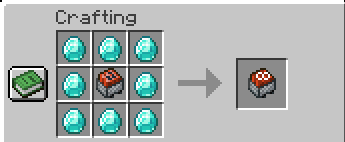
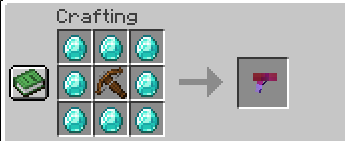
Recipes🛠️

Infinte TNT recipe

Infinite TNT minecart recipe

TNT Blaster recipe

Super TNT recipe
Join my Discord🎮
- to get help🛟
- report bugs🐛
- suggest something💡
- ask me other questions❓
- get the latest news about my mods / datapacks📰
You can join here: https://discord.gg/r2NkP67T9r
Updates:🔄️
TNT extension 1.4
- added super tnt🎆
-summons 1000 tnt for 1000 downloads⬇️- ty very much♥️
Credits🖌️:
Big thanks to Foxeddev for designing all items and modelling the tnt blaster♥️
Have fun with my Mod / Datapack♥️
Available Versions
How to Install TNT extension 1.4 on Your Server
Order Server
Order a Minecraft Java server with at least 3 GB RAM (4 GB recommended).
Set datapack Loader
In the panel under "Egg", select the datapack loader and matching Minecraft version (26.1.2).
Install Mod
Open the mod browser in the dashboard and search for "TNT extension 1.4". Click "Install" – done! Alternatively, upload the .jar via SFTP to the /mods folder.
Compatibility
Mod Loaders
Minecraft Versions
26.1.2, 26.1.1, 26.1 (+14 more)
Server-side
✓ RequiredRecommended RAM
4 GB(min. 3 GB)Frequently Asked Questions
TNT extension 1.4 server crashes on startup – what to do?
Most common cause: wrong datapack version or insufficient RAM. Check the server log (latest.log) for "OutOfMemoryError" or "Mixin" errors. With Mado Hosting: ensure at least 3 GB RAM is allocated and the loader matches the mod version (26.1.2). You can switch loaders with one click in the panel.
Is TNT extension 1.4 compatible with datapack and fabric and forge and neoforge and quilt?
TNT extension 1.4 officially supports datapack, fabric, forge, neoforge, quilt for Minecraft 26.1.2, 26.1.1, 26.1. Note: Forge and Fabric mods are NOT cross-compatible – pick one loader and stick with it. The Mado dashboard automatically detects incompatible loader combinations.
Server lagging with TNT extension 1.4 – how to optimize performance?
Recommended RAM: 4 GB (per 8 players). Use /spark profiler to check if TNT extension 1.4 consumes the most tick time. Common fixes: reduce server view-distance to 8-10, install "performant" or "starlight" as supplementary mods on Forge. With Mado Hosting, your server runs on NVMe SSDs with dedicated CPU cores for minimal latency.
Similar Mods





Rent Modded Server
Install TNT extension 1.4 with just one click on your server.