
To Crawl
Start crawling the way you feel comfortable! It has useful settings individually for each player. And optimized for multiplayer!
Screenshots
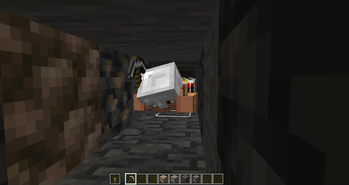
About this Mod
📖 About
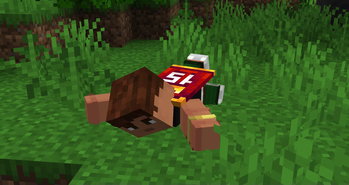
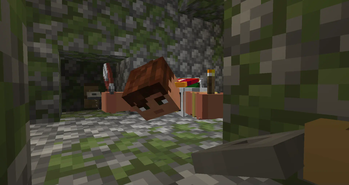
The datapack will allow you to lie down and crawl, which can be configured as you like.
Features:
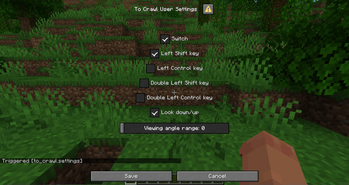
- Fine-tuning for the ability to lie down and stand up, including: pressing and double-pressing the Sneak and Sprint keys, the viewing angle range or its deactivation;
- A
to_crawl.switchtrigger is available for any supported version; - For versions 1.21.6+, you can open the user settings dialog with the
to_crawl.settingstrigger; - For version 1.21.5, each setting has its own trigger, here they all are:
to_crawl.settings.key.sneak,to_crawl.settings.key.sprint,to_crawl.settings.key.double_sneak,to_crawl.settings.key.double_sprint,to_crawl.settings.look_down-up,to_crawl.settings.viewing_angle_range;
- A
- Crawling will be disabled automatically in the following cases:
- The player just jump;
- The player falls more than 4.75 blocks or at high speed;
- If the player is hit by an iron golem, ender dragon, ravager (can be expanded with addons);
- The presence of water in the player's full height (two blocks).
- You can step on the height of slabs without any problems;
- Optimized code for multiplayer.
🧩 Add-ons
You can add entities to the to_crawl:disable_by_hit entity_type tag that disable crawling with a hit.
You can also change the maximum delay between double pressing. To do this, go to the end of to_crawl:load function and change the parameters for sneak and sprint (inverted time in ticks, default is -8).
🔗 Links
You can leave a comment on the PMC page!

Russian discord server of datapackers / Русский дискорд сервер датапакеров
Если вы датапакер, ищите адекватной помощи, полезных ресурсов и возможности поделиться проектами, то вам на СвинСоюз: Датапаки!
Это сервер-ответвление от изначального заброшенного сервера ZeroCaty "СвинСоюз". Сейчас мы не имеем к нему никакого отношения.
Available Versions
How to Install To Crawl on Your Server
Order Server
Order a Minecraft Java server with at least 3 GB RAM (4 GB recommended).
Set datapack Loader
In the panel under "Egg", select the datapack loader and matching Minecraft version (1.21.11).
Install Mod
Open the mod browser in the dashboard and search for "To Crawl". Click "Install" – done! Alternatively, upload the .jar via SFTP to the /mods folder.
Compatibility
Mod Loaders
Minecraft Versions
1.21.11, 1.21.10, 1.21.9 (+4 more)
Server-side
✓ RequiredRecommended RAM
4 GB(min. 3 GB)Frequently Asked Questions
To Crawl server crashes on startup – what to do?
Most common cause: wrong datapack version or insufficient RAM. Check the server log (latest.log) for "OutOfMemoryError" or "Mixin" errors. With Mado Hosting: ensure at least 3 GB RAM is allocated and the loader matches the mod version (1.21.11). You can switch loaders with one click in the panel.
Is To Crawl compatible with datapack and fabric and neoforge and quilt?
To Crawl officially supports datapack, fabric, neoforge, quilt for Minecraft 1.21.11, 1.21.10, 1.21.9. The Mado dashboard automatically detects incompatible loader combinations.
Server lagging with To Crawl – how to optimize performance?
Recommended RAM: 4 GB (per 8 players). Use /spark profiler to check if To Crawl consumes the most tick time. Common fixes: reduce server view-distance to 8-10, install "performant" or "starlight" as supplementary mods on Forge. With Mado Hosting, your server runs on NVMe SSDs with dedicated CPU cores for minimal latency.
Similar Mods




Rent Modded Server
Install To Crawl with just one click on your server.
Details
- License
- Creative Commons Attribution Non Commercial No Derivatives 4.0 International
- Server-side
- Required