
To Glide
A simple way to glide across the sky
Screenshots
About this Mod

Take to the skies—no wings required.
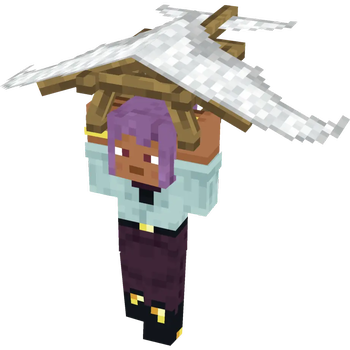
To Glide adds a simple but immersive gliding system to Minecraft, letting you slow your fall and travel through the air using handheld gliders. Whether you're exploring mountains, escaping danger, or just enjoying the view, gliding gives you a new way to move through the world.
Features
Handheld Gliders
Activate a glider mid-air to reduce fall speed and glide forward.Smooth Aerial Movement
Control your descent and momentum for a natural, responsive flying experience.Toggle System
Turn gliding on and off instantly while in the air.Dyeable Gliders
Customize your glider’s appearance with any color.Third-Person Animations
Dynamic arm positioning and item alignment while gliding for better immersion.No Elytra Required
Glide early-game without needing rare endgame items.
How It Works
- Hold a glider in your main hand
- Jump or fall from a height
- Right-click mid-air to activate gliding
- Control your descent and direction
- Right-click again to deactivate
You must be slightly above the ground to start gliding.
Mechanics
Gradual fall speed reduction
Forward momentum scaling
Automatic deactivation when:
- touching the ground
- entering water
- using Elytra
Customization
- Fully dyeable like leather armor
- Works with resource packs
- Designed to visually fit both classic and slim player models
License & Credits
Special thanks to L33tfox for allowing me to use his mod as a template
Available Versions
How to Install To Glide on Your Server
Order Server
Order a Minecraft Java server with at least 3 GB RAM (4 GB recommended).
Set fabric Loader
In the panel under "Egg", select the fabric loader and matching Minecraft version (1.20.1).
Install Mod
Open the mod browser in the dashboard and search for "To Glide". Click "Install" – done! Alternatively, upload the .jar via SFTP to the /mods folder.
Compatibility
Mod Loaders
Minecraft Versions
1.20.1
Server-side
✓ RequiredRecommended RAM
4 GB(min. 3 GB)Frequently Asked Questions
To Glide server crashes on startup – what to do?
Most common cause: wrong fabric version or insufficient RAM. Check the server log (latest.log) for "OutOfMemoryError" or "Mixin" errors. With Mado Hosting: ensure at least 3 GB RAM is allocated and the loader matches the mod version (1.20.1). You can switch loaders with one click in the panel.
Is To Glide compatible with fabric and forge and neoforge?
To Glide officially supports fabric, forge, neoforge for Minecraft 1.20.1. Note: Forge and Fabric mods are NOT cross-compatible – pick one loader and stick with it. The Mado dashboard automatically detects incompatible loader combinations.
Server lagging with To Glide – how to optimize performance?
Recommended RAM: 4 GB (per 8 players). Use /spark profiler to check if To Glide consumes the most tick time. Common fixes: reduce server view-distance to 8-10, install "performant" or "starlight" as supplementary mods on Forge. With Mado Hosting, your server runs on NVMe SSDs with dedicated CPU cores for minimal latency.
Similar Mods




Rent Modded Server
Install To Glide with just one click on your server.