
Together Forever
A chained together challenge mod that binds players, causing shared inventory, and shared health/hunger.
Screenshots



About this Mod

Together Forever 🔗❤️
Survival is better when you're stuck together.
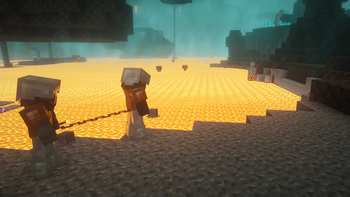
Together Forever is a Minecraft mod that binds players together in a struggle for survival. Once chained, you and your partners become a single organism: you share movement, health, hunger, and even your inventory. If one of you eats, everyone is fed. If one of you dies, everyone dies.
Perfect for cooperative challenges, "Soul Link" playthroughs, or just chaotic fun with friends.
Features
🔗 Chain Physics
Players are physically tethered together. If you run too far apart, the chain will pull you back together with spring-like physics. You have to move as a unit to succeed.
- Climb the chain by holding space!
❤️ Shared Vitality (Health & Hunger)
- Damage is Shared
- Healing is Shared
- Hunger is Shared
🎒 Shared Inventory
- One Inventory: Every player in the chain shares the same inventory, armor slots, and offhand.
- Instant Sync: Picking up an item gives it to everyone. Equipping armor equips it for everyone.
📖 How to Play
Creating a Link
Craft an Iron Chain. (Or spawn one if you wish to be chained from the start)
Right-Click another player while holding the Chain.
You are now bound together!
- Add more Iron Chain to lengthen the chain. Right click with a golden pickaxe to shorten the chain again.
Note: You can chain multiple people together in a series (A-B-C).
Breaking a Link
Obtain a Lava Bucket.
Right-Click a player you are chained to.
The lava burns the chain (consuming the lava, leaving an empty bucket), and you are free.
⚙️ Commands & Game Rules
You can turn on or off the shared health/hunger and shared inventory with the following commands:
/gamerule togetherforever:share_inventoryturns on or off shared inventory/gamerule togetherforever:share_vitalityturns on or off shared health and hunger/gamerule togetherforever:respawn_togetherturns on or off respawning together with your chain intact
Enjoy!
Available Versions
How to Install Together Forever on Your Server
Order Server
Order a Minecraft Java server with at least 3 GB RAM (4 GB recommended).
Set fabric Loader
In the panel under "Egg", select the fabric loader and matching Minecraft version (26.1).
Install Mod
Open the mod browser in the dashboard and search for "Together Forever". Click "Install" – done! Alternatively, upload the .jar via SFTP to the /mods folder.
Compatibility
Mod Loaders
Minecraft Versions
26.1, 1.21.11, 1.21.10 (+1 more)
Server-side
✓ RequiredRecommended RAM
4 GB(min. 3 GB)Frequently Asked Questions
Together Forever server crashes on startup – what to do?
Most common cause: wrong fabric version or insufficient RAM. Check the server log (latest.log) for "OutOfMemoryError" or "Mixin" errors. With Mado Hosting: ensure at least 3 GB RAM is allocated and the loader matches the mod version (26.1). You can switch loaders with one click in the panel.
Is Together Forever compatible with fabric and forge?
Together Forever officially supports fabric, forge for Minecraft 26.1, 1.21.11, 1.21.10. Note: Forge and Fabric mods are NOT cross-compatible – pick one loader and stick with it. The Mado dashboard automatically detects incompatible loader combinations.
Server lagging with Together Forever – how to optimize performance?
Recommended RAM: 4 GB (per 8 players). Use /spark profiler to check if Together Forever consumes the most tick time. Common fixes: reduce server view-distance to 8-10, install "performant" or "starlight" as supplementary mods on Forge. With Mado Hosting, your server runs on NVMe SSDs with dedicated CPU cores for minimal latency.
Similar Mods




Rent Modded Server
Install Together Forever with just one click on your server.