
Tool Info hub
Tool Info Hub displays real-time tool damage against armored targets and precise block-mining times, dynamically scaling with enchantments and potions.
Screenshots
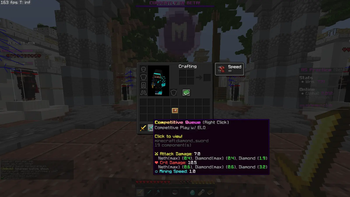
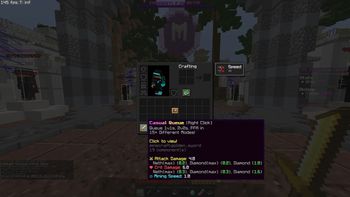
About this Mod
About Tool Info Hub
Tool Info Hub is a client-side utility mod designed to bring deep, real-time analytics to your Minecraft tooltips. Built natively for Minecraft 26.1.2 on the Fabric loader, this mod eliminates the guesswork from combat and mining by calculating your exact capabilities based on your active gameplay state.
Instead of showing generic tool attributes, Tool Info Hub bridges the gap between item data and player data to show you exactly how your gear performs in active scenarios.
Core Features
True Damage Tracking:
Scans the item's modern Data Components alongside your player entity to deliver a live calculation of your attack power. It handles base weapon damage, active potion effects (Strength/Weakness), and manually maps damage scaling for Sharpness, Smite, and Bane of Arthropods.
PvP Armor Simulation:
Displays how much final damage your normal and critical strikes will actually inflict against targets wearing full sets of Max Netherite (Prot IV), Max Diamond (Prot IV), or Standard Diamond armor.
Fractional Mining Speeds:
Breaks down your mining efficiency into precise seconds (s) required to break Stone, Deepslate, and Obsidian.
Status Effect Integration:
Dynamically updates your mining speeds on the fly when you are under the influence of status modifiers like Haste or Mining Fatigue.
Zero Clutter:
The advanced tooltip additions are restricted strictly to primary tools and weapons (Swords, Pickaxes, Axes, Shovels, Hoes) to keep the rest of your inventory screens clean.
Available Versions
How to Install Tool Info hub on Your Server
Order Server
Order a Minecraft Java server with at least 3 GB RAM (4 GB recommended).
Set fabric Loader
In the panel under "Egg", select the fabric loader and matching Minecraft version (26.1.2).
Install Mod
Open the mod browser in the dashboard and search for "Tool Info hub". Click "Install" – done! Alternatively, upload the .jar via SFTP to the /mods folder.
Compatibility
Mod Loaders
Minecraft Versions
26.1.2, 26.1.1, 26.1 (+12 more)
Server-side
✗ UnsupportedRecommended RAM
4 GB(min. 3 GB)Frequently Asked Questions
Tool Info hub server crashes on startup – what to do?
Most common cause: wrong fabric version or insufficient RAM. Check the server log (latest.log) for "OutOfMemoryError" or "Mixin" errors. With Mado Hosting: ensure at least 3 GB RAM is allocated and the loader matches the mod version (26.1.2). You can switch loaders with one click in the panel.
Is Tool Info hub compatible with fabric?
Tool Info hub officially supports fabric for Minecraft 26.1.2, 26.1.1, 26.1. The Mado dashboard automatically detects incompatible loader combinations.
Server lagging with Tool Info hub – how to optimize performance?
Recommended RAM: 4 GB (per 8 players). Use /spark profiler to check if Tool Info hub consumes the most tick time. Common fixes: reduce server view-distance to 8-10, install "performant" or "starlight" as supplementary mods on Forge. With Mado Hosting, your server runs on NVMe SSDs with dedicated CPU cores for minimal latency.
Similar Mods




Rent Modded Server
Install Tool Info hub with just one click on your server.