
Tool Promt
A mod that will help players remember the durability of their tools!
Screenshots
About this Mod
🛠️ ToolPrompter
Have you ever been deep in a mining session or halfway through a massive build, only to realize your Max-Enchanted Pickaxe just shattered? Tool Prompt is a lightweight utility mod designed to keep you informed about your tool's health without distracting you from the gameplay.
✨ Features
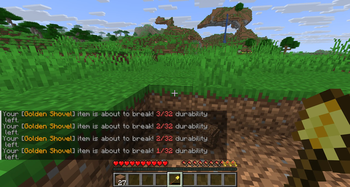
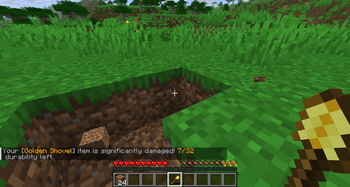
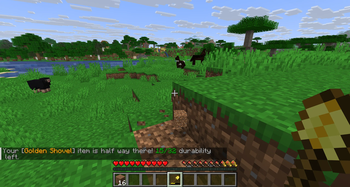
ToolPrompter acts as your personal equipment monitor. It tracks the durability of your active items and sends timely alerts directly to your chat when your tool reaches specific wear-and-tear milestones:
- 75% Remaining: A friendly heads-up.
- 50% Remaining: Halfway there-time to start thinking about a trip home.
- 3% Remaining (CRITICAL): The final alert. Stop using the tool immediately to prevent permanent breakage!
🛠 Technical Info
- Client-side.
- Server-side.
- Works with all standard tools, weapons, and items with durability.
- Dependencies: Fabric API
Available Versions
How to Install Tool Promt on Your Server
Order Server
Order a Minecraft Java server with at least 3 GB RAM (4 GB recommended).
Set fabric Loader
In the panel under "Egg", select the fabric loader and matching Minecraft version (1.21.11).
Install Mod
Open the mod browser in the dashboard and search for "Tool Promt". Click "Install" – done! Alternatively, upload the .jar via SFTP to the /mods folder.
Compatibility
Mod Loaders
Minecraft Versions
1.21.11
Server-side
✗ UnsupportedRecommended RAM
4 GB(min. 3 GB)Frequently Asked Questions
Tool Promt server crashes on startup – what to do?
Most common cause: wrong fabric version or insufficient RAM. Check the server log (latest.log) for "OutOfMemoryError" or "Mixin" errors. With Mado Hosting: ensure at least 3 GB RAM is allocated and the loader matches the mod version (1.21.11). You can switch loaders with one click in the panel.
Is Tool Promt compatible with fabric?
Tool Promt officially supports fabric for Minecraft 1.21.11. The Mado dashboard automatically detects incompatible loader combinations.
Server lagging with Tool Promt – how to optimize performance?
Recommended RAM: 4 GB (per 8 players). Use /spark profiler to check if Tool Promt consumes the most tick time. Common fixes: reduce server view-distance to 8-10, install "performant" or "starlight" as supplementary mods on Forge. With Mado Hosting, your server runs on NVMe SSDs with dedicated CPU cores for minimal latency.
Similar Mods



![[TaCZ] Timeless and Classics Zero](https://cdn.modrinth.com/data/SzzJttH8/fd27766d2bb8390d284696b1dbd358f87e081439_96.webp)


Rent Modded Server
Install Tool Promt with just one click on your server.