
Tool Trims Concept
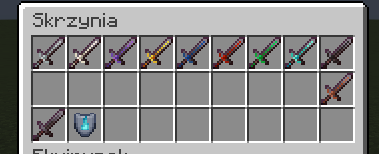
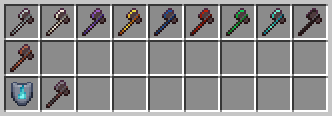
This mod introduces new trims for tools, allowing customization similar to armor. Now you can decorate your pickaxes, swords, and axes with unique patterns to match your playstyle. Explore the world of Minecraft, discover special smithing templates.
Screenshots

About this Mod
About mod:
This mod introduces new trims for tools, allowing customization similar to armor. Now you can decorate your pickaxes, swords, and axes with unique patterns to match your playstyle. Explore the world of Minecraft, discover special smithing templates, and give your tools a distinctive look!
The mod is still in development and is currently in its alpha version! Not all tools have their trim variants yet, but we're working on future updates. Expect new features and improvements in upcoming releases!
What's new?
Added the ability to apply the "Heat" trim to netherite pickaxes
Netherite pickaxes can be decorated with all decorative materials (Copper ingot/ Iron ingot/ Amethyst/ Gold Ingot/ Quartz/ Emerald/ Redstone Dust/ Lapis Lazuli/ Diamond/ Netherite)
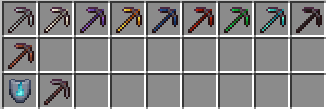
WARNING! This mod is still in development and currently only supports applying trims to netherite swords, netherite axes or netherite pickaxes. More tools will be added in future updates!
Content:
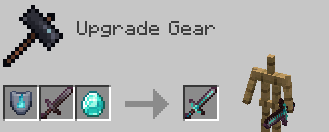
Applying smithing templates
Templates can be applied to the tool (only the netherite sword, netherite axes or netherite pickaxes for now) in the smithing table by inserting: smithing template -> tool -> mineral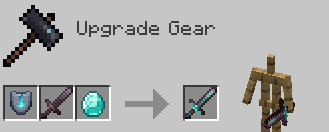
List of minerals that can be used:
Netherite Ingot
Diamond
Emerald
Redstone Dust
Lapis Lazuli
Gold Ingot
Amethyst Shard
Nether Quartz
Iron Ingot
Copper Ingot
Smithing Templates:
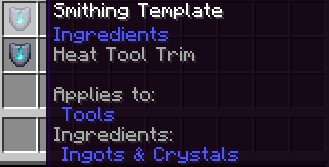
"Heat" smithing template
This is a smithing template that can be found in the weaponsmith's house in all types of villages. There is a 1/3 chance of finding it in quantities of 1 to 2.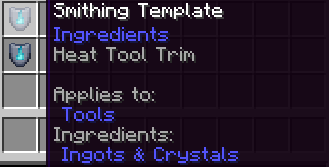
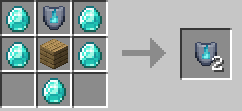
Template duplication recipe:
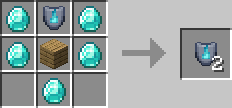
*Any type of planks can be used instead of oak planks
Information:
Tool Trims Concept
Mod Version: 25y03a
Mod for: Minecraft Java
Neoforge version: 21.1.65 (Download here: https://projects.neoforged.net/neoforged/neoforge )
Minecraft version: 1.21.1
Authors: MrKazanek/Bluezers
Available Versions
How to Install Tool Trims Concept on Your Server
Order Server
Order a Minecraft Java server with at least 3 GB RAM (4 GB recommended).
Set neoforge Loader
In the panel under "Egg", select the neoforge loader and matching Minecraft version (1.21.1).
Install Mod
Open the mod browser in the dashboard and search for "Tool Trims Concept". Click "Install" – done! Alternatively, upload the .jar via SFTP to the /mods folder.
Compatibility
Mod Loaders
Minecraft Versions
1.21.1
Server-side
✓ RequiredRecommended RAM
4 GB(min. 3 GB)Frequently Asked Questions
Tool Trims Concept server crashes on startup – what to do?
Most common cause: wrong neoforge version or insufficient RAM. Check the server log (latest.log) for "OutOfMemoryError" or "Mixin" errors. With Mado Hosting: ensure at least 3 GB RAM is allocated and the loader matches the mod version (1.21.1). You can switch loaders with one click in the panel.
Is Tool Trims Concept compatible with neoforge?
Tool Trims Concept officially supports neoforge for Minecraft 1.21.1. The Mado dashboard automatically detects incompatible loader combinations.
Server lagging with Tool Trims Concept – how to optimize performance?
Recommended RAM: 4 GB (per 8 players). Use /spark profiler to check if Tool Trims Concept consumes the most tick time. Common fixes: reduce server view-distance to 8-10, install "performant" or "starlight" as supplementary mods on Forge. With Mado Hosting, your server runs on NVMe SSDs with dedicated CPU cores for minimal latency.
Similar Mods




Rent Modded Server
Install Tool Trims Concept with just one click on your server.