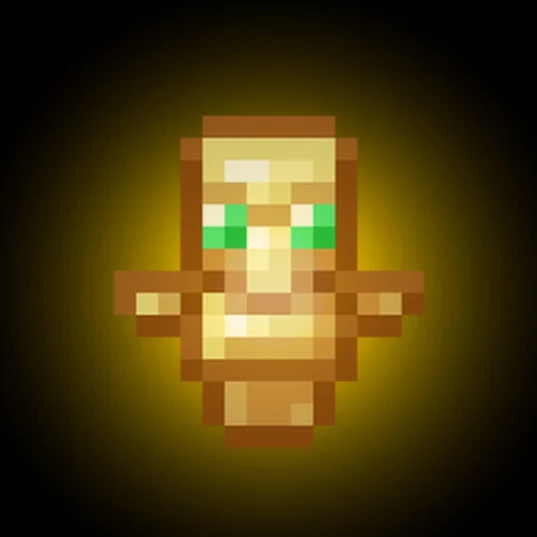
Totem Resize
The Totem Resizer is a client-side mod that lets you change the size of the "Totem of Undying" in your hand and on your screen. It’s perfect for clearing up your view during combat or just personalizing your game.
Screenshots
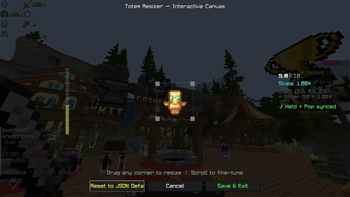
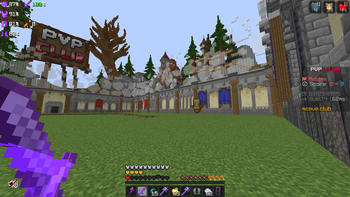
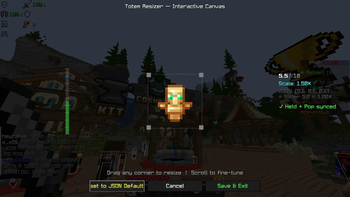
About this Mod
TotemScale is a sleek, lightweight, client-side utility designed to solve one of Minecraft’s oldest visual nuisances: the bulky "Totem of Undying" model. Whether you are a PVPer who needs a clear field of view or a casual player who wants a more minimalist aesthetic, TotemScale gives you total control over how the totem appears on your screen.
Built for the 1.21.x era, this mod integrates directly into the modern Minecraft engine, ensuring high performance and a "native" feel.
Key Features
Precision Scaling (0.1x – 2.5x): Use an intuitive in-game slider to shrink the totem into a tiny charm or grow it into a massive icon.
Total Visual Coverage: The scaling logic applies to every state of the totem:
Main Hand: Keeps your right-side vision clear.
Off-Hand: Prevents the totem from blocking your peripheral view.
The "Pop" Animation: Shrinks the large on-screen animation that triggers when you cheat death, so you can keep fighting without a giant golden face in your way.
Fully Rebindable Controls: No more digging through config files. Access the customization menu with a single keypress (Default: 'J'). The keybinding is fully integrated into the standard Minecraft Options > Controls menu.
Vanilla & Server Compatible: Since the mod only changes how you see the totem, it is 100% Client-Side. You can use it on any vanilla server, SMP, or competitive network (like Hypixel) without any risk or extra server-side setup.
Technical Excellence
Modern Compatibility: Optimized for Java 21 and the 1.21.1 through 1.21.11 update cycle.
Data Component Ready: Uses the latest 1.21 item handling system, ensuring it works perfectly with custom resource packs and modded totems.
Seamless UI: Powered by a clean, modern interface that matches the updated 1.21 "Tricky Trials" and "Mounts of Mayhem" menu styles.
Zero Impact: Lightweight code ensures your FPS remains stable, even during intense combat or "totem popping" scenarios.
Available Versions
How to Install Totem Resize on Your Server
Order Server
Order a Minecraft Java server with at least 3 GB RAM (4 GB recommended).
Set fabric Loader
In the panel under "Egg", select the fabric loader and matching Minecraft version (1.21.11).
Install Mod
Open the mod browser in the dashboard and search for "Totem Resize". Click "Install" – done! Alternatively, upload the .jar via SFTP to the /mods folder.
Compatibility
Mod Loaders
Minecraft Versions
1.21.11, 1.21.10, 1.21.9 (+9 more)
Server-side
✗ UnsupportedRecommended RAM
4 GB(min. 3 GB)Frequently Asked Questions
Totem Resize server crashes on startup – what to do?
Most common cause: wrong fabric version or insufficient RAM. Check the server log (latest.log) for "OutOfMemoryError" or "Mixin" errors. With Mado Hosting: ensure at least 3 GB RAM is allocated and the loader matches the mod version (1.21.11). You can switch loaders with one click in the panel.
Is Totem Resize compatible with fabric?
Totem Resize officially supports fabric for Minecraft 1.21.11, 1.21.10, 1.21.9. The Mado dashboard automatically detects incompatible loader combinations.
Server lagging with Totem Resize – how to optimize performance?
Recommended RAM: 4 GB (per 8 players). Use /spark profiler to check if Totem Resize consumes the most tick time. Common fixes: reduce server view-distance to 8-10, install "performant" or "starlight" as supplementary mods on Forge. With Mado Hosting, your server runs on NVMe SSDs with dedicated CPU cores for minimal latency.
Similar Mods






Rent Modded Server
Install Totem Resize with just one click on your server.