
Tpa_QMZ
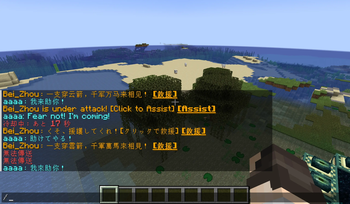
This mod provides a simple tp without needing their consent, and allows you to return.A Quick SOS system: press Left Alt to broadcast a signal with a global sound effect; other players can click the message to tp and provide assistance.
Screenshots
About this Mod
TpaQMZ Mod Overview
When you and your friend are thousands of miles apart, have you ever thought about using the tp command?
However, this requires cheat permission, which may make you worry about your friend cheating in the game.
This mod provides a seamless teleportation experience. Use /tpa to warp instantly and /back to return to previous locations or death points.
Its key feature is the Quick Rescue system: press a hotkey to broadcast an SOS signal, allowing friends to teleport and assist you immediately.
Command Reference
1. Teleportation Commands
/tpa ATeleports the executor directly to Player A./tpa A BTeleports Player A to Player B's location.
2. Back Commands
/backReturns the executor to their location prior to the last teleport./back deathReturns the executor to their last death coordinate.Tip:Return positions and Death positions are stored as independent data sets within the world save, allowing for repeated use.
3. Quick Rescue (SOS)
- Trigger: Activated via a hotkey (Default:
Left Alt). - Broadcast: Sends a global message: someone is under attack!
- Audio Feedback: All players will hear the vanilla firework launch sound as a notification.
- Interaction: Other players can simply click the message in the chat to teleport and assist.
- Constraints: Default 30s cooldown and 5m validity period.
4. Admin Configuration
/tpaConfig setCooldown <seconds>Sets the interval required between sending rescue requests (default: 30s)./tpaConfig setTimeout <minutes>Sets the duration for which a rescue request remains clickable (default: 5m)./tpaConfig dangerTp <true/false>Enables or disables "Dangerous Teleports."Tip:A teleport is considered "Dangerous" if the executor moves someone other than themselves. This includes forcing a player to warp to the executor's own location.
Available Versions
How to Install Tpa_QMZ on Your Server
Order Server
Order a Minecraft Java server with at least 3 GB RAM (4 GB recommended).
Set forge Loader
In the panel under "Egg", select the forge loader and matching Minecraft version (1.20.1).
Install Mod
Open the mod browser in the dashboard and search for "Tpa_QMZ". Click "Install" – done! Alternatively, upload the .jar via SFTP to the /mods folder.
Compatibility
Mod Loaders
Minecraft Versions
1.20.1
Server-side
✓ RequiredRecommended RAM
4 GB(min. 3 GB)Frequently Asked Questions
Tpa_QMZ server crashes on startup – what to do?
Most common cause: wrong forge version or insufficient RAM. Check the server log (latest.log) for "OutOfMemoryError" or "Mixin" errors. With Mado Hosting: ensure at least 3 GB RAM is allocated and the loader matches the mod version (1.20.1). You can switch loaders with one click in the panel.
Is Tpa_QMZ compatible with forge?
Tpa_QMZ officially supports forge for Minecraft 1.20.1. The Mado dashboard automatically detects incompatible loader combinations.
Server lagging with Tpa_QMZ – how to optimize performance?
Recommended RAM: 4 GB (per 8 players). Use /spark profiler to check if Tpa_QMZ consumes the most tick time. Common fixes: reduce server view-distance to 8-10, install "performant" or "starlight" as supplementary mods on Forge. With Mado Hosting, your server runs on NVMe SSDs with dedicated CPU cores for minimal latency.
Similar Mods






Rent Modded Server
Install Tpa_QMZ with just one click on your server.