
TP HOME
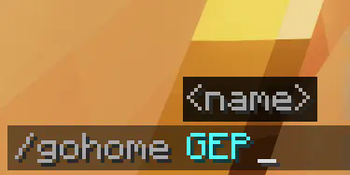
set home and go home anytime. Commands: /sethome <name> /deletegame <name> /sethomelimit <number> //op /gohome <name> /listhome
Screenshots
About this Mod
TP Home - Advanced Home Teleportation System
A comprehensive home management plugin featuring intelligent cooldown systems, acceleration mechanics, and emergency teleportation options. Set multiple homes, teleport between them, and manage cooldowns with an intuitive GUI interface.
Key Features:
- Multi-Home System: Create and manage multiple home locations with configurable limits
- Smart Cooldown Management: Persistent cooldown system that survives server restarts
- Acceleration System: Reduce cooldowns using in-game items (Ender Pearls, Gold Ingots, Amethyst Shards)
- Emergency Teleport: Bypass cooldowns instantly using diamonds with temporary debuffs
- Player Teleportation: Send and accept teleport requests between players
- Death Recovery: Teleport back to your last death location
- Interactive GUIs: User-friendly inventory-based menus for all features
- Teleport Delays: Configurable countdown with movement cancellation
- Permission Support: Flexible permission system for different player groups
- Persistent data-blocked: JSON-based storage for homes and cooldowns
Perfect for survival servers looking to enhance player convenience while maintaining balanced gameplay through cooldown mechanics and resource costs.
Available Versions
How to Install TP HOME on Your Server
Order Server
Order a Minecraft Java server with at least 3 GB RAM (4 GB recommended).
Set bukkit Loader
In the panel under "Egg", select the bukkit loader and matching Minecraft version (26.1.2).
Install Mod
Open the mod browser in the dashboard and search for "TP HOME". Click "Install" – done! Alternatively, upload the .jar via SFTP to the /mods folder.
Compatibility
Mod Loaders
Minecraft Versions
26.1.2, 26.1.1, 26.1 (+12 more)
Server-side
✓ RequiredRecommended RAM
4 GB(min. 3 GB)Frequently Asked Questions
TP HOME server crashes on startup – what to do?
Most common cause: wrong bukkit version or insufficient RAM. Check the server log (latest.log) for "OutOfMemoryError" or "Mixin" errors. With Mado Hosting: ensure at least 3 GB RAM is allocated and the loader matches the mod version (26.1.2). You can switch loaders with one click in the panel.
Is TP HOME compatible with bukkit and fabric and neoforge and paper?
TP HOME officially supports bukkit, fabric, neoforge, paper for Minecraft 26.1.2, 26.1.1, 26.1. The Mado dashboard automatically detects incompatible loader combinations.
Server lagging with TP HOME – how to optimize performance?
Recommended RAM: 4 GB (per 8 players). Use /spark profiler to check if TP HOME consumes the most tick time. Common fixes: reduce server view-distance to 8-10, install "performant" or "starlight" as supplementary mods on Forge. With Mado Hosting, your server runs on NVMe SSDs with dedicated CPU cores for minimal latency.
Similar Mods




Rent Modded Server
Install TP HOME with just one click on your server.