
TPS Reforged
A simple TPS and MSPT monitor for Minecraft servers, with global and per-dimension performance display, configurable colors, formatting, and actionbar support.
Screenshots
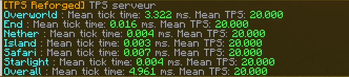
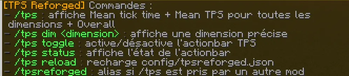

About this Mod
TPS Reforged
TPS Reforged is a lightweight Minecraft utility mod that displays server TPS and MSPT in a clean and configurable way.
The mod is designed for server owners and modpack creators who want a simple command to quickly check server performance, including global tick time and per-dimension tick information.
Features
- Display global server TPS and MSPT
- Display TPS/MSPT per dimension
- Compact one-line display per dimension
- Custom display names for dimensions
- Automatically add unknown dimensions to the config
- Hide specific dimensions from the output
- Custom dimension ordering
- Configurable line format
- Configurable colors
- Optional actionbar TPS display
- Reloadable config with
/tps reload - Help command with
/tps help
Commands
/tps
Displays TPS/MSPT for all visible dimensions and the overall server./tps dim <dimension>
Displays TPS/MSPT for one specific dimension./tps toggle
Toggles the actionbar TPS display for the player./tps status
Shows whether the actionbar display is enabled for the player./tps reload
Reloads the configuration./tps help
Shows the available commands.
Configuration
TPS Reforged includes a configurable JSON file where you can customize:
- Prefix
- Colors
- TPS/MSPT thresholds
- Dimension display names
- Dimension order
- Hidden dimensions
- Output line format
- Actionbar format
Notes
TPS Reforged is not a full profiler.
It is made to quickly show server TPS/MSPT and identify which dimensions are heavier.
For advanced profiling such as entity cost, block entity cost, chunk analysis or method sampling, use a dedicated profiler such as Spark.
Available Versions
How to Install TPS Reforged on Your Server
Order Server
Order a Minecraft Java server with at least 3 GB RAM (4 GB recommended).
Set fabric Loader
In the panel under "Egg", select the fabric loader and matching Minecraft version (1.21.1).
Install Mod
Open the mod browser in the dashboard and search for "TPS Reforged". Click "Install" – done! Alternatively, upload the .jar via SFTP to the /mods folder.
Compatibility
Mod Loaders
Minecraft Versions
1.21.1
Server-side
✓ RequiredRecommended RAM
4 GB(min. 3 GB)Frequently Asked Questions
TPS Reforged server crashes on startup – what to do?
Most common cause: wrong fabric version or insufficient RAM. Check the server log (latest.log) for "OutOfMemoryError" or "Mixin" errors. With Mado Hosting: ensure at least 3 GB RAM is allocated and the loader matches the mod version (1.21.1). You can switch loaders with one click in the panel.
Is TPS Reforged compatible with fabric?
TPS Reforged officially supports fabric for Minecraft 1.21.1. The Mado dashboard automatically detects incompatible loader combinations.
Server lagging with TPS Reforged – how to optimize performance?
Recommended RAM: 4 GB (per 8 players). Use /spark profiler to check if TPS Reforged consumes the most tick time. Common fixes: reduce server view-distance to 8-10, install "performant" or "starlight" as supplementary mods on Forge. With Mado Hosting, your server runs on NVMe SSDs with dedicated CPU cores for minimal latency.
Similar Mods






Rent Modded Server
Install TPS Reforged with just one click on your server.