
Trade Upgrade
Adds a new late game recipe for increasing the max trade limit of villagers, and recipes for villager spawn eggs.
Screenshots
About this Mod
Are you tired of the villagers' trade limit holding back your progress? Trade Upgrade offers a solution! This data pack introduces a new late-game item that significantly increases the maximum trade limit of villagers, eliminating the tedious process of endlessly shuffling villagers. This project was my first full data pack, born out of the frustration of managing villager trades and a desire for a more streamlined experience.
Key Features
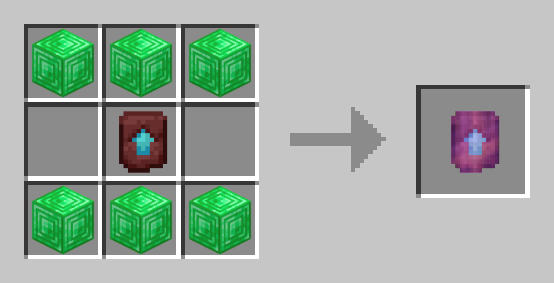
- Craft a Trade Upgrade using emerald blocks and a Netherite Upgrade Template.
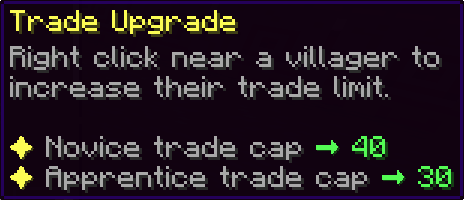
- Use the Trade Upgrade on a villager to dramatically increase their max trade cap:
- Novice trade cap -> 40
- Apprentice trade cap -> 30
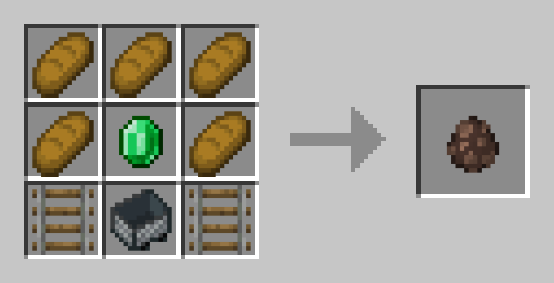
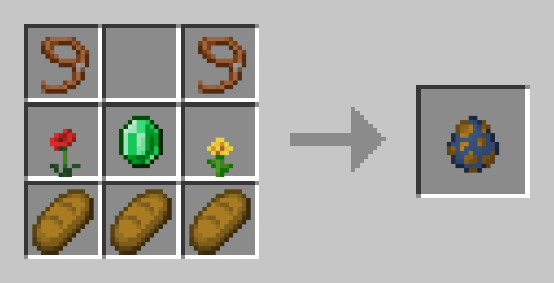
- Includes recipes for Villager and Wandering Trader spawn eggs, providing a more convenient way to obtain villagers without relying on lengthy transportation.
- Features helpful in-game error messages to prevent accidental upgrades on ineligible villagers (e.g., baby villagers or nitwits).
How to use the Trade Upgrade
Once you have a Trade Upgrade in hand, right-clicking within 5 blocks of an eligible villager will apply the upgrade to the one closest to you. Upgraded villagers will have their novice and apprentice trade maximums significantly increased.
Note: Novice villagers, baby villagers, and nitwits cannot be upgraded.
Custom Recipes
Trade Upgrade Recipe
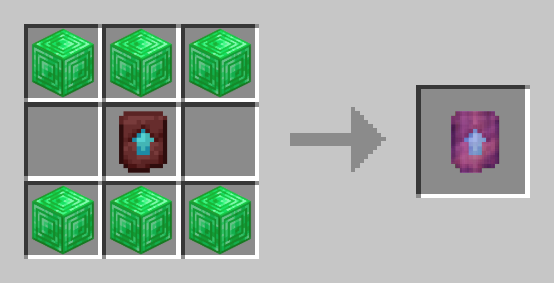
| Villager Spawn Egg | Wandering Trader Spawn Egg |
|---|---|
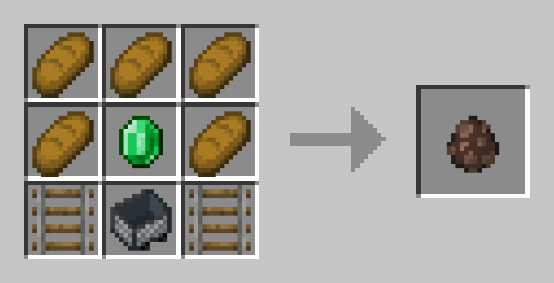 |
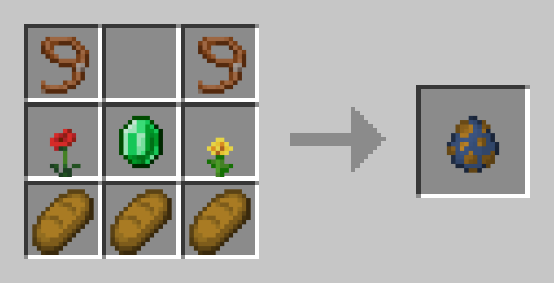 |
Find a Bug?
If you encounter any issues or have suggestions for improvements, please submit them using the "Report issues" tab on the side of this page.
Like this Project?
If you're feeling generous and want to support my work, you can buy me a coffee.
Thank you! 🧡
Available Versions
How to Install Trade Upgrade on Your Server
Order Server
Order a Minecraft Java server with at least 3 GB RAM (4 GB recommended).
Set datapack Loader
In the panel under "Egg", select the datapack loader and matching Minecraft version (1.21.5).
Install Mod
Open the mod browser in the dashboard and search for "Trade Upgrade". Click "Install" – done! Alternatively, upload the .jar via SFTP to the /mods folder.
Compatibility
Mod Loaders
Minecraft Versions
1.21.5, 1.21.4
Server-side
✓ RequiredRecommended RAM
4 GB(min. 3 GB)Frequently Asked Questions
Trade Upgrade server crashes on startup – what to do?
Most common cause: wrong datapack version or insufficient RAM. Check the server log (latest.log) for "OutOfMemoryError" or "Mixin" errors. With Mado Hosting: ensure at least 3 GB RAM is allocated and the loader matches the mod version (1.21.5). You can switch loaders with one click in the panel.
Is Trade Upgrade compatible with datapack and fabric and forge and neoforge and quilt?
Trade Upgrade officially supports datapack, fabric, forge, neoforge, quilt for Minecraft 1.21.5, 1.21.4. Note: Forge and Fabric mods are NOT cross-compatible – pick one loader and stick with it. The Mado dashboard automatically detects incompatible loader combinations.
Server lagging with Trade Upgrade – how to optimize performance?
Recommended RAM: 4 GB (per 8 players). Use /spark profiler to check if Trade Upgrade consumes the most tick time. Common fixes: reduce server view-distance to 8-10, install "performant" or "starlight" as supplementary mods on Forge. With Mado Hosting, your server runs on NVMe SSDs with dedicated CPU cores for minimal latency.
Similar Mods




![CobbleDollars [Cobblemon Addon]](https://cdn.modrinth.com/data/s7N7AsqL/684040a264fc1d7f9b856ec5d2da39767398c7ad.png)
Rent Modded Server
Install Trade Upgrade with just one click on your server.